Best Portable Photo Booth Camera: Top 5 Picks for Events
For event hosts and mobile photographers, a portable photo booth is a powerful way to capture memorable moments without the hassle of bulky gear. The options below prioritize portability, ease of use, and reliable software control, so you can spin, print, and share moments on the fly. Each model on this list supports multiple shooting modes, lighting options, and social sharing, making them suitable for weddings, parties, corporate events, and school functions.
Below is a quick overview of five standout choices. These selections balance portability with practical features like built-in printers, RGB lighting, iPad compatibility, and remote/app control. Use the buying guide after the product summaries to compare critical factors and pick the best fit for your venue and workflow.
| Product | Brand | Key Feature |
|---|---|---|
| MWE 360 Photo Booth Machine | MWE | 360° spin with ring light and flight case |
| JIYANG Portable Photo Booth | JIYANG | iPad-based booth with ChackTok software |
| DSLR Photo Booth With Camera And Printer | TAYRHI | 15.6″ touch screen; built-in printer and printer media |
| Portable Photo Booth With iPad Flashlight | PAAFNN | RGB lighting, flashlight, music-synced effects |
| Dowshata DSLR Photo Booth With Printer | Dowshata | DSLR with printer, RGB lights, movable flight case |
MWE 360 Photo Booth Machine

The MWE 360 Photo Booth combines a ring-light setup with a 360° rotating platform, creating immersive moments from all angles. A dedicated flight case makes transport and setup straightforward for venues of any size. The device supports a three-color lighting mode with ten brightness levels per mode, ensuring flattering illumination for a variety of skin tones and outfits. The rotation speed is adjustable, helping you tailor motion to the space and the event vibe.
Two control paths maximize flexibility: a USB-powered ring light and a companion software app. The booth can run through popular shooting modes—Boomerang, Photo, Normal Video, Slow-motion, and GIF—and you can add background music for video clips. The software ecosystem supports social sharing to keep guests engaged between performances. The unit is designed to hold 4–6 people in a single pass and is well-suited for high-energy celebrations where quick, engaging content is king.
- 360° Spin with Ring Light and USB-powered brightness
- Three lighting modes with ten brightness levels per mode
- Software options for Boomerang, Photo, Video, GIF, and slow motion
JIYANG Portable Photo Booth

The JIYANG portable setup centers on iPad compatibility, turning your iPad into a full-featured photo and video booth. It supports social media-ready workflows with ChackTok software, which controls RGB light ring brightness, color temperature, and saturation. The system is designed for parties, weddings, corporate events, and large gatherings where a straightforward, app-driven workflow is essential. The advertises a broad range of shooting options, including spin videos and GIFs, to create dynamic guest content.
What sets this option apart is its emphasis on an isolated software ecosystem that standardizes shooting processes and presets for efficiency. The device supports multiple shooting modalities, extensive filters, and digital props, making it a versatile centerpiece for DIY photo moments. It’s especially attractive for operators who want a ready-to-use platform with minimal setup time and strong social sharing capabilities.
- Multi-function iPad Photo Booth for photos and videos
- Exclusive ChackTok software for light control and presets
- Multiple shooting types: video, spin video, GIF, and photos
DSLR Photo Booth With Camera And Printer
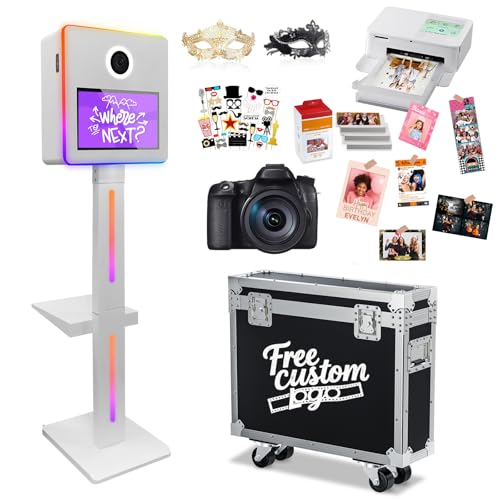
This DSLR photo booth integrates a 15.6″ touch display with a fast, capable PC backbone (Intel i5, 8GB RAM, 256GB SSD). It’s designed for quick capture, on-site sharing, and instant printing. The included flight case makes transport straightforward, and the system ships with a complete printing bundle (CP1500 printer, 108 sheets of 6″ photo paper, and ink cartridges). The hardware is complemented by customizable RGB lighting, controllable via remote, to craft venue-appropriate ambience for every shot.
Key attributes extend beyond raw speed: the platform supports custom digital frames and templates, and the vendor offers design options for custom designs. The combination of a high‑resolution DSLR, built-in printing, and a robust lighting system supports professional-quality photos in energetic event environments, with reliable performance for both the photographer and the client.
- 15.6″ touch screen for easy interaction
- In‑house printer with included photo paper and ink
- Customizable RGB lighting with remote control
Portable Photo Booth With iPad Flashlight

Designed for iPad-based photo sessions, this portable booth emphasizes a flexible lighting approach. It supports full-size iPad compatibility across models, with an adjustable ring light and flashlight configuration. The RGB light strip can be tuned or synchronized with music via remote or app control, enabling dramatic effects that respond to the event’s rhythm. The setup is compact, making it ideal for mobile events where guest interaction and quick content creation matter most.
With a focus on party atmosphere, the lighting features are central to delivering high-quality images in diverse environments. The system’s music-synced lighting adds an extra layer of energy to performances and dance floors, while remote or app control keeps operators at a distance from guests, preserving photo quality and pace. The design prioritizes ease of use and immediate feedback for event hosts and photographers alike.
- Full compatibility with iPad sizes
- RGB light strip and flashlight with remote or app control
- Lighting effects synchronized to music
Dowshata DSLR Photo Booth With Printer

The Dowshata portable DSLR photo booth pairs a robust camera setup with a compact, movable flight case and RGB lighting. It emphasizes durability and portability, using sheet metal construction for long service life and easy transport to remote venues. The 15.6″ touch screen allows guests to preview and navigate the photo experience, while the RGB lights set the mood for the shoot. The included flight case helps protect the system during transit and setup in busy event spaces.
With a focus on direct print capability, this model supports quick sharing and instant prints for guests. The combination of RGB lighting, a reliable DSLR, and a protective flight case makes it a strong choice for wedding parties, corporate events, and holiday gatherings where dependable performance and a polished presentation are required.
- DSLR camera with built-in RGB lighting
- 15.6″ touch screen for guest interaction
- Movable flight case enhances portability and protection
Buying Guide
When choosing a portable photo booth camera, consider how the system will be used, the venue, and the operator’s workflow. The following factors help balance portability with performance and ensure a smooth guest experience.
Platform and Compatibility
Assess whether the booth relies on an iPad, DSLR, or mixed platform. iPad-based booths (like JIYANG) typically offer simpler setup and broad app support, while DSLR-based systems deliver higher image quality and robust printing options. Some models blend both approaches with external printers and touchscreen interfaces for easy guest interactions. Consider whether you need standalone operation or integration with existing gear, such as a photographer’s DSLR or a printer network.
Lighting and Visual Effects
Lighting drives photo quality in dynamic environments. Look for RGB lighting with adjustable color, brightness, and remote or app control. Some booths include ring lights for flattering fills, while others offer full RGB strips that respond to music or guest actions. Portability should not come at the expense of even illumination; check LED density, diffusion, and power requirements for your typical venues.
Printing and Media Capabilities
Decide if on-site printing is essential. Integrated printers simplify workflow, but some systems rely on external printers or digital sharing only. If printing is required, verify print speed, paper size options (6″ or 4×6 formats), ink cartridges, and availability of predesigned templates. Also consider whether guests can receive digital copies via email or social platforms directly from the booth.
Mobility, Durability, and Setup Time
Portability matters for mobile events. A flight case and modular panels reduce setup time and protect gear during transport. Examine materials (metal frames vs. plastic), weight, and the ease of assembly/disassembly. Durable hinges, secure latches, and compact footprints help when moving through crowded venues or stairs. Quick-connect components and documented assembly steps shorten the initial setup and takedown.
Software, Control, and Customization
Software quality and control options influence how efficiently operators run the booth. Look for remote control or mobile apps that adjust rotation, lighting, and shooting modes. Preset templates, filters, backgrounds, and digital props speed operation and enhance guest experience. The ability to share or export media directly to social networks can be a major time-saver for hosts and event teams.
Durability, Warranty, and Support
Invest in a system with a reliable warranty and accessible support. Portable photo booths endure frequent handling, and a strong service plan reduces downtime. Consider the availability of replacement parts, software updates, and whether the vendor provides onboarding resources or customization options for branding and logos.
What To Compare At A Glance
- Platform: iPad-only, DSLR-focused, or hybrid
- Rotation and motion: 360° spin, static photo, or video modes
- Lighting: RGB, ring light, or mood lighting with music sync
- Print capabilities: built-in printer, media formats, and paper stock
- Portability: flight cases, weight, and ease of transport
- Software: control apps, templates, and social sharing
Choosing the right portable photo booth camera involves aligning technical features with event requirements. For small to mid-size venues that prioritize speed and ease of use, iPad-based systems with software presets can be ideal. For higher image quality and on-site printing, DSLR-based booths with flight cases provide robust performance. Consider a blend of features—such as an intuitive touchscreen, adjustable RGB lighting, and reliable remote controls—to deliver a consistent, engaging guest experience.