Best Video Podcast Setup for Two: Complete Kits for Duo Broadcasts
Looking for a reliable two-person video podcast setup? This guide highlights five complete bundles designed for duet shows, interviews, and panel discussions. Each option pairs two mics with cameras or mixing gear to deliver professional audio and video. The best pick depends on your preferred workflow, budget, and space. The top choices favor different needs: all-in-one bundles for quick launches, dual-camera rigs for polished visuals, and flexible interfaces for future expansion.
| Product | Best For | Why It Stands Out |
|---|---|---|
| Movo Video Podcast Equipment Bundle – 2 XLR Mics, 2 4K Cameras | Co-hosted shows seeking a true two-camera setup | Two 4K cameras and a USB audio interface provide a complete, ready-to-go system. |
| Movo Video Podcast Equipment Bundle – 2 XLR Mics, 2 4K UHD Cameras, 2 Desk Stands | Streamers who want desk setups | Includes desk mic stands for flexible desk placement and clean setup. |
| Hayner-Seek Podcast Equipment Bundle for 2 | Budget-friendly, beginner-friendly kits | Dual mics with built-in mixer, RGB, and voice-changing options. |
| MAONO PD200W Hybrid Wireless Bundle for 2 | Wireless flexibility and multi-mode recording | Three recording modes (wireless, USB, XLR) with dual mics per system. |
| Rode RODECaster Video All-in-One Bundle | High-end control and professional live production | Advanced live production console with multi-source video and audio management. |
Movo Video Podcast Equipment Bundle – 2 XLR Mics, 2 4K Cameras

The bundle includes two XLR dynamic microphones, two 4K cameras, two boom arms, and a USB audio interface. It is designed for co-hosted shows and interviews, offering a polished dual-camera look with professional audio capture. The USB interface provides a straightforward workflow for recording to a computer or streaming setup.
Best for: co-hosted podcasts that require two cameras and a ready-to-use audio path. Better for: producers who want a compact, all-in-one kit without piece-by-piece sourcing. Caution: The two-camera setup may require space and careful camera placement to maximize angles.
Movo Video Podcast Equipment Bundle – 2 XLR Mics, 2 4K UHD Cameras, 2 Desk Stands
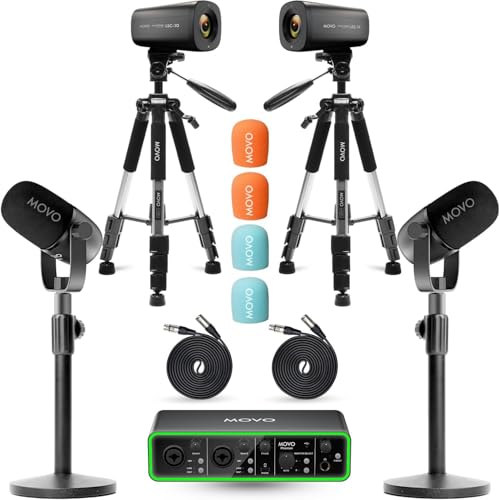
This variant adds two desk mic stands, enabling flexible placement on a desk and cleaner setup. The dual 4K cameras remain, supporting multi-camera shots suitable for YouTube or live streams. The high-quality USB audio interface continues to deliver clear vocal capture, essential for dialog-heavy formats.
Best for: desk-first studios where mic positioning matters. Choose this if: you want stable desktop mounting and simplified cable management. Caution: Desk setups may require extra space and proper lighting to avoid shadows.
Hayner-Seek Podcast Equipment Bundle for 2

This bundle targets two-person streaming with two dynamic mics and two studio headphones. It includes an upgraded audio mixer, multiple mic inputs, and built-in voice-changing effects. The kit emphasizes ease of use for beginners while offering flexible connections for more experienced creators.
Best for: beginner or budget-conscious setups that still want feature-rich control. Why selected: the included mixer and multiple voice options help new creators explore sound design. Caution: Some features rely on the mixer’s internal effects, which may require experimentation to find ideal settings.
MAONO PD200W Hybrid Wireless Podcast Bundle for 2

MAONO’s PD200W bundle supports three recording modes: wireless, USB, and XLR, allowing flexible setup for co-hosts. It partners two dynamic mics with a built-in 30mm capsule design, offering strong signal-to-noise and clean vocal reproduction. The system notes that camera accessories are sold separately, which is essential for integrated video use.
Best for: creators who value wireless flexibility and multi-mode recording. Why choose: the ability to switch between wireless and wired setups without changing mics. Caution: wireless reliability can vary by environment; ensure a stable signal and interference-free space.
Brvomussy Podcast Equipment Bundle for 2

This all-in-one kit includes two dynamic microphones and an audio interface with a built-in mixer. It features 8 customized sound effects and four voice change options, plus RGB lighting to enhance streaming visuals. The bundle is designed for gamers, live streamers, and casual podcasters who want a feature-rich mini-studio.
Best for: creators who want on-the-fly sound design and entertaining voice options. Choose this if: you value live effects and lighting to elevate streams. Caution: more features can require a learning curve for optimal use.
Hayner-Seek Podcast Equipment Bundle for 2 (RS2i2)

This bundle emphasizes an audio interface with two XLR mics and an 8GB memory card for built-in recording. It highlights RGB lighting and plug-and-play simplicity, aiming at beginners who want quick setup for podcasting, streaming, and content creation. The kit supports XLR or USB mic connections, broadening compatibility across devices.
Best for: new creators seeking a compact, all-in-one setup with built-in recording options. Why selected: built-in memory storage can streamline quick capture. Caution: check memory card capacity if you plan long sessions or high-quality recordings.
Buying Guide: Key Considerations For A Duo Podcast Setup
- Two-camera vs. single-camera workflows: Dual cameras provide more angles but require adequate space and lighting.
- Microphone options: Dynamic mics reduce room noise; consider USB for simplicity or XLR for expansion with an audio interface.
- Audio interface and mixer features: Look for phantom power if using condenser mics, preamps with sufficient headroom, and easy routing for two mics.
- Recording vs. streaming needs: Wireless mics offer flexibility but require reliable interference-free environments; USB-first kits are typically easier for beginners.
- Space and lighting: Softbox or LED lighting improves video quality; ensure placement doesn’t cast unwanted shadows on co-hosts.
- Future-proofing: Choose kits that allow upgrading cameras, mics, or mixing capabilities without a full rebuild.
FAQ
- Q: What is the simplest way to start a two-person video podcast? A: Choose an all-in-one kit with two mics, a compact audio interface, and at least one high-quality camera to minimize setup steps.
- Q: Should I prioritize two cameras or a single camera with a good backdrop? A: Two cameras offer richer visuals for co-hosts; a single camera can work if space is limited and lighting is strong.
- Q: Are wireless mics reliable for podcasts? A: Wireless mics offer flexibility but require stable signal environments; test in your actual recording space before publishing.
- Q: Do I need a separate mixer or can I use USB-only mics? A: A mixer or audio interface provides better control, more inputs, and room for expansion as your show grows.
- Q: How important is lighting for video podcasts? A: Lighting dramatically affects video quality; even inexpensive lights with diffusion improve overall production value.
- Q: Can I mix and match components from different bundles? A: Yes, but ensure compatibility between mics, interfaces, and cameras to avoid missing connections or power requirements.