Best Video Tape to Digital Transfer Solutions for Preserving Memories
Preserving old home videos is a top priority for many families. This guide helps buyers choose the right video tape to digital transfer solution. The selections below cover common formats like VHS, VHS-C, 8mm, Hi8, Digital8, MiniDV, and more. Each pick is explained for who benefits most, plus practical considerations to help you decide. The recommended products focus on ease of use, compatibility with common tapes, and reliable output formats like MP4 or DVD.
| Product | Main Format Support | |
|---|---|---|
| Time To Remember Video Tape Transfer Service | VHS, VHS-C, 8mm, Hi8, Video 8, Digital 8, MiniDV | Most hands-off option for multiple tapes with cloud delivery |
| Portta VHS to Digital Converter | VHS, Hi8, MiniDV, VHS-DVD, AV inputs | Do-it-yourself transfers without a computer |
| Sony Camcorder for miniDV Tape Transfer | MiniDV tapes | Direct capture to computer or DVD from a trusted brand |
| Sony Camcorder for 8mm Digital8 Hi8 Tape Transfer | 8mm, Video8, Hi8, Digital8 | Older 8mm family tapes with USB/DVD output |
| ClearClick Video to Digital Converter 2.0 | VHS, VCR, Hi8, Camcorders, DVD players | Standalone recording without a computer |
Product selections prioritize accessibility, format coverage, and practical workflows for different user types—whether you want a DIY workflow, a hands-off service, or a plug-and-play device that records directly to USB. The table above summarizes core strengths to help you compare quickly.
Time To Remember VHS and 8mm To MP4 Transfer

Best for a mostly hands-off experience, this service handles multiple tape formats in one package. It converts to MP4, suitable for smartphones and computers. Output includes 30 days of cloud delivery via Google Drive and complimentary recycling of media. Tape formats covered include VHS, VHS-C, 8mm, Video 8, Hi-8, Digital 8, and MiniDV, with a standard resolution of 640×480. This option suits buyers who prefer professional handling and archival storage without owning transfer hardware.
Who it’s best for: Families with several tapes and a preference for a complete, turnaround-focused service. Why selected: It streamlines digitization end-to-end and includes cloud delivery and recycling. Limitation: Output is MP4 at standard definition, which may be lower than some 1080p expectations for high-end viewers.
Portta VHS To Digital Converter

Best for do-it-yourself transfers without a computer. This converter/recorder supports AV/RCA, S-Video, and AUX inputs, with a built-in 3.0″ LCD preview and no PC software required. Output formats include MP4 and MP3, with a variety of TV standard inputs (NTSC and PAL). Caution: The device is a capture box, not a standalone player for tapes. It requires a separate storage medium for saving videos.
Who it’s best for: Do-it-yourself hobbyists who want a portable transfer setup and direct playback on the capture unit. Why selected: It offers direct recording and flexible input options. Limitation: It does not play tapes back independently; you must connect to a screen or storage to view results.
Sony MiniDV Tape Transfer Camcorder

Best for MiniDV tapes when you want a brand-backed transfer path. This Sony camcorder is capable of playback on all miniDV tapes and uses a USB capture device to move files to a computer or burn to DVD. Included power supply and AV/S-Video cables simplify the transfer process from the camcorder to a new digital format. Caution: Requires a computer or compatible DVD burner for file storage and playback options.
Who it’s best for: Owners of MiniDV tapes seeking a reliable Sony-supported workflow. Why selected: Strong brand compatibility and straightforward USB capture. Limitation: The transfer path relies on an external capture setup and may require additional steps to finalize into preferred formats.
Sony 8mm/Hi8/Digital8 Tape Transfer Camcorder
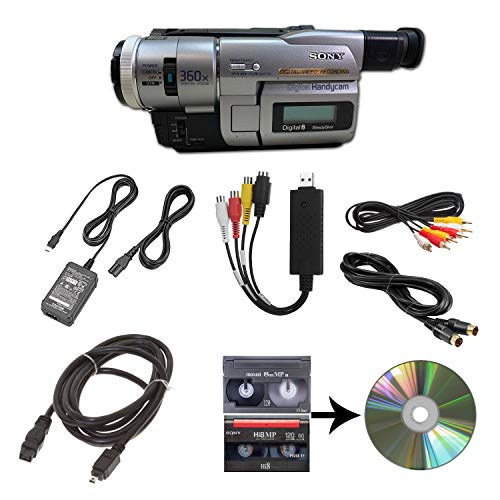
Best for older 8mm family tapes with a built-in transfer path. This Sony camcorder supports playback for 8mm, Video8, Hi8, and Digital8 tapes and uses a USB capture device to move files to a computer or DVD. The setup includes power, AV, and S-Video cables for transfer or TV playback. Caution: Requires an appropriate computer or DVD burner for storage and viewing.
Who it’s best for: Families with a mix of 8mm and Hi8 tapes seeking a Sony-based solution. Why selected: Covers multiple older formats with a direct transfer route. Limitation: May require additional software or hardware for final file organization and long-term storage.
Oassuose VHS to Digital Converter

Best for simple plug-and-play conversion from multiple analog sources. This USB-A/USB-C capture card supports RCA or S-Video inputs and can output 1080P/30fps to USB-A or USB-C storage or capture devices. It is a practical option for PC or Mac users who want quick digitization with direct saving to their preferred storage. Caution: Uses bundled acquisition software; ensure software compatibility before use.
Who it’s best for: People who want a straightforward, cable-friendly transfer with modern USB outputs. Why selected: Wide compatibility with many analog sources and no driver installation required for basic use. Limitation: Requires compatible acquisition software to complete the process.
ClearClick Video To Digital Converter 2.0

Best for standalone digitization without a computer. ClearClick 2.0 records directly onto USB flash drives or SD cards, with SD capture resolutions of SD 640×480 or 720×480. It supports VHS, VCRs, DVDs, Hi8, Camcorders, and retro gaming systems. Important: Requires a working VCR/camcorder and tapes; it does not play tapes by itself. Limitation: Not suitable for high-definition output.
Who it’s best for: Users who want a simple, all-in-one device for quick digitization. Why selected: Direct-to-storage capture eliminates a computer step. Limitation: Output resolution is standard definition only; not ideal for HD preservation.
Buying Guide: Key Considerations For Digitizing Tapes
- Format Coverage: Identify which tape formats you have (VHS, VHS-C, 8mm, Hi8, Digital8, MiniDV, etc.). Choose a solution that supports your full set of formats to minimize buying multiple devices.
- Output Quality: Decide between SD (640×480/720×480) and HD (1080P). Services often deliver MP4 in standard definition; capture devices can provide HD outputs depending on your hardware and software.
- Ease Of Use: If you want a hands-off approach, consider a mail-in service. If you prefer control and file organization, a converter or capture device may be better.
- Storage And Delivery: Check if the solution includes cloud delivery, USB drive, or DVD options. Plan for long-term storage formats like MP4 or archival-friendly formats.
- Hardware Dependencies: Some devices require computers, software, or specific cables. Verify compatibility with your operating system and storage devices before purchase.
- Reliability And Support: Brand reputation and included cables, power supplies, and accessories can influence ease of use and longevity of the transfer workflow.
Frequently Asked Questions
- What is the best format for archiving transfers? — MP4 is widely compatible for playback on most devices, but check if your storage strategy favors MP4, MOV, or AVI based on your editing plans.
- Do these devices require a computer? — Some options are standalone, while others use a PC/Mac to save files. Choose according to how you plan to edit or store the footage.
- Can I digitize tapes without special equipment? — A mail-in service can handle multiple tapes and formats; DIY converters require some setup but offer immediate control over the process.
- Is HD possible when transferring from standard-definition tapes? — Direct HD transfer is typically not possible from legacy SD tapes; some devices upscale or provide higher capture resolution, but quality depends on the source.
- Will all tapes be preserved as-is? — Tapes degraded over time; consider cleaning, proper storage, and archival strategies to minimize further deterioration during transfer.
- What format should I choose for long-term preservation? — Keep multiple copies: a digital master in a widely compatible format (MP4) and an additional archival-friendly backup, such as a lossless or less-compressed format if available.