Best Video Camera Tape Players and Transfer Solutions for Preserving Old Footage
Answering the search for reliable video camera tape players, this guide highlights five practical options that help you view, digitize, or preserve VHS-C, 8mm, Hi8, and miniDV tapes. These picks are best for: casual hobbyists who want quick playback, hobbyist archivists aiming to digitize libraries, and creators seeking vintage footage for projects. The following sections compare each device’s strengths, who it’s best for, and potential limits, so you can choose confidently. A quick buying table is included to summarize key details at a glance.
| Product | Best For | Format Support | Digitization Options |
|---|---|---|---|
| VHS-C Tape Cassette Adapter – BECBOLD | Retro playback and archiving | VHS-C tapes via standard VHS player | Direct playback and recording to VHS |
| Sony Camcorder for 8mm Digital8 Hi8 | All-in-one transfer to PC/DVD | 8mm, Hi8, Digital8 | USB capture to computer |
| Hi8 8mm VCR – Tech Collector | Easy digitization with USB | Hi8/8mm | USB adapter for PC |
| Tech Collector Sharp 8mm Tape Player | VHS-style output with digitizing | 8mm tapes | USB adapter and software |
| Konig Motorised VHS-C Adapter | Repair and review of old tapes | VHS-C | Box contents include adaptor |
VHS-C Tape Cassette Adapter for Camcorders

Brand: BECBOLD. This adapter enables playing or recording VHS-C tapes using a standard VHS player/recorder, offering a simple path to access old footage. It’s best for vintage-cassette viewers who want immediate playback and basic transfer options from VHS-C to VHS. A key limitation: it does not work with MiniDV, Hi8, Digital8, or 8mm tapes.
Best for: Individuals seeking a straightforward way to view and preserve VHS-C footage on a traditional VHS setup. Not ideal for complete digital archiving without a conversion workflow.
Sony Camcorder for 8mm Digital8 Hi8 Transfer
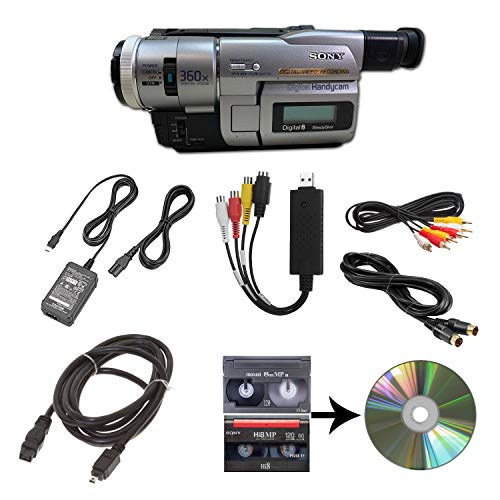
Brand: Sony. This camcorder is designed to playback 8mm, Video8, Hi8, and Digital8 tapes, with a USB capture device to transfer footage to computer files or burn to DVD. It includes power supply, AV and S-Video cables for transfer or TV playback. Best for: users who want a single device capable of playing multiple old tape formats and transferring those files to a PC or DVD. Caution: Ensure your computer recognizes the USB capture device and install any required drivers.
Hi8 8mm VCR with USB Digitizing

Brand: Tech Collector. This package includes a Hi8/8mm VCR camcorder for playing old tapes and a USB adapter to digitize. Best for: users who want to watch and digitize 8mm/Hi8 tapes with a simple USB workflow. Limitation: the device may rely on bundled software, which could vary by batch or availability.
Tech Collector Sharp 8mm Tape Player Camcorder

Brand: Tech Collector. This device shoots vintage-style video directly to tape, adds a nostalgic VHS-like effect, and includes USB adapter plus tape digitizing software. Best for: creators seeking a retro aesthetic combined with straightforward digitization. Caution: the included software may have compatibility limits with newer computers.
König Motorised VHS-C Compact Adaptor
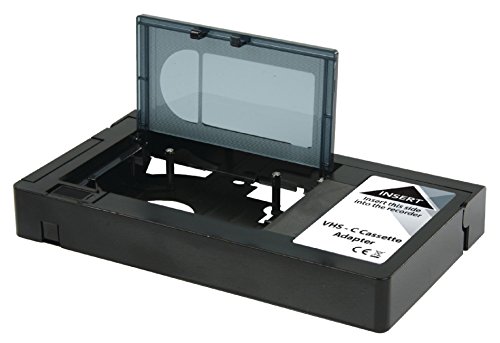
Brand: KÖNIG. This motorised VHS-C adaptor is designed to help review old tapes. It includes a basic box with the adaptor and English-language user guidance. Best for: those who already have VHS-C tapes and want a simple playback/review option. Limitation: packaging notes may indicate limited English documentation, so expect basic setup instructions.
Kimire Video Camera Camcorder with USB

Brand: kimire. Features a 1080P video resolution, 24MP stills, 3.0-inch LCD with 270° rotation, USB 2.0, and a webcam option. Best for: users who want a modern camcorder option that can still accept older footage via USB transfer. Caution: it is primarily a consumer-grade device and may not include professional-grade components for archival transfers.
Tech Collector MiniDV Tape Player

Brand: Tech Collector. This miniDV tape player camcorder with blank tape, AV cable, and USB supports shooting vintage-style video directly to tape and includes a USB adapter for digitizing. Best for: hobbyists who want a compact, all-in-one tape playback and digitization setup. Limitation: product copy emphasizes nostalgic effects rather than professional-grade transfer quality.
Panasonic MiniDV Camcorder Bundle
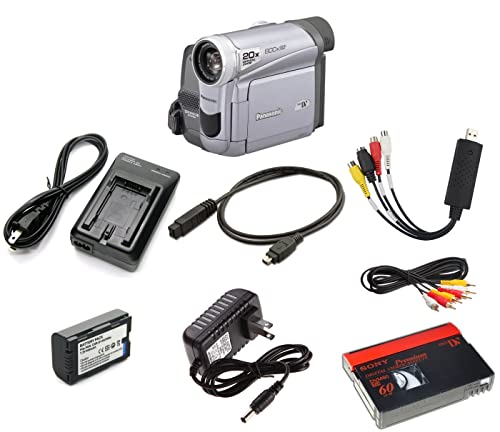
Brand: Panasonic. This bundle supports playback of old miniDV tapes and later transfer to digital via USB capture device or DVD burning. Best for: users who want a reliable, established brand option with a clear path from tape to digital files. Caution: ensure compatibility with your computer’s USB capture software before purchasing.
Buying Guide
- Format compatibility: Identify which tapes you own (VHS-C, 8mm, Hi8, Digital8, miniDV) and choose devices that explicitly support those formats.
- Digital transfer method: Decide whether you prefer USB capture, DVD burning, or direct playback to a TV. USB capture typically yields convenient digital files.
- Ease of use: For casual collectors, devices that combine playback with simple digitization software save setup time.
- Hardware reliability: Look for devices with clear instruction manuals or bundled cables, especially for older formats.
- Future-proofing: If you plan long-term preservation, prioritize devices that offer reliable USB transfer and compatible software options.
- Limitations: Some adapters only support specific tape formats; avoid those if you own mixed formats unless you plan to use multiple devices.
FAQ
- What is the best device for digitizing multiple tape formats?
– A multi-format system or a camcorder with built-in USB capture is typically best for ease of digitization across 8mm, Hi8, and Digital8. - Do these devices require special software?
– Some kits include digitizing software; others rely on generic USB capture software. Check included cables and software compatibility with your computer. - Can I watch tapes directly on a TV with these devices?
– Many provide AV cables or HDMI outputs for TV playback, though USB capture devices focus on digitization. - Are these suitable for professional archiving?
– They are designed for consumer use and amateur digitization. For professional-grade archiving, consult a dedicated video transfer service or high-end capture hardware. - Will a USB adapter work with modern computers?
– Most USB adapters are compatible with current systems, but some legacy software may require compatibility modes or drivers. Verify system requirements before purchase. - Is it necessary to digitize all tapes?
– Digitizing preserves content in widely accessible formats and reduces the risk of degradation from continued playback on aging hardware.