Best Rapid-Feed 35mm Film and Slide Scanners for Fast Digitizing
Answering your search for a rapid-feed, standalone solution, these scanners convert 35mm film and slides into digital JPEGs quickly without requiring a computer. They suit casual archivists, hobbyists, and seniors looking to preserve memories with minimal setup. The top picks here emphasize fast loading, clear previews, and straightforward transfers to digital formats. The table below compares the five best options featured in this guide.
| Product | Best For | |
|---|---|---|
| DigitPro 35mm Film & Slide Scanner | Home archivists with large slide collections | 2.4” LCD, TV-out, rapid feeder |
| KODAK Slide N SCAN | Families needing a wide format viewer | 5” LCD, multi-film compatibility |
| DIGITNOW! 135 Film Negative Scanner | Budget-conscious buyers | SD card save, USB connectivity, rapid feeder |
| VuPoint FS-C1-VP | Compact on-the-go digitizing | 5 MP, built-in backlight |
| KODAK SCANZA Digital Film & Slide Scanner | Versatile film formats | 3.5” LCD, multiple adapters |
Below you will find five detailed product sections. Each section explains who the product is best for, why it stands out for rapid-feed scanning, and a practical caveat to consider before you buy.
DigitPro 35mm Film & Slide Scanner

Best for: Home archivists with large 35mm slide collections who want an all-in-one, standalone device. This scanner converts 135 negatives and slides to high-quality JPEGs without a computer. It supports Positive, Negative, and B&W modes for flexible archival work. The integrated 2.4” LCD makes quick checks possible, and TV-out sharing enables easy viewing on a bigger screen. A rapid slide feeder is designed for continuous loading, ideal for processing substantial vintage lots. Caution: It may have limited advanced editing options compared to computer-based workflows.
KODAK Slide N SCAN Film & Slide Scanner

Best for: Families and casual users who want a larger viewing experience. The 5” LCD enables clear gallery-style previews, and the scanner supports 135, 126, and 110 formats with adapters. It can save directly to an SD card for easy sharing or display. A quick-load tray supports continuous action, making it suitable for scanning multiple slides in one sitting. Caution: SD card not included, so plan for compatible storage separately.
DIGITNOW! 135 Film Negative Scanner

Best for: Budget-minded buyers who want a standalone, no-computer workflow. This scanner includes an adjustable rapid slide feeder and saves JPGs to an SD card (up to 32GB) or can connect to a computer. It offers 1800 DPI for a solid balance of quality and file size. The feature set includes TV-out via USB, making it convenient to view on a TV. Caution: 1800 DPI is adequate for most personal archives but may not satisfy high-resolution archival standards.
VuPoint FS-C1-VP Film and Slide Digital Converter
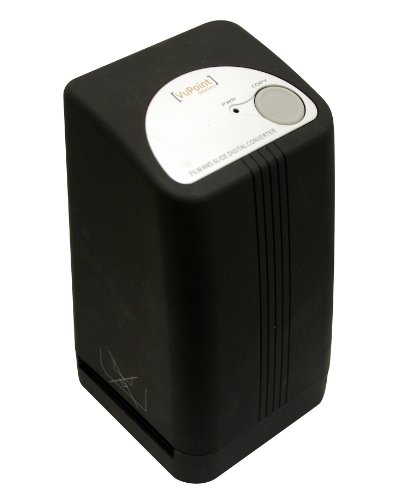
Best for: Highly portable digitization on the go. The VuPoint FS-C1-VP offers 5.0 MP quality with automatic color balance and exposure control, plus a built-in backlight for varied lighting environments. It is well-suited for quick transfers of smaller batches and travel scanning. Caution: Resolution is lower than some newer models, which may affect fine detail in large-format scans.
KODAK SCANZA Digital Film & Slide Scanner

Best for: Users who need wide-format versatility, including 35mm, 126, 110, Super 8, and 8mm film in a single device. It features a large 3.5” LCD with adjustable brightness and included adapters for fast, one-step scans. The device aims at quick, film-to-JPEG conversion with a user-friendly interface. Caution: Large-insertion adapters require careful handling to avoid feeding jams with tightly loaded frames.
Buying Guide
What to consider when choosing a rapid-feed film and slide scanner:
- Compatibility: Check supported film formats (35mm, 126, 110, Super 8, etc.) and whether adapters are included or sold separately.
- Display quality: A larger LCD helps preview and edit on the device prior to saving files.
- Storage and transfer: SD card compatibility, USB/HDMI outputs, and whether the unit saves directly to card or requires computer transfer.
- Feeder speed: Look for a rapid or continuous-loading feeder if you have long archives.
- Resolution and file quality: Higher DPI yields more detailed scans; balance with file size and your archive’s needs.
- Ease of use: Standalone devices with simple menus suit non-technical users; more advanced devices may offer finer controls.
FAQ
- Q: Do these scanners require a computer to work? A: Most listed models offer standalone operation, but some can transfer files directly to SD cards or via USB to a computer if desired.
- Q: Which is best for 35mm slides specifically? A: Models with rapid feeders and adjustable adapters, such as DigitPro and Kodak Scanza, are well-suited for 35mm slides.
- Q: Can I view scans on my TV? A: Several units include TV-out or HDMI options to display scans on a TV or monitor.
- Q: Is higher DPI always better for archival quality? A: Higher DPI increases detail but also file size. Choose based on your preservation needs and storage capacity.
- Q: Do these units work with negative and color film? A: Most listed devices support color positives, negatives, and black-and-white modes, but confirm format specifics in each model’s features.