Best Bulk Photo Scanning Equipment for Digitizing Large Collections
Answering buyers who need to convert large batches of photos and related media, this guide highlights five bulk-friendly options. The selections emphasize speed, batch handling, and versatile scanning of photo formats, negatives, and documents. The intended audiences vary: hobbyists digitizing family photo archives, small offices archiving receipts and photos, and professionals organizing legacy collections. The table below compares the five picks to help you decide quickly.
| Product | Best For | Key Benefit |
|---|---|---|
| Epson FastFoto FF-680W | Large photo collections | Fast, batch-scans up to 36 photos at once; wireless and app-enhanced sharing |
| AMBIR Photo Scanner Bundle | Everyday archival scanning | Fast 300/600 DPI options with auto crop and deskew |
| Vosaplk Slide Viewer Light Box | Slide and negative digitization | Ultra-thin, adjustable brightness for negatives and slides |
| JJC 35mm Negative Film Setup | Old negatives and slides | LED backlight with multiple brightness levels for clear digitization |
| HP Small USB Document & Photo Scanner | Portable bulk scanning | Fast, compact sheetfed option with versatile formats |
Epson FastFoto FF-680W Wireless High-Speed Duplex Photo Scanner

Best for: bulk photo archiving in homes or small studios. Features include high-speed duplex scanning at up to 1 photo per second at 300 dpi and batch-scan support for up to 36 photos. The device is designed to transform older images quickly and efficiently, with capabilities to scan Polaroids, panoramas, postcards, and up to 8 x 10 inch photos. The Epson FastFoto app adds voice and text overlays and can create slideshows from a smartphone. Caution: setup and bulk processing may require a stable wireless network and sufficient storage for large digital archives.
AMBIR Photo Scanner Bundle With Auto Crop & Deskew

Best for: quick digitization of mixed photo sizes with built-in correction. The bundle promises fast scanning, supports multiple photo sizes (from small 3″ x 5″ up to 8″ x 10″), and offers 300 or 600 DPI options for higher archival quality. Choose this if you need reliable auto-cropping and deskewing to minimize manual editing after scanning. Limitation: higher 600 DPI settings can slow down throughput compared to 300 DPI in large batches.
Vosaplk Slide Viewer Light Box

Best for: digitizing slides and film negatives with backlighting. The ultra-thin light box supports multiple slides and negatives simultaneously, offering adjustable brightness across three levels and a high color temperature range for accurate digitization. It pairs with smartphone apps to scan and edit directly. Caution: designed primarily for slides and negatives, not standard photo prints; compatibility with scanning hardware depends on subsequent capture methods and software.
JJC 35mm Negative Film Scanning Copy Kit
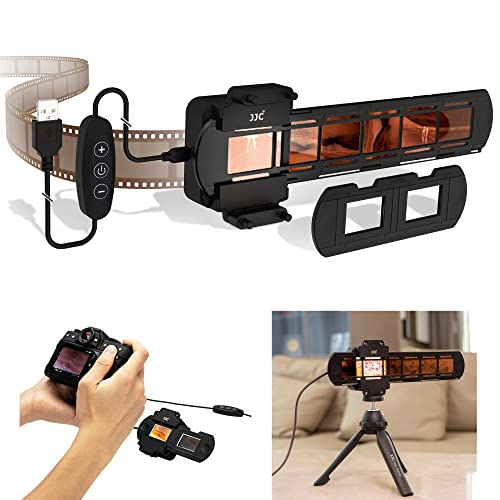
Best for: converting 35mm negatives and slides to digital with a controlled backlight. The kit features 42 built-in LEDs with a 6500K color temperature and 95+ color rendering, plus a 10-level brightness option for precise captures. Choose this if you need a dedicated setup for negative-to-digital conversions. Limitation: requires careful handling of fragile film and a steady surface during scanning to maintain alignment.
HP Small USB Document & Photo Scanner

Best for: portable bulk scanning on the go. This compact, sheetfed scanner handles a range of document sizes and photos with 15 pages per minute (in its simplex mode) and 1200 dpi resolution, making it suitable for lightweight bulk jobs in travel or small offices. Use this when you need a travel-friendly option that still delivers reliable, everyday scanning performance. Caution: not optimized for very large photo archives or heavy-duty archival tasks.
Buying Guide: Key Purchase Considerations
- Scanning Speed vs. Volume: For large photo archives, prioritize devices with batch or duplex scanning to minimize manual work.
- Photo Size Range: Confirm support for your largest formats (8 x 10 inches, panoramas, Polaroids) to prevent multiple passes.
- Image Quality: Look for DPI options that fit archival needs (300 DPI is common, 600 DPI for higher detail).
- Software and Connectivity: Wireless and mobile app integration can streamline organization, tagging, and sharing; ensure compatibility with your OS.
- Handling of Negatives and Slides: If your archives include film, consider dedicated light boxes or film digitizers for accurate backlight and color rendering.
- Portability vs. Stationary Use: Bulk scanning often benefits from stationary, high-capacity devices, but portable options are useful for on-the-go digitization.
Practical Comparisons
- Best for fastest bulk photo digitization: Epson FastFoto FF-680W.
- Best for mixed media and easy organization: AMBIR bundle with software support.
- Best for slide and negative archives: Vosaplk light box paired with a compatible capture device.
- Best low-profile setup for negatives and 35mm film: JJC negative film kits.
- Best portable option for quick on-the-go scans: HP USB document & photo scanner.
FAQ
- Which scanner is best for large photo collections?
- What should I look for regarding batch scanning capacity?
- Are negative and slide digitizers necessary for film archives?
- Can these devices save scans directly to cloud storage?
- Is 300 DPI sufficient for archival purposes?
- Do I need a flatbed scanner if I have thousands of photos?
FAQ Answers
- The Epson FastFoto FF-680W is designed for high-volume photo archiving with batch capabilities. It supports fast batch scans and wireless sharing via the Epson app.
- Batch scanning capacity depends on the model; many units offer batch modes or high-speed duplex scanning to process multiple photos simultaneously, reducing handling time.
- For film archives, dedicated light boxes or film digitizers improve image clarity and accuracy when scanning negatives and slides.
- Many scanners offer USB, network, or cloud-enabled workflows; check the product specs for cloud compatibility and software integration options.
- 300 DPI often provides adequate archival quality for photo restoration and viewing; 600 DPI offers higher detail for print reproduction and long-term storage.
- A flatbed plus a dedicated bulk scanner can be ideal: use a bulk scanner for fast throughput and a flatbed for fragile or oversized items.