Best NVR Recorder 8 Channel for 8-Channel PoE Security Systems
Answering common buyer questions, this guide highlights the best 8-channel NVRs that work with PoE cameras. It focuses on ease of setup, storage efficiency, and compatibility with common camera brands. The top picks suit different buyers: new homeowners seeking simple plug‑and‑play systems, small businesses needing reliable remote access, and enthusiasts who want AI features and future expansion. The following summary table compares the five selected models at a glance.
| Product | Brand | Storage | Key Strength | Best For |
|---|---|---|---|---|
| Amcrest NV4108E-A2 8CH POE NVR | Amcrest | Up to 10TB HDD (not included) | 8MP/4K real-time recording, AI-ready | Homeowners wanting 8MP/4K clarity |
| REOLINK RLN8-410 | REOLINK | Pre-installed 2TB HDD | Plug‑and‑play with Reolink cameras | Easy plug‑and‑play Reolink system |
| Amcrest NV4108E-2TB | Amcrest | Pre-installed 2TB HDD | 8ch recording with AI-ready features | Amcrest ecosystem users |
| Hiseeu 16 channel Extendable NVR | Hiseeu | No HDD included | Extendable up to 16 channels | Budget‑mensitive setups with future growth |
| REOLINK RLN8-410 (Another model) | REOLINK | Pre-installed 2TB HDD | Smart integration with Reolink cameras | Smart home security fans |
Amcrest NV4108E-A2 8-Channel PoE NVR — 8MP/4K Real-Time
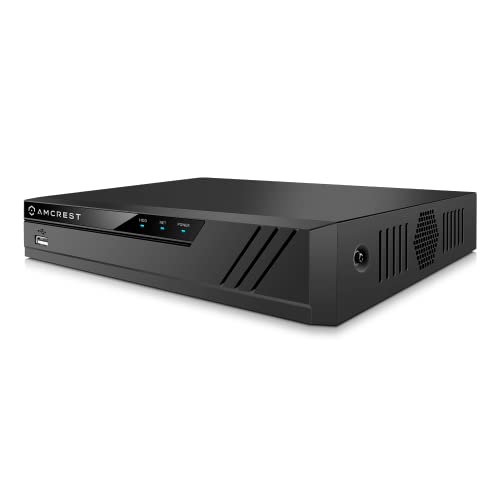
The Amcrest NV4108E-A2 supports 8 channel recording and live view in up to 8MP/4K resolution at 30fps. It can manage up to 10TB hard drives, though a surveillance HDD is not included. This model is compatible with Amcrest WiFi and wired IP cameras, with limited third‑party support. It uses advanced H.265 compression for storage efficiency and includes intelligent search, playback, and backup features. Best for buyers who own Amcrest cameras or want high‑resolution recordings with AI readiness potential.
Who this is best for: homeowners or small offices already invested in Amcrest gear. Why: seamless integration, efficient compression, and strong local storage options. Limitation: broader third‑party camera compatibility is limited.
REOLINK RLN8-410 — 8 Channel NVR for Reolink Cameras

The REOLINK RLN8-410 is designed to work with Reolink PoE IP cameras. It supports up to 8 channels with a plug‑and‑play setup and ships with a pre‑installed 2TB drive. It offers full integration with Reolink smart features like person/vehicle detection and playback. Best for users who want a cohesive Reolink ecosystem, including easy remote access and standalone operation. Caution: limited to Reolink cameras for optimal function.
Amcrest 4K 8CH POE NVR — Pre‑Installed Drive Option

This Amcrest 8‑channel NVR includes a pre‑installed 2TB drive and supports up to 10TB drives. It records up to 8MP/4K across 8 channels, with playback options for 1080p, 4MP, and 4K. It is best for Amcrest camera users seeking an affordable, ready‑to‑go system with robust AI feature support depending on the camera model. Limitation: optimized for Amcrest cameras; third‑party support is more restricted.
Hiseeu 8 Port 4K PoE NVR — 8 PoE Ports, 16‑Channel Expandable

The Hiseeu model features 8 PoE ports with expandability up to 16 channels via a PoE switch. It supports 4K/2K/8MP/5MP/3MP/1080P cameras, streaming remotely via a mobile app. Best for budget‑mocused buyers who want room to grow and flexible camera compatibility. Caution: limited third‑party compatibility and setup may require IP address adjustments for non‑native cameras.
REOLINK RLN8-410‑White — 8 Channel NVR for Reolink Systems

Like the other Reolink option, this NVR is tailored for Reolink cameras, offering plug‑and‑play setup, DHCP‑based operation, and smart integration with Reolink AI features. Best for users who want a cohesive ecosystem with automated detection and efficient playback. Limitation: best performance when used with compatible Reolink devices only.
Buying Guide
- Camera compatibility: Choose an NVR that supports your camera brand (or multiple brands) to avoid compatibility issues during setup and playback.
- Storage planning: Consider the maximum drive capacity and whether you want pre‑installed drives. H.265+/H.265 compression helps save space for longer histories.
- AI features: If you need smart alerts or advanced search, confirm AI capabilities align with the camera models you own or plan to buy.
- Expansion and scalability: If you anticipate adding more cameras, pick an NVR that supports channel expansion or has easy switch options for future growth.
- Remote access and apps: Check the reliability of mobile apps and the ease of remote viewing, playback, and notifications.
- Installation environment: For homes, a compact 1U chassis may be ideal; for small businesses, consider models with more robust cooling and support for additional drives.
FAQ
- What does an 8-channel NVR mean?
It means the device can manage and record from up to eight IP cameras simultaneously via PoE or network connections. - Can I mix camera brands with an 8-channel NVR?
Some NVRs support limited third‑party IP cameras, but performance and features may be best with native or brand‑matched cameras. - Do I need a hard drive to use an 8-channel NVR?
Yes. Most NVRs require a hard drive; some come with a pre‑installed drive, others do not. Check drive compatibility and space needs. - What is PoE, and why is it useful in an NVR system?
PoE provides power and data over a single Ethernet cable, simplifying installation and reducing cable clutter. - Are AI features essential for home security?
AI can improve detection accuracy and reduce false alerts, but core video recording works without AI. Choose based on your monitoring needs. - Can I access footage without the internet?
Many PoE systems can operate on a local network without internet, but remote access usually requires network connectivity.