Best Digital Camera HDMI Cables: Top 5 Picks for Clear Video
Choosing the right HDMI cable for a digital camera ensures sharp video output, reliable audio, and smooth playback on displays, monitors, or projectors. This guide highlights five top-rated cables that support camera workflows, whether you’re streaming live footage, reviewing footage on a large screen, or transferring data to a capture device. Each option is designed to handle high bandwidth, 4K and beyond, while remaining compatible with common camera ports. Use this overview to compare build quality, length, and bidirectional capabilities to fit your setup.
| Product | Brand | Key Features |
|---|---|---|
| JSAUX Mini HDMI to HDMI Cable 6FT | JSAUX | 4K@60Hz, Aluminum shell, Bi-directional, Mini HDMI to HDMI |
| oldboytech 4K Micro HDMI to HDMI Cable 6FT | oldboytech | 4K@60Hz, Bi-directional, wide device compatibility |
| Highwings Mini HDMI to HDMI Cable 10FT | Highwings | 4K@60Hz, Bi-directional, Aluminum shell, Nylon braided |
| Silkland Mini HDMI to HDMI Cable 6.6FT | Silkland | 8K@60Hz, 4K@240Hz, HDMI 2.1, 48Gbps |
| BlueRigger Mini HDMI to HDMI Cable 6FT | BlueRigger | 4K@60Hz, HDR, Ethernet, Audio Return |
The following sections provide deeper details on each cable to help you assess compatibility with your camera setup, including port types, supported resolutions, and build quality for professional use.
JSAUX Mini HDMI To HDMI Cable 6FT

The JSAUX cable features bi-directional mini HDMI to HDMI transmission, enabling video and audio streaming from devices with a mini HDMI port to an HDTV or projector with a standard HDMI port, and vice versa. It supports 4K at 60Hz, ensuring sharp details for camera feeds, and backward compatibility with full HD 1080p displays. The aluminum shell and braided construction provide durability for field use, while compatibility spans cameras, camcorders, tablets, laptops, and certain Raspberry Pi models. This makes it a versatile choice for on-the-go videography and monitoring.
Key considerations include ensuring your camera actually uses a mini HDMI port (not micro HDMI). The cable’s 6-foot length is practical for handheld shooting or desk setups, and the high-speed HDMI 2.0 standard helps prevent bottlenecks when streaming high-bitrate footage to an external monitor or capture device. This cable is suitable for reviewers, travel shooters, and anyone needing reliable mini HDMI to HDMI connectivity.
oldboytech 4K Micro HDMI To HDMI Cable 6FT

The oldboytech Micro HDMI to HDMI cable delivers 4K at 60Hz with supported 2K at 165Hz, suitable for action cameras and DSLR setups using micro HDMI ports. It operates in both directions, enabling simple streaming from micro HDMI devices to HDMI displays or the reverse. Compatibility spans a wide array of devices including GoPro models, Raspberry Pi, certain Canon cameras, and camera accessories. The 6-foot length and nylon braid offer durability in rugged shooting environments, making it a reliable option for content creators who frequently connect cameras to external monitors or capture cards.
When selecting this cable, verify your device’s port type (micro HDMI vs. mini HDMI) to avoid mismatches. The 18 Gbps bandwidth supports modern high-resolution video and audio, while the built-in resilience ensures long-term performance in field workloads. This cable is well-suited for videographers who require flexible mounting and quick compatibility across multiple devices.
Highwings Mini HDMI To HDMI Cable 10FT

The Highwings 10-foot Mini HDMI to HDMI cable offers 4K at 60Hz with a robust bi-directional design. Its aluminum shell and nylon braided exterior provide durability, while the long length extends reach for camera rigs, monitors, and capture devices without stressing connectors. It lists compatibility with Raspberry Pi Zero, various Nikon and Canon cameras, and other mini HDMI-enabled devices, appealing to both enthusiasts and professionals who need flexibility in staging shots or editing workflows. The cable supports HDMI 2.0 capabilities, ensuring reliable transmission for high-bitrate content.
Consider the balance of length versus ease of handling. A 10-foot cable gives more freedom on-location but can be heavier and prone to tangling if not managed carefully. It’s a solid choice for studio-to-monitor setups or when mounting equipment where shorter cables are impractical.
Silkland 8K 4K Mini HDMI To HDMI Cable 6.6FT

The Silkland cable features a Mini HDMI to HDMI connection with 8K at 60Hz and 4K at up to 240Hz, or 144Hz and 120Hz in other configurations. It uses HDMI 2.1 technology with a full 48Gbps bandwidth, enabling Dynamic HDR, eARC, VRR, and other advanced features. It’s designed for creators and professionals who work with high-end cameras, Raspberry Pi Zero, and other mini HDMI devices. The cable’s braided jacket and durable build facilitate reliable performance in demanding environments, making it suitable for high-fidelity monitoring, editing, and on-set viewing.
Note to buyers: confirm the device’s support for Mini HDMI (not Micro HDMI or USB-C adapters). While the cable supports extremely high bandwidth, some cameras may not utilize the full 8K capability depending on internal encoding. This option excels for users targeting future-proofing and top-tier display compatibility.
BlueRigger Mini HDMI To HDMI Cable 6FT
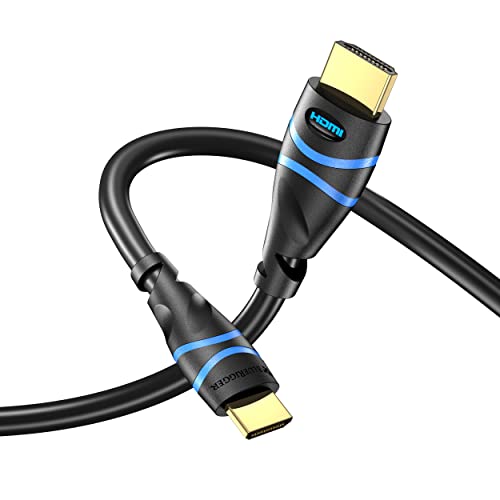
The BlueRigger Mini HDMI to HDMI cable supports 4K resolution, HDR, and Audio Return, with Ethernet included in the HDMI signal. The cable is fully shielded and uses durable construction to minimize interference and signal loss, which can be crucial when connecting cameras to monitors or capture devices in busy production environments. It’s compatible with DSLR cameras, camcorders, graphic cards, and Raspberry Pi Zero W, but not with devices that only have micro HDMI or mini USB ports. This makes it a solid general-purpose option for standard camera setups requiring dependable 4K output.
For users who prioritize a balance of cost and reliability, BlueRigger’s cable offers straightforward compatibility and a proven performance history with many camera brands. It is particularly appealing for those who need a dependable link from a camera to a monitor or capture card without specialized features that may not be utilized in everyday shooting scenarios.
Buying Guide: Purchase Considerations For Camera HDMI Cables
Key decision factors when selecting a camera HDMI cable include port type compatibility, resolution and bandwidth support, cable length, bi-directional capability, and build quality. The following considerations reflect multiple perspectives to help you choose the best fit for your workflow:
- Port type: Verify whether your camera uses mini HDMI, micro HDMI, or standard HDMI. Mismatches render the cable unusable, so match the port type exactly before purchasing.
- Resolution and bandwidth: If you require 4K at 60Hz or higher, ensure the cable supports HDMI 2.0 or HDMI 2.1 with sufficient bandwidth (18Gbps for HDMI 2.0, up to 48Gbps for HDMI 2.1). This affects streaming quality and future-proofing.
- Bi-directional capability: Some setups benefit from cables that support both directions, allowing easy connection from camera to monitor and vice versa. This is especially useful when using adapters or capturing to a laptop.
- Cable length: Choose a length that balances reach with manageability. Longer cables offer flexibility on set but can introduce more signal loss if not properly shielded.
- Durability: Aluminum shells, braided jackets, and robust connectors increase longevity in field conditions. This is important for travel shoots and on-location projects.
- Compatibility: Consider the broader ecosystem, including Raspberry Pi, camcorders, GoPro, and various DSLR brands. A cable with broad compatibility offers greater versatility for multi-device workflows.
- Display and device requirements: Some displays or capture devices may require specific HDMI features like ARC or HDR support. Ensure your cable supports those features if needed for your setup.
In practice, for camera-to-monitor workflows, prioritize cables with Mini HDMI or Micro HDMI compatibility and at least 4K@60Hz support. If you anticipate future needs or high-end streaming, HDMI 2.1 capable cables provide more headroom for 8K and higher frame rates. Consider the environment—braided cables with protective shells are preferable for outdoor shoots.