Best Live Streaming Cameras for YouTube in 2026
Answering the question “Which live streaming camera is best for YouTube?” this guide highlights five solid options tailored to common creator needs. These cameras are suitable for streamers, content creators, educators, and product demonstrators aiming for crisp video, clear audio, and reliable autofocus. We outline who each product is best for, why it stands out, and any limitations to note. A quick buyer’s table at the start helps compare core specs at a glance.
| Product | Key Strength | Best For |
|---|---|---|
| EMEET S600 4K Webcam | 4K sensor, PDAF, noise-reduction mics | Aspiring streamers needing top image quality |
| EMEET PIXY Dual-Camera AI PTZ | Dual-camera with AI tracking | Hands-off tracking for dynamic scenes |
| Shcngqio 1080P HD Webcam | Wide-angle, auto light correction | Budget-friendly, high-clarity live streams |
| NBPOWER 1080P 60FPS | Full HD 1080p, fill RGB light | Real-time streaming in variable lighting |
| EMEET PIXY Wireless 4K PTZ | Wireless, AI tracking, multi-platform | Untethered, multi-platform live sessions |
EMEET S600 4K Streaming Webcam

The EMEET S600 offers a Sony 1/2.55″ sensor with 4K streaming and 1080P at 60FPS, designed for serious streamers and beauty/content creators who demand sharp, high-detail video. PDAF autofocus helps maintain focus across scenes, while built-in noise-reduction mics support clearer voice capture. The 73° field of view and adjustable 40-73° FOV at 1080P give flexibility for close-ups or broader scenes. Best for creators prioritizing image clarity and reliable auto-focus in variable lighting.
Who it’s best for: streamers and gaming creators seeking premium video quality with fast autofocus. Why selected: top-tier sensor, flexible resolutions, and balanced audio. Limitation: 4K performance may depend on software or app compatibility; some users may need extra software to optimize settings.
EMEET PIXY Dual-Camera AI-Powered PTZ

PIXY merges a main 4K camera with PDAF focus and a secondary AI camera that detects face position to optimize exposure and skin tones. The 3-chip AI tracking provides faster, smoother framing, with a 310° pan and 180° tilt. Gesture control starts and stops tracking with a simple hand gesture. Best for: live presenters, beauty demos, or fitness streams that benefit from stable, dynamic framing. Limitation: dual-camera setup requires space and careful mounting to maximize tracking accuracy.
Shcngqio 1080P HD Webcam

The Shcngqio TWC29 provides 1080P clarity with a wide-angle lens and built-in noise-canceling microphone. Automatic light correction helps maintain visibility in varying lighting, making it a practical choice for streamers on a budget. Best for: entry-level YouTube creators or school/education streams where lighting is inconsistent. Limitation: 1080P, not 4K, which may be a consideration for high-detail production values.
8K Video Camera FlyFrost 8K Vlogging Camcorder
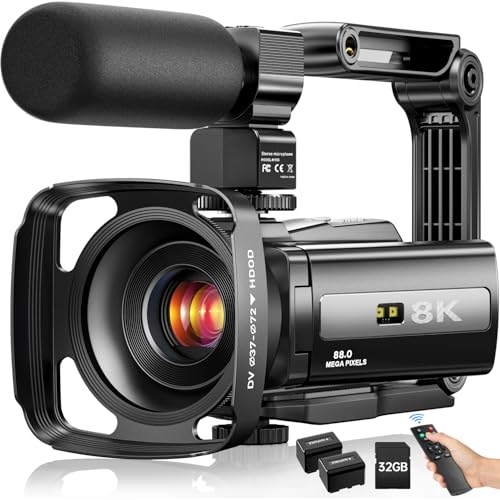
This camera targets creators seeking extreme resolution capabilities and extensive feature sets. It records up to 8K at 15FPS with 88MP images and includes a 3-inch touch screen, 18X digital zoom, and infrared night vision. Best for: creators wanting top-end resolution and on-the-go versatility. Limitation: 8K at 15FPS may not be ideal for fast-moving scenes or live streaming without processing power and bandwidth considerations.
MWIRB 8K Ultra HD Video Camera

MWIRB’s 8K camera provides similar ultra-high resolution options with 88MP stills and 18X digital zoom, plus 6-axis anti-shake stabilization. The 3-inch rotatable touch screen and built-in WiFi streamline sharing and control via a companion app. Best for: creators who value self-recording ease and remote operation. Limitation: similar to FlyFrost, 8K performance relies on post-processing and bandwidth; real-time streaming may require optimization.
NBPOWER 1080P 60FPS Streaming Camera

The NBPOWER camera delivers full 1080P at 60FPS with a built-in fill RGB light and privacy cover. Its autofocus helps maintain focus during movement, and the microphone supports clear voice capture. Best for: budget-conscious streamers who need reliable 1080P performance in dim settings. Limitation: no 4K option, so not ideal for high-resolution production.
EMEET PIXY Wireless 4K PTZ Streaming Camera

PIXY Wireless provides a dual-camera design with AI tracking, gesture control, HDR, and 48kHz built-in mic. Its wireless setup offers flexibility for multi-angle streaming and remote placement. Best for: creators who want hands-free tracking and a clean, wire-free studio. Limitation: wireless operation may require stable network to avoid dropped frames or tracking hiccups.
Buying Guide: Key Purchase Considerations
- Resolution versus bandwidth: Higher resolutions (4K) deliver crisper images but demand more processing power and bandwidth. Consider your streaming platform, PC specs, and internet upload speeds.
- Autofocus and tracking: If you stream hands-on demos or movement-heavy content, models with PDAF and AI tracking reduce manual adjustments.
- Field of view: Narrow FOV focuses on you; wider FOV captures the surroundings. Select FOV based on your scene complexity and background.
- Audio quality: Built-in mics with noise reduction help, but external mics can dramatically improve sound. Check if the camera supports external mic input.
- Software integration: Look for companion software that simplifies color correction, exposure, and tracking presets. Confirm compatibility with OBS, YouTube, or other platforms.
- Mounting and space: PTZ and dual-camera setups require stable mounting; ensure you have room and proper stands or tripods.
- Power and portability: Wireless options offer flexibility but may introduce latency if the network is unstable. Wired connections tend to be more reliable for live streams.
Frequently Asked Questions
- Do I need 4K for YouTube live streams? A: Not strictly; 1080p is widely supported and uses less bandwidth. 4K is beneficial for VOD replays and future-proofing, if your setup supports it.
- Is autofocus essential for live streaming? A: Autofocus helps when your position changes often. PDAF or AI tracking can reduce manual adjustments during scenes.
- Should I buy a dual-camera setup? A: Dual cameras can provide dynamic angles for demonstrations, but require more space and setup time. Use when you need multi-angle coverage.
- Is wireless streaming camera reliable for live streams? A: Wireless cameras offer flexibility but rely on a strong network. For critical streams, prefer wired connections or local capture with a backup.
- Can I use these cameras with OBS or other software? A: Most listed cameras support OBS and major streaming software. Check compatibility in the product’s software section or user guides.
- What is the best camera for beginners on YouTube? A: A budget 1080p webcam with built-in light and noise-canceling mic can be an excellent starting point, then upgrade as your channel grows.