Best High Resolution Film Scanning Machines for Clear Digital Archives
Looking for high resolution film scanning options to digitize your memories quickly and with good detail? This guide highlights five reliable scanners and viewing devices that convert 35mm and various film formats into crisp digital files. Each pick is explained for specific buyers—enthusiasts, hobbyists, and professionals—so you can choose the best fit for your needs. The table below summarizes the top five products and their ideal user profiles.
| Product | Best For | Key Strength |
|---|---|---|
| Wolverine Titan 8-in-1 | All-in-one fast converters | 3-second conversions with HDMI out |
| DIGITNOW! 135 Film Scanner | Budget-friendly standalone digitizing | SD card save, no computer required |
| Magnasonic All-in-One 24MP | Versatile formats, built-in memory | 2.4″ LCD, TV output |
| BEONEGLOBAL ClearScan S5 | High-resolution film and slide scans | 5″ LCD, 24MP sensor |
| BEONEGLOBAL ClearScan P5 | Upgraded ease of use | 5″ LCD, 24MP sensor |
Wolverine Titan 8-in-1 High Resolution Film to Digital Converter
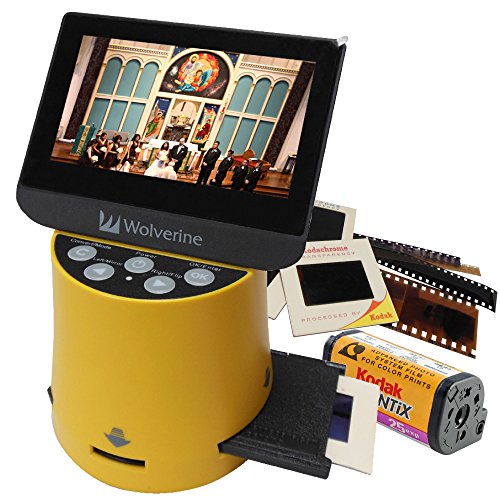
The Wolverine Titan 8-in-1 is designed to convert multiple film formats—35mm, 127, 126kpk, 110, and APS slides and negatives—into digital images. It features a large 4.3″ color screen for immediate viewing and an HDMI output to display results on a TV in high-definition. This unit is best for collectors or hobbyists who want quick, single-device conversion with live preview on a built-in display. A caution: HDMI cable is not included, so you’ll need to supply one if you want TV viewing.
Who this is best for: Photographers and enthusiasts who value speed and a self-contained viewing screen for on-the-spot validation.
DIGITNOW! 135 Film Negative Scanner

The DIGITNOW! 135 Film Negative Scanner is a budget-friendly standalone option. It supports 35mm and slides, saving in JPEG to an SD card (up to 32GB) or a computer at up to 1800 DPI. It includes an adjustable rapid slide feeder and can output to a TV via NTSC/PAL with a USB 2.0 interface. This model is better for casual digitization without a computer, though the resolution is moderate compared to higher-end units.
Who this is best for: Casual collectors or hobbyists seeking an affordable, computer-free solution for quick digitization.
Caution: Higher resolution scans may be more time-consuming, and you’re limited by built-in processing compared to higher-tier scanners.
Magnasonic All-in-One High Resolution 24MP Film Scanner
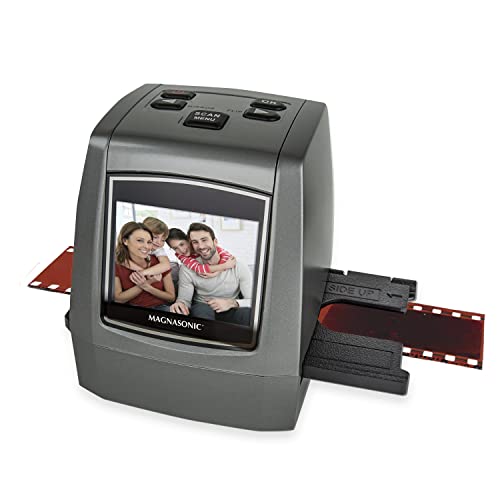
The Magnasonic all-in-one scanner handles 35mm, 126KPK, 110, Super 8, and negatives, converting to high-resolution 24MP JPEG files. It includes a 2.4″ LCD for viewing and a TV output option, so you can review results without a computer. Built-in 128MB memory stores up to about 100 images, and SD card expansion allows larger libraries. It’s ideal for users who want a straightforward, multi-format solution with immediate local viewing.
Who this is best for: Families and archives who want a simple, self-contained device with TV viewing capability.
Caution: Still images only; this device does not capture video and relies on internal memory and SD expansion for storage.
BEONEGLOBAL ClearScan S5 Film Scanner

The ClearScan S5 uses a high-resolution approach with a 5″ LCD and a 24MP CMOS sensor to digitize 135, 126, 110, Super 8 negatives and slides. The ergonomic front-panel controls are designed for comfortable operation, and the large display helps with instant adjustments. This model suits users who want precise control over scan results and a bright, large preview screen. A potential limitation is that scanning quality depends on the sensor’s capabilities, so expect excellent 24MP results rather than ultra-high-end professional specs.
Who this is best for: Serious hobbyists who value a larger viewing area and higher-resolution previews before saving files.
BEONEGLOBAL ClearScan P5 Film Scanner

The P5 model improves usability with an upgraded design, a 5″ LCD, and a 24MP sensor for high-resolution scans of 35mm, 135, 126, 110, and Super 8 film and slides. The interface is simplified with the control layout placed below the screen for easy operation. It’s a strong choice for users who want reliable, high-quality conversions and a straightforward workflow. A short caveat: performance can vary with very old or degraded film, which may require careful handling during scanning.
Who this is best for: Digital archivists and hobbyists seeking an easy-to-use, high-resolution scanner with a robust display and reliable output.
Buying Guide: How to Choose Your Film Scanner
- Format compatibility: Confirm the device supports your film types (35mm, 126KPK, 110, APS, Super 8). If you own multiple formats, a multi-format unit saves space and complexity.
- Resolution and image quality: Look for 24MP or higher sensors for sharp detail. Note that higher resolution scanners may have longer scan times.
- Display and preview: A large built-in LCD helps verify focus and exposure before saving files. HDMI/TV output is useful for immediate sharing on larger screens.
- Storage options: SD card support and internal memory matter if you prefer standalone operation without a computer.
- Ease of use: Front-panel controls and straightforward interfaces reduce setup time, especially for beginners.
- Portability and space: Consider the footprint if you have limited workspace or need a travel-friendly option.
- Limitations to expect: Some devices may have fixed focus or limited color management. Always check the sensor size and color accuracy for archival quality.
Frequently Asked Questions
- Do these scanners require a computer? Some models operate standalone with SD cards and built-in memory, while others export via USB to a computer. Check your preferred workflow before buying.
- Is 24MP sufficient for archival purposes? Yes, for most consumer film scanning needs, 24MP provides detailed results suitable for printing and sharing, though professional-grade work may demand higher specs.
- Can I view scans on a TV? Several models include HDMI or TV-out options to view results on a larger screen without a computer.
- Will scanning remove dust and scratches? Scanners with good optics and cleaning features reduce artifacts, but you may still need to clean slides and negatives before scanning for best results.
- Are APS or old formats harder to digitize? Some older formats may have compatibility quirks, but multi-format devices aim to cover these with dedicated adapters and feeds.
- What is the difference between viewing quality and final image quality? Preview quality on the device screen may differ from the saved JPEGs; always review saved files on a computer for final quality checks.