Best DV Cable Options to Connect Camcorder to PC for Smooth Digitization
Directly transferring video from a DV camcorder to a PC requires a reliable FireWire/IEEE 1394 connection or a compatible capture solution. This guide highlights five dependable cables and adapters that help you connect DV camcorders to a computer, with clear guidance on who benefits most from each option. If you’re digitizing old tapes, editing in a PC, or archiving family memories, this article helps you choose the right cable or capture path for your setup. The products below are selected for compatibility, ease of use, and straightforward data transfer in typical home or small-office environments.
Overview of top picks at a glance:
- Best for Sony DV camcorders with a 4-pin FireWire connection, requiring a USB-to-FireWire path.
- Best for upgrading to FireWire 800/400 compatibility without a PC expansion card.
- Best for classic RCA/VHS to USB digitization with a built-in capture-ready path.
- Best for Sony DCR-TRV style camcorders with dedicated FireWire-to-USB designs.
- Best for flexible FireWire 9-pin to 4-pin adapters across various 1394 devices.
| Product | Best For | Key Benefit |
|---|---|---|
| PASOW FireWire Cable 9 Pin to 4 Pin | DV / camcorders to 1394 ports | 800/400 compatibility, flexible 6 ft |
| Kouiyta USB to Firewire 4 Pin | Sony DV camcorders | USB 2.0 path to 4-pin FireWire |
| PASOW Firewire 4 Pin to 6 Pin | Connecting camcorders to PC | 6 ft, easy cross-device use |
| Cuxnoo FireWire 9 Pin to 4 Pin | Broad 1394 device support | Stable 1394 data transfer |
| Herfair Firewire 9Pin to 4Pin | DV camcorders to PC | 6 ft, USB 2.0 style design for data transfer |
PASOW FireWire Cable 9 Pin to 4 Pin 6 ft

Reference features: IEEE 1394b Firewire 800 cables for legacy 1394a ports; data transfer up to 800 Mbps; Plug and Play; hot pluggable; twisted-pair construction with shielding.
Best for: Users with a DV camcorder that uses a 9-pin FireWire port and a PC with 1394a/1394b compatibility. This cable is chosen for its long reach and robust shielding, which helps reduce interference during long digitization sessions.
Caution: This cable requires compatible FireWire ports on both devices; not all modern PCs include 1394 inputs without adapters. Best used when your PC supports FireWire 800/400 natively or via a card.
Kouiyta USB Male to Firewire 4 Pin Cable

Reference features: USB 2.0 Type-A male to 4-pin Firewire FireWire; designed for Sony DCR-TRV75E DV camcorders; dedicated internal pin configuration; not a universal adapter; supports video viewing but not capture.
Best for: Owners of specific Sony DV camcorders that rely on a USB-initiated FireWire path to view video on a computer. Choose this if your camcorder model is explicitly supported and capture is not required.
Caution: Not suitable for general data transfer or video capture; it does not support transferring files or capturing video to the PC. Verify camcorder compatibility before purchase.
PASOW Firewire Cable 4 Pin to 6 Pin
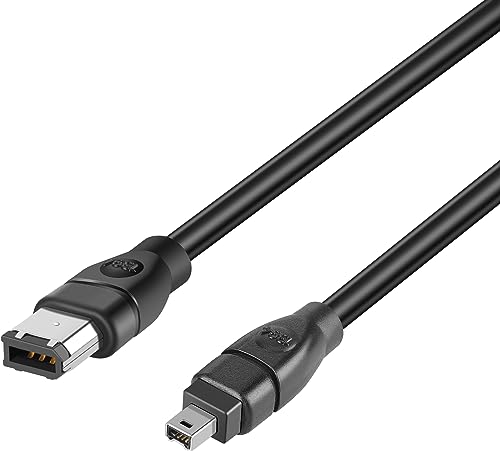
Reference features: Firewire 400 (6Pin) to 4Pin; supports devices with 6-pin or 4-pin ports; transfer rate up to 400 Mbps; suitable for cameras, audio interfaces, and capture cards.
Best for: Users upgrading from older 4-pin devices to a 6-pin PC port, enabling broader compatibility across devices. It provides a simple, direct adapter path for DV workflows.
Caution: The 6-pin to 4-pin direction is specific; ensure your devices require the 6-to-4 pin configuration to avoid mismatched ports.
Cuxnoo FireWire 9 Pin to 4 Pin 6 ft

Reference features: Precision connectors; broad compatibility with 1394-enabled devices; 400 Mbps high-speed performance; designed for stable data transfer between DV devices and PCs.
Best for: General-purpose DV/IEEE 1394 connections where a reliable 9-pin to 4-pin adapter is needed. Choose this when you want a stable link across multiple 1394 devices.
Caution: Data transfer performance depends on device compatibility; check if your camcorder’s DV output and PC port align with 9/4-pin mapping.
Herfair Firewire 9Pin to 4Pin 6 ft

Reference features: Firewire 800 to 400; USB 2.0 design for data transfer; supports DV camcorder connections to PC; six-foot length for flexible setup.
Best for: Users with 9-pin FireWire devices seeking a straightforward 9-to-4-pin bridge for PC connections. This option emphasizes straightforward connectivity across common DV workflows.
Caution: This cable’s USB design note may imply non-traditional power profiles; ensure your PC ports provide adequate bandwidth for video transfer.
Buying Guide
What to consider when choosing a DV cable to connect a camcorder to a PC
- Device compatibility: Confirm your camcorder’s FireWire port type (9-pin, 6-pin, or 4-pin) and your PC’s FireWire capabilities (1394a vs 1394b).
- Data transfer speed: 400 Mbps (FireWire 400) is common; 800 Mbps (FireWire 800) is faster and better for larger video files, though not all devices support it.
- Cable length: Longer cables offer flexibility but may introduce signal degradation on some setups. Shorter may provide more stable connections in tight spaces.
- Plug-and-play: Some devices require drivers; others are recognized automatically. If you digitize often, a true plug-and-play path minimizes setup time.
- Versatility: If you plan to connect multiple devices (camcorders, capture cards, printers), choose cables with broad compatibility and clear pin configurations.
- Capture vs. playback: Some cables allow playback viewing but not capture. If you need to digitize, prioritize cables explicitly supporting data transfer to the PC.
FAQ
- Can I use a USB-to-FireWire adapter to connect a DV camcorder to my PC? Yes, but performance depends on the adapter and system compatibility. For best results, use a cable designed for FireWire-to-1394 connections when your camcorder requires 1394 data lines.
- Do all PCs have FireWire ports? Many modern PCs lack FireWire, requiring PCIe/ExpressCard adapters or USB-based capture solutions for legacy DV devices.
- What is the difference between FireWire 400 and FireWire 800? FireWire 800 provides faster theoretical transfer rates (up to 800 Mbps) and better performance with newer devices, but compatibility varies by device.
- Is a separate video capture card needed? Not always. Some DV-to-PC paths use direct FireWire cables, but if you’re digitizing analog sources (VHS, Hi8), a capture card or USB converter is often necessary.
- Will these cables support both viewing and capturing video? Some cables are designed for viewing or playback only; others explicitly support capturing video to a PC. Check the product details for capture support.
- What length should I choose? For most setups, 6 ft offers a comfortable balance between reach and signal integrity. Longer runs may require active or high-quality shields.