Best Ways to Convert Analog Video Cameras to IP Surveillance
Answering a common buyer question, these 5 products provide reliable, plug‑and‑play paths from legacy analog cameras to modern IP networks. They’re best for: small to mid‑sized setups upgrading existing CCTV without re‑cabling; users needing remote access or NVR compatibility; and those wanting flexible encoding for limited bandwidth. The following sections compare top options and explain which is best for different scenarios.
Summary table of selected products:
| Product | Best For | Key Benefit | Limitations |
|---|---|---|---|
| LQY0T AHD2NET Analog to IP Video Encoder | Users with AHD/TVI/CVI/CVBS cameras | Smart H.265/H.264 encoding; ONVIF/RTSP/RTMP support | Default IP and password may require secure setup |
| IPConverter Self-Adaption 1080P AHD TVI CVI to IPC Converter | 1080P only; BNC to IP conversion | Simple 1080P IP conversion | Power supply not included |
| LQY0T BNC to IP Video Encoder (4‑in‑1) | Multiple camera types in one unit | RTSP/H.265 1080P; easy plug‑and‑play | Limited to 1080P in some cases |
| Analog to IP Camera Converter (Generic) | Compact, affordable conversion | Easy installation; passive balun approach | Data sheet limited; may rely on passive design |
| MEIRIYFA Passive Video Balun Kit | Longer cable runs with POE/IPC needs | Supports 720P–8MP; Cat5e/6 compatibility | Balun focus; may require additional PoE planning |
LQY0T AHD2NET Analog to IP Video Encoder

This encoder accepts 720P/1080P AHD, TVI, CVI, and CVBS analog signals, making it ideal for upgrading existing setups without replacing cameras. It emphasizes broad compatibility and supports ONVIF, RTSP, RTMP, TCP/IP, HTTP, and DHCP. With H.265 as default, it reduces bandwidth while preserving clear 1080P video. A dual‑stream output lets high‑quality local recording pair with low‑bandwidth remote viewing.
Best for: small businesses or home security systems with mixed camera types seeking a single, expandable IP path. Better for users who already own ONVIF‑compliant NVRs or streaming software. Choose this if you want strong protocol support and a ready‑to‑connect experience.
Caution: Default IP is 192.168.1.10 and the password is “admin”—secure the device after installation to prevent unauthorized access.
IPConverter Self‑Adaption 1080P AHD TVI CVI to IPC Converter

This model focuses on 1080P conversions from AHD/CVI/TVI to IP, turning a BNC camera into an IP device for NVR setups. It’s simple to deploy, with a 12V 1A power input. The converter is best when you have a 1080P camera network and want minimal fiddling with settings.
Best for: users who want a straightforward, 1080P‑only path from BNC cameras to an NVR without extra features. Better for those prioritizing minimal setup over feature depth. Choose this if your system is already optimized for 1080P and you don’t need multi‑resolution streaming.
Caution: Power adapter is not included, so you’ll need to provide one separately.
LQY0T BNC to IP Video Encoder – 4‑in‑1

This 4‑in‑1 encoder accepts CVBS, AHD, CVI, and TVI signals and converts them to RTSP IP streams at 1080P with H.265 encoding. It’s designed for easy integration with mainstream NVRs and VMS platforms, and its plug‑and‑play design helps reduce setup time.
Best for: households or small businesses with multiple analog camera types needing a single IP stream converter. Better for users who want robust compatibility and straightforward installation. Choose this if you need broad input support and efficient encoding.
Caution: While versatile, some setups may benefit from additional configuration for optimal bandwidth management in constrained networks.
Analog to IP Camera Converter (Generic)

This compact converter targets 1080P AHD/CVI/TVI cameras with IP output in an IPC workflow. It emphasizes a smart, passive approach with a real‑time power indicator and a sturdy, enclosed design. It suits small installations where space and ease of use matter most.
Best for: budget‑conscious buyers who want a simple path from analog to IP with minimal hardware. Better for quick upgrades in single‑camera or limited‑camera environments. Choose this if you prefer a compact, self‑contained unit with clear status indication.
Caution: The data sheet is sparse; verify compatibility with your NVR before purchasing to avoid mismatch with your specific camera outputs.
POE Over Coax Converter By CubQuantnestars
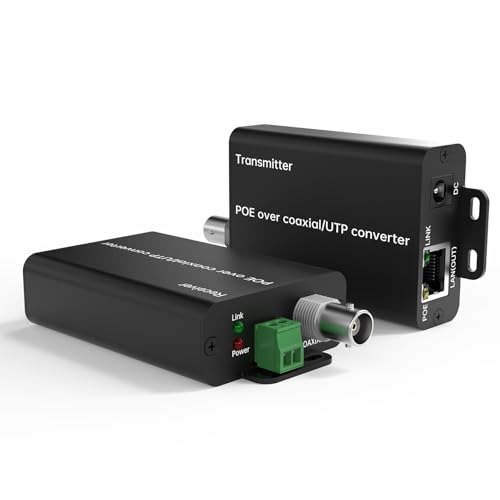
This kit converts analog to IP over coax with Power over Coax support, enabling data and power over existing RG59 lines. It supports PoE/PoE+ and includes longer transmission ranges up to 1000 meters for certain installations. The dual‑medium design eliminates the need for re‑wiring, making it useful in elevator rides, long corridors, or industrial spaces.
Best for: projects needing to reuse existing coax while adding IP connectivity and PoE power. Better for mid‑to‑large scale upgrades where reducing re‑cabling costs is important. Choose this if you must extend IP coverage across long distances without laying new fiber or Ethernet runs.
Caution: System performance depends on coax quality and correct pairing of transmitter/receiver units; mispairing can degrade video quality over long runs.
Buying Guide: Key Purchase Considerations
- Camera compatibility: Confirm whether your cameras are AHD, CVI, TVI, or CVBS and whether the encoder supports ONVIF, RTSP, or RTMP for your NVR or VMS.
- Resolution needs: Decide if 720P, 1080P, or higher is required. Some devices explicitly support 1080P, while others offer 4K onward via two‑stream setups.
- Network constraints: If bandwidth is limited, prioritize devices with H.265 encoding and dual‑stream capabilities to balance local recording quality and remote viewing efficiency.
- Power options: Some units include PoE or DC power; others require a separate power adapter. Check what your installation site can provide.
- Installation simplicity: Plug‑and‑play designs reduce setup time. For complex layouts, consider devices with auto‑detect features and clear configuration defaults.
- Security considerations: Change default credentials, enable network segmentation, and ensure firmware updates as part of ongoing security hygiene.
- Future scalability: If you plan to add more cameras, a multi‑input encoder or a scalable NVR/VMS workflow can save headaches later.
Frequently Asked Questions
- What does an Analog to IP converter do?
It converts legacy analog camera signals into IP streams that can be viewed and recorded on IP networks and NVRs. - Do I need a separate power supply?
Many devices include a DC input; some can operate via PoE. Check the product specs to confirm power requirements. - Is H.265 better than H.264?
Yes, H.265 generally reduces bandwidth and storage needs while preserving image quality, especially at higher resolutions. - Will these work with any NVR?
Most support common protocols like ONVIF, RTSP, or RTMP, but always verify compatibility with your specific NVR software. - Can I upgrade my entire system at once?
Yes, by using multi‑input encoders or staggered upgrades, you can gradually convert cameras to IP without full rewiring. - Are passive baluns reliable for long runs?
Passive baluns are cost‑effective for short to mid distances; for longer distances, active solutions may offer better reliability.