Best Cheap 35mm Film Scanners for Quick Digitizing
Direct answer: these budget-friendly 35mm film scanners offer straightforward digitizing of negatives and slides, with simple one-device operation, built-in displays, and convenient USB/SD connections. They are best for casual hobbyists, students, and memory preservation projects who want an affordable way to convert old film to digital. The top picks below emphasize ease of use, value, and practical features for each buyer type.
Summary table of selected products:
| Product | Best For | Key Benefit | Note |
|---|---|---|---|
| KODAK Slide N SCAN | Casual collectors | 5” LCD, quick-load trays | Supports 135/110/126 |
| Magnasonic All-in-One 24MP | Families with a TV hookup | HDMI output, built-in memory | 5″ display |
| DigitPro Film & Slide Scanner | Standalone convenience | 5” LCD, one-click scanning | Supports multiple formats |
| DigitConvert 2.4″ LCD Scanner | Compact storage needs | Small LCD, no PC required | 2.4″ screen |
| BEONEGLOBAL ClearScan MINI | Simple, reliable scans | Up to 16MP CMOS sensor | 2.31″ LCD |
KODAK Slide N SCAN Film & Slide Scanner

The KODAK Slide N SCAN is designed for quick conversion of color and black-and-white negatives and slides into digital files. It includes a 5” LCD display for instant previews and editing, plus a dedicated 50mm slide holder and adapters for 135, 110, and 126 formats. This model emphasizes ease of use and a gallery-style viewing experience, making it ideal for scrapbookers and family historians who want a straightforward, all-in-one device.
Best for: casual users who want an all-in-one unit with a large built-in display and simple loading trays. The integrated screen helps verify scans without a computer.
Limitation: the device saves to an SD card (not included), so you’ll need compatible memory to archive your scans.
Magnasonic All-in-One 24MP Film Scanner

The Magnasonic scanner converts 35mm, 110, 126, and Super 8 film and slides into 24MP digital JPEGs. It features a built-in 5″ display and an HDMI output option for viewing on a TV or monitor. It also includes 128MB of internal memory and supports up to 128GB SD cards. This option is strong for households that want to preview and share scans on a larger screen with minimal setup.
Best for: households that want a larger viewing experience and easy TV/monitor presentation of scanned images.
Limitation: HDMI output requires cables not included in the package, and internal memory is modest for large archiving projects.
Mobile Film Scanner for 35mm Slides & Negatives (DGODRT)
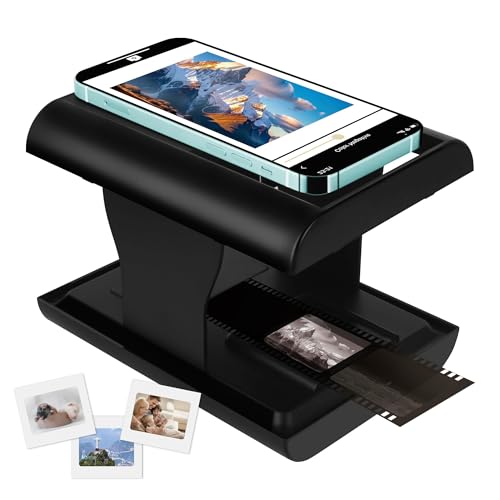
This portable, smartphone-connected scanner digitizes 35mm negatives and slides via a built-in LED backlight. It is designed for one-device operation and easy sharing to phones, making it ideal for beginners who want a simple, on-the-go solution. It supports direct capture into a phone app for quick edits and sharing.
Best for: beginners who want a one-device workflow and instant mobile sharing capability.
Limitation: the final image quality is tied to the phone’s camera resolution, which may vary between users.
DigitPro Film And Slide Scanner

The DigitPro scanner supports 35mm and 135/126/110 formats with a 5” LCD display and easy one-touch scanning. It stores images to an internal memory or an SD card (not included) for straightforward archiving. The device is marketed as an all-in-one solution, promising quick conversion with simple navigation.
Best for: users who want a compact, standalone unit with a large display for immediate review and simple saving options.
Limitation: external memory capacity depends on the SD card you provide; ensure you have a sufficiently large card for your needs.
DigitPro 35mm Film Scanner (2.4″ LCD)

This 2.4″ LCD-equipped scanner is designed to convert 135 negatives and slides to digital JPEGs directly on-device. It supports 2.4″ LCD preview, TV-out sharing, and a fast slide feeder for efficient batch processing. It’s marketed as a user-friendly option for home archiving without a computer.
Best for: users who want a self-contained device with TV-out and batch-feeding capabilities for 35mm collections.
Limitation: TV-out requires a compatible display and the overall image resolution is tied to the device’s built-in camera capabilities.
DigitConvert 35mm Film & Slide Scanner

The DigitConvert model emphasizes an all-in-one approach with a 2.4″ LCD, convenient SD card saving up to 128GB, and a no-PC-required workflow. It supports 135 and 35mm formats and offers a straightforward, batch-friendly approach for archiving old slides and negatives into digital JPEGs.
Best for: seniors or anyone who wants a user-friendly, plug-and-scan workflow without computer software.
Limitation: image editing and advanced features are limited by the on-device controls and built-in software.
BEONEGLOBAL ClearScan MINI

The ClearScan MINI offers up to 16MP scans with a compact form factor and a 2.31″ LCD screen. It is designed for easy handling and quick digitization of 35mm film, slides, and negatives. This model focuses on ergonomic use and reliable, simple-to-understand operation for quick personal archiving.
Best for: users who want a small, reliable scanner with a clear interface for occasional digitizing tasks.
Limitation: smaller LCD may hinder detailed reviews before saving your scans; plan to review on a larger screen if needed later.
Buying Guide
What to consider when choosing a cheap 35mm film scanner
- Display size and usability: A larger built-in display helps with quick previews and color checks, but smaller screens can be sufficient for casual use.
- Format support: Ensure the device handles the film formats you own (35mm, 135/126/110, slides, Super 8).
- Storage and connectivity: Look for internal memory or SD card support and whether you can transfer files directly to a computer or phone.
- One-step scanning vs. manual editing: Some models offer on-device editing; others rely on post-processing on a PC or phone.
- Portability and power: Foldable or compact units are easier to store or travel with, while powered models may require USB or DC adapters.
- Quality vs. convenience: Higher resolution (e.g., 16–24MP) improves detail but may come with larger file sizes and slower processing.
Best value strategies
- Match to usage: Pick a model with a large display if you frequently present scans to family or use it as a digital photo frame.
- Plan for archiving: If you have a large current library, prioritize SD card capacity and internal storage to minimize trips to a computer.
- Future-proofing: Consider models with HDMI output for easy viewing on a TV or monitor, even if you don’t plan to use it now.
Who should buy these
- Casual memory keepers: The KODAK Slide N SCAN and DigitConvert models emphasize easy loading and direct display preview.
- Families and classrooms: Magnasonic and DGODRT offer straightforward sharing options and simple operation for multiple users.
- Travel-light digitizers: Foldable or compact scanners suit those who need portability without heavy setup.
Quick comparison at a glance
- Best for big screen previews: Magnasonic All-in-One 24MP
- Best standalone with quick-load feeder: DigitPro family
- Best compact foldable option: TCNEWCL or BEONEGLOBAL ClearScan MINI
- Best overall value for immediate sharing: KODAK Slide N SCAN
FAQ
- Do these scanners work without a computer? Yes, several models are designed to operate standalone with built-in displays or SD cards.
- Can I view scans on a TV or monitor? Some models offer HDMI or TV-out connections for larger viewing.
- What formats are supported? Most support 35mm, 135/126, 110 slides, and negatives; some also handle Super 8.
- Is higher resolution always better? Generally yes for detail, but it increases file size and processing time.
- Are these suitable for long-term archiving? They are suitable for casual archiving; for extensive professional archiving, consider higher-end scanners.
- Will the quality depend on my phone’s camera? For phone-connected models, the phone camera can influence final image quality in some cases.