Best 3D Printer Cameras for Stunning Time-Lapse Filming and Monitoring
Capturing your 3D printing process with a dedicated time-lapse camera not only helps monitor print jobs remotely but also creates mesmerizing videos that document every layer of your creation. This article reviews the best 3D printer cameras with time-lapse features, real-time monitoring, and AI detection capabilities for American consumers looking to enhance their 3D printing experience. Below is a summary table of the top models selected for detailed review.
| Product | Brand | Key Features |
|---|---|---|
| Creality K1 AI Camera 3D Printer Camera | Creality | Real-time viewing, AI printing failure detection, automatic time-lapse creation |
| chitu Systems Official K1 AI Camera | chitu systems | HD quality, AI foreign object detection, automatic print pause |
| Creality Nebula Camera | Creality | 24-hour real-time monitoring, spaghetti detection, WiFi connection |
| R QIDI TECHNOLOGY 3D Printer Camera | R QIDI TECHNOLOGY | Remote monitoring via QIDI slicer and third-party apps, plug & play, time-lapse video |
| Lokkr Creality Upgraded K1 HD Quality AI Camera | Lokkr | True-to-life HD video, easy installation, time-lapse filming |
Creality K1 AI Camera 3D Printer Camera

The Creality K1 AI Camera supports real-time viewing of your print status through the Creality Cloud or Creality Print platforms. It features intelligent printing failure detection that can automatically suspend your print job if an error occurs, reducing wasted filament. This camera enables easy time-lapse filming by logging into the Creality Cloud platform, allowing you to generate and share time-lapse videos of your printing sessions effortlessly. Its integration with Creality’s K1 MAX, SE, and K1C models makes it a seamless choice for users of these printers.
chitu Systems Official K1 AI Camera for CREALITY

This chitu systems K1 AI Camera provides HD-quality images that let you monitor your print clearly in real time. It includes advanced AI features that detect foreign objects on the printer platform before printing starts; if present, the print pauses to avoid nozzle collisions. Additionally, it monitors for failures during printing, suspending the process automatically to prevent filament waste. This camera is easy to install and compatible with Creality K1/K1 MAX printers, making it a practical option for improving print oversight and safeguarding print quality.
Creality Nebula Camera for 24H Real-Time Monitoring

The Creality Nebula Camera offers 24-hour real-time monitoring with WiFi connectivity, letting you watch prints remotely from your phone or computer via the Creality Cloud app. The built-in spaghetti detection function alerts you when printing errors create filament messes, saving expensive materials. Time-lapse photography lets you capture the full print process in a video format. It’s compatible with multiple Creality devices, including Sonic Pad, Nebula Pad, Ender 3 V3/Plus, and more, providing versatile application across various models.
R QIDI TECHNOLOGY 3D Printer Camera for X-Max3/X-Plus3

The R QIDI TECHNOLOGY 3D Printer Camera is designed as an optional accessory compatible with QIDI MAX3, PLUS3, and SMART3 printers. It supports remote monitoring via QIDI Slicer or third-party platforms like Klipper console, allowing real-time print status updates from anywhere. The camera includes a plug-and-play setup and an automatic time-lapse video creation function that compiles your entire print into an engaging video. This model offers a flexible way to maintain oversight and archive your printing projects without requiring constant physical supervision.
Lokkr Creality Upgraded K1 HD Quality AI Camera
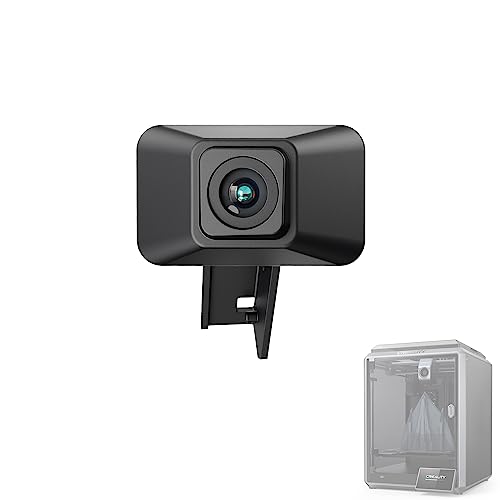
The Lokkr Creality Upgraded K1 AI Camera delivers HD quality, true-to-life video for detailed monitoring of your prints. It supports real-time status viewing through Creality Cloud or Creality Print, making it easy to keep track of job progress. The camera’s straightforward installation—thanks to a reserved interface—ensures minimal setup hassle. It automatically produces time-lapse videos accessible via the cloud, perfect for sharing your creations with other enthusiasts or clients.
Buying Guide for Choosing a 3D Printer Time Lapse Camera
Selecting the right 3D printer camera for time-lapse and monitoring involves considering several important factors:
Compatibility
Ensure the camera is compatible with your specific 3D printer model or control system. Many cameras are designed for particular printer models, such as Creality’s K1 series or QIDI’s MAX series. Verify that your printer is listed as supported.
Video Quality
HD resolution is essential for detailed real-time monitoring and high-quality time-lapse videos. Cameras like the Creality K1 AI and Lokkr K1 offer sharp video clarity for clear print observation.
AI Detection Features
Cameras that include AI-powered failure or object detection provide extra assurance by automatically pausing the print to prevent nozzle damage or filament waste. This technology minimizes the risk of failed prints, saving time and materials.
Real-Time Remote Monitoring
Look for cameras that connect via WiFi and integrate with user-friendly apps or cloud platforms. This allows you to check on print status anytime, from anywhere, offering flexibility and control even when away from your workshop.
Time-Lapse Automation
The ability to automatically generate time-lapse videos without additional input is a valuable convenience. Embedded software or cloud services that capture each completed layer streamline the process of producing engaging videos for sharing or documentation.
Ease of Installation
Plug-and-play designs or cameras with reserved interfaces simplify installation. Look for models that come with clear instructions and minimal setup steps to get you printing and recording sooner.
Additional Features
Some cameras include unique functions like spaghetti detection to identify filament jams or night vision for low-light conditions. Consider what additional features improve usability based on your printing environment.
By examining these factors, you can select a 3D printer camera that enhances your printing workflow, helps detect problems early, and captures stunning time-lapse videos with ease.