Best 1080p 60fps Webcams for Cheap, Clear Video—Top Picks for Every Budget
Looking for an affordable 1080p 60fps webcam that delivers solid video and clear audio? This guide focuses on budget-friendly options that provide smooth 1080p video at 60 frames per second, built-in microphones, and practical features like light correction or privacy covers. It is ideal for students, remote workers, content creators, and casual streamers who want reliable performance without breaking the bank. Below are five carefully selected webcams, each with the best-use case and a concise buying summary to help you compare quickly.
| Product | Best For | Why It Stands Out |
|---|---|---|
| N BPOWER 1080P 60FPS Streaming Camera | Streaming, gaming, remote meetings | 1080p60 with built-in mic and fill light for dim environments |
| VITADE Webcam 1080P 60fps | Webinars, conferences, education | Wide angle with dual mics and auto light correction |
| NexiGo N980P 1080P 60FPS Webcam | Zoom, Teams, daily video calls | 60fps, dual mics, wide 120° view for versatile setups |
| VIZOLINK 1080P 60FPS Webcam | Remote work and streaming | 1080p60 with four noise-canceling mics and auto light correction |
| saylas 2K/1080P Webcam | Video calls with sharper detail | Adaptive resolution up to 2K/1080P60 with autofocus |
Note: Each option emphasizes 1080p at 60fps where supported and includes built-in mics or privacy features to suit different environments. The table above highlights who each model is best for and why it’s a strong budget pick compared to higher-end cameras.
NBPOWER 1080P 60FPS Streaming Camera

Best for: streamers and remote workers who need a single-camera setup with integrated lighting. This NBPOWER model records Full HD 1080p at 60fps and includes a built-in microphone and a fill RGB light, supporting better results in low-light environments. It also features autofocus for cleaner faces during movement. The privacy cover provides a quick physical block when not in use. A potential limitation is that some users may prefer higher-end color accuracy for critical productions; nonetheless, the light helps reduce grain in darker settings.
VITADE Webcam 1080P 60fps with Microphone

Best for: educators and professionals who need balanced audio and video with a wide view. This VITADE camera delivers 1080p at 60fps with a 100° ultra-wide lens, plus built-in dual omnidirectional mics with noise suppression. Automatic light correction helps maintain image quality in dim rooms. A caution is that wide angles can introduce more background capture, so positioning matters for a clean shot.
NexiGo N980P 1080P 60FPS Webcam

Best for: everyday video calls and office use with a wide field of view. The NexiGo N980P streams at 1080p60 and includes built-in dual mics with noise reduction plus automatic color adjustments. It has a 120° viewing angle, making it suitable for desk setups that show more of your surroundings. Limitation: very wide angles can distort facial proportions if not carefully framed.
VIZOLINK 1080P 60FPS Webcam
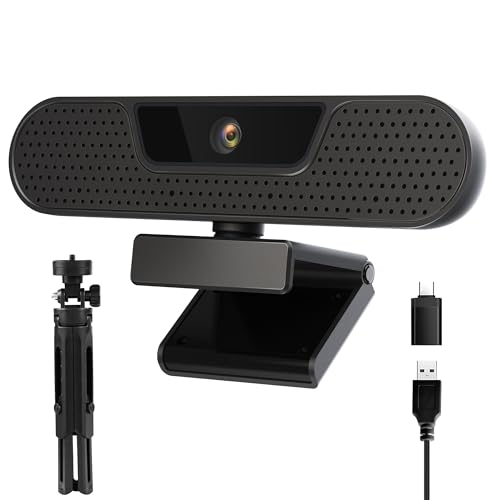
Best for: users who want a compact setup with multiple mics for cleaner voice pickup. The VIZOLINK W2G delivers 1080p at 60fps with four noise-canceling microphones and auto light correction. It offers a wide 75° field of view, which is ideal for desk-level shots and small spaces. A potential drawback is that its wider angle may capture more background than needed in tight rooms.
saylas 2K Webcam with Microphone

Best for: users who want higher resolution options. The saylas camera supports 2K at 30fps and 1080p at 60fps, with autofocus and a privacy cover. It includes two microphones for clearer audio. This model is a good pick if you occasionally need crisper detail and are working within a limited budget. Limitation: 2K performance may depend on lighting and software compatibility; 60fps is supported at 1080p rather than 2K in all modes.
EMEET S600 4K Webcam

Best for: those who occasionally need higher-than-1080p detail. The EMEET S600 offers 4K at 30fps or 1080p at 60fps with PDAF autofocus and dual mics, plus a privacy cover. The 4K option provides the clearest image, but overall performance depends on lighting and software support. Choose this if you want the possibility of stepping up to 4K for special videos or streams.
Buying Guide: What to Look For When Choosing a Cheap 1080p 60fps Webcam
- Resolution versus frame rate: If 60fps is essential for smooth motion, prioritize models specifically listing 1080p60. Some cameras offer 1080p at 60fps as a mode alongside higher-resolution options.
- Low-light performance: Look for built-in light correction, such as auto white balance or fill lights, to improve image quality in dim rooms.
- Microphone quality: Dual mics or noise-canceling tech helps ensure clear audio, reducing the need for an external microphone in most everyday scenarios.
- Autofocus and field of view: PDAF or fast autofocus improves face tracking during movement. A wider FOV is helpful for desks or group calls but can distort portraits if too wide.
- Privacy features: A physical privacy cover is a simple, reliable safeguard when the camera is not in use.
- Compatibility and setup: USB plug-and-play with Windows, macOS, and common streaming software is ideal for quick setups with minimal driver requirements.
- Price versus value: Budget-friendly models vary in color accuracy and background noise suppression. Prioritize features most relevant to your use case (education, meetings, or streaming).
Frequently Asked Questions
- Do all these webcams support 1080p at 60fps? Yes, several models explicitly list 1080p60, while some offer 4K with 1080p60 as an alternative mode.
- Is a built-in microphone enough for professional calls? For casual and semi-professional use, built-in mics with noise suppression are sufficient, but a dedicated microphone may improve audio in noisy environments.
- Should I prioritize a wide-angle lens? A wider field of view helps in small or shared spaces, but can distort faces if too wide. Choose based on your desk setup and whether you want to show surroundings.
- Is privacy protection important? A privacy cover is a simple, effective safeguard; many budget cameras include one as standard.
- Do these webcams require drivers? Most are USB plug-and-play with Windows and macOS, reducing the need for separate drivers or software installation.
- Can I upgrade to 4K later? Some models offer 4K modes, but 1080p60 is the most common specification for budget webcams. If you need true 4K, expect a higher price.