Best Video Capture Cards for Capturing the Moment in Streaming
Capture the moment with high-quality video capture cards designed for consoles, cameras, and PC setups. This guide highlights five reliable options that balance value, latency, and compatibility for streamers, educators, and gamers across Windows, Mac, and more. Use the product table below as a quick reference before diving into detailed sections.
| Product | Brand | Key Benefit |
|---|---|---|
| Capture Card Nintendo Switch, 4K HDMI Video Capture Card | Rybozen | 1080p 60FPS capture with easy USB 3.0 connectivity |
| Audio Express AXHDCAP 4K HDMI Capture Card | Audio Express | 4K input, 1080P output with low latency |
| WARRKY Video Capture Card (HDMI to USB 3.0 A/C) | Warrky | Low latency, 4K input, USB-C/USB-A compatibility |
| WARRKY Video Capture Card with 100W Power Delivery | Warrky | 4K@30/1080P@60 with PD charging for Quest 3 and iPad |
| Portta HDMI Video Capture Card | Portta | 1080P 60FPS, 4K input, loop-out and audio I/O |
The following sections review each option’s strengths, supported formats, and practical use cases to help you choose a solution that best captures your moments on stream or in recorded videos.
Rybozen Capture Card: 1080P 60FPS For Consoles And Cameras

Rybozen’s capture card supports 1080p at 60FPS for video sources from PS4, PS5, Xbox, DSLR cameras, or set-top boxes. It also handles 4K30/60Hz input with a 2K30Hz output, offering broad compatibility for streaming platforms like OBS, Twitch, and YouTube. The device is plug-and-play with no driver requirement, automatically appearing as a webcam once connected, and it works across Windows and Mac systems via USB 3.0 with low latency. Ideal for creators who want reliable framing without CPU strain.
Audio Express AXHDCAP 4K HDMI Capture Card

The Audio Express AXHDCAP delivers enhanced capture with 4K input (HDMI 4K60) and 1080P output at 1080P30, accompanied by rich stereo sound. Its ultra-low latency ensures real-time previews for streaming, conferencing, or teaching scenarios. It supports Windows, Mac, and Linux, and works with popular platforms such as OBS, Zoom, and VLC. A versatile option for creators needing smooth, lag-free video with broad OS compatibility.
WARRKY: HDMI To USB 3.0 A/C Capture Card

WARRKY’s capture card emphasizes low latency with a dedicated MS2130 chipset, delivering about 5ms delay. It supports 1080P60 capture from 4K30 input and includes a USB-C to USB-A adapter for easy cross-device use. The aluminum chassis aids heat dissipation, and the braided cable design improves durability. This option suits gamers and streamers who prioritize near-instantaneous streaming and sturdy build quality across USB-C and USB-A devices.
WARRKY L-Shaped USB-C Capture Card With PD Power

This model features a right-angle USB-C connector optimized for Quest 3 and iPad environments. It supports 4K30 input and 1080P60 recording with YUY2 color format for richer visuals. A notable benefit is 100W Power Delivery, allowing PD charging while capturing gameplay or streaming, which keeps battery interruptions at bay during long sessions. The aluminum shell and protective braided cables further reinforce durability for mobile setups.
RGBlink 4K HDMI Capture Card For Streaming

The RGBlink capture card supports 4K input with loop-out, delivering 4K@60Hz input and 1080P@60Hz USB3.0 output. It uses YUY2 for high-frame-rate capture and lower latency, suitable for long streaming sessions on PS5, Xbox, Switch, or PC. The device is plug-and-play with no driver requirements and features an aluminum body for heat dissipation. It’s a strong choice for creators who need smooth 4K input with reliable looping capabilities.
PDAPTMAG HDMI Video Capture Card
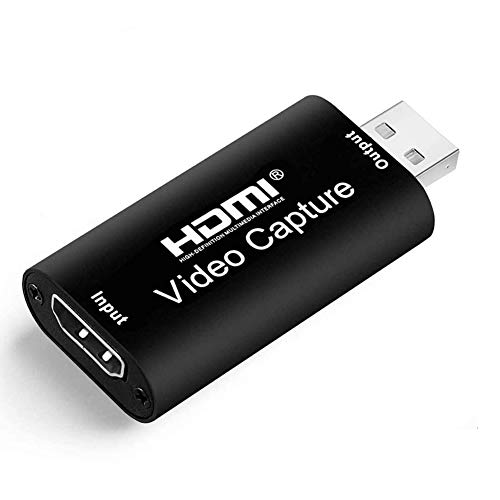
The PDAPTMAG card offers 4K input with 1080P 30Hz output, focusing on compatibility with cameras, camcorders, and consoles like PS4, Xbox One, and Nintendo Switch. It emphasizes plug-and-play functionality and low latency for live streaming, live teaching, or video conferencing. This option suits users who want straightforward setup and broad device compatibility without advanced features or high frame rates.
Buying Guide: Key Considerations For Choosing A Capture Card
When selecting a capture card, consider how you will use it most often, your devices, and your streaming goals. Key factors include resolution and frame rate, latency, compatibility, audio handling, and physical design.
- Resolution and frame rate: Look for 1080p60 as a baseline for fluid video, with 4K input options if you plan 4K streaming or recording. Note that some cards cap output at 1080p even if the input is higher.
- Latency: Low-latency hardware and efficient USB interfaces (USB 3.0/USB-C) help minimize delays between action and on-screen results, crucial for live gameplay and commentary.
- Input and output options: Ensure the card supports your source (PS5, Switch, DSLR, or camcorder) and offers loop-out or pass-through if you want to monitor without impacting your stream.
- Audio capture: Some cards include mic-in or 3.5mm audio jacks for live commentary; others rely on embedded audio. Decide if you need separate audio input alongside video.
- Power and charging: For mobile or VR setups, USB-C PD or additional power features can prevent battery drain or allow simultaneous charging during streams.
- Build quality and heat management: Aluminum housings and braided cables enhance durability and thermal performance for extended sessions.
- Software compatibility: Check compatibility with OBS, XSplit, Zoom, VLC, and other platforms. Some cards function as standard webcams without extra drivers.
- Pricing and future-proofing: Balance features with budget while considering whether 4K input, low latency, and platform support align with long-term needs.
For most American streamers and content creators, the best choice will depend on whether your priority is 1080p60 for speed and reliability, or 4K input for future-proofing and crisp footage. If you frequently capture VR or mobile devices, models with PD charging and right-angle USB-C connectors can improve comfort and uptime. Always verify the latest compatibility notes from the manufacturer before purchasing.