Best Cameras for Dementia Patients: Clear, Safe Monitoring Solutions for Home
Answering the need for reliable, caregiver-friendly monitoring, these cameras are selected for ease of use, privacy, and dependable alerts. They suit caregivers, family members, and facilities seeking simple, non-intrusive ways to check in on loved ones living with dementia. The top picks balance offline or online setup, clear night vision, and quick two-way communication. This guide highlights devices that can help with daily check-ins, safety alerts, and peace of mind.
| Product | Best For | Key Benefit |
|---|---|---|
| TP-Link Tapo C100 | Home-based dementia care | Motion alerts and 2-way audio in a compact package |
| CallToU 2-Way Talk | No Wi-Fi required | Private, dedicated 2.4GHz FHSS monitoring |
| INFIYA 2K Indoor Camera | Elderly supervision with tracking | 360° view and intelligent tracking |
| Blink Mini 2K+ | Pet and person monitoring | 2K resolution with easy plug-in setup |
| HelloBaby 6″ IPS Monitor | Grandparent-friendly monitor | Large display with long battery life |
TP-Link Tapo C100 Indoor Camera For Easy Care

Best for: caregivers seeking a simple, affordable indoor camera with motion detection and two-way audio. Why selected: the TP-Link Tapo C100 provides motion alerts, an on-device night vision range, and easy app-based communication without complexity. Its 2.4GHz Wi‑Fi requirement aligns with many home networks, offering reliable push alerts when motion or sound is detected. Caution: some users report sensitivity to false alerts in busy environments; adjust activity zones to minimize alerts.
CallToU Two-Way Talk Monitor For Elderly (No WiFi)
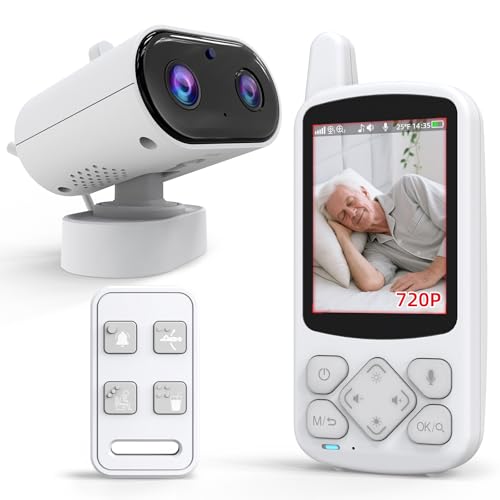
Best for: families prioritizing privacy and offline operation. Why selected: operates over a secure 2.4GHz FHSS signal (no internet required), offering real-time camera and monitor capabilities with infrared night vision. The built-in SOS features and daily reminders can aid dementia care routines. Caution: requires physical proximity; no internet may limit remote access for long-distance caregivers.
INFIYA 2K Indoor Camera With One-Touch Call

Best for: households needing a wide field of view and easy one-tap call to connect with a caregiver. Why selected: features 2K resolution, 360° pan/tilt, and intelligent tracking with a one-tap call button—useful for elderly individuals who may benefit from quick, direct communication. Caution: 2.4GHz Wi-Fi only; not compatible with 5GHz networks, which may limit some setups.
Blink Mini 2K+ Indoor Security Camera

Best for: quick setup and reliable daily checks in small spaces. Why selected: 2K video in a compact, plug-in form factor offers sharp visuals and two-way audio with improved clarity. Caution: Blink requires a subscription for some cloud features, which may affect ongoing costs for families managing budgets.
HelloBaby 6″ IPS Screen Monitor For Elderly

Best for: families needing a large, straightforward display for caregiving without internet dependence. Why selected: a 6″ IPS screen provides comfortable viewing, long battery life, and remote pan/tilt capabilities. Caution: larger screen can take more space; battery life varies by usage and features like VOX can impact standby time.
JEMXITG No-WiFi Elderly Monitor With Camera
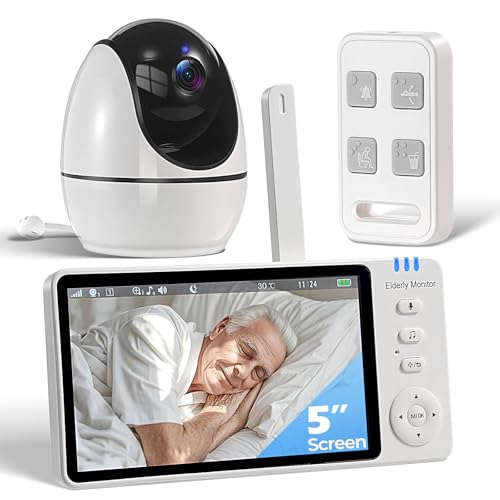
Best for: caregivers seeking a complete non-WiFi senior care solution with emergency buttons. Why selected: includes two-way audio, SOS, medication reminders, and infrared night vision, all without internet. Caution: battery life and setup may require more hands-on configuration compared with plug-and-play Wi-Fi models.
Buying Guide: Key Purchase Considerations For Dementia Care Cameras
- Privacy vs. Convenience: Weigh offline (no internet) options against cloud features. Offline devices protect privacy but may limit remote access for distant caregivers.
- Alert Relevance: Look for motion and sound detection tuned for indoor use with adjustable sensitivity to reduce false alerts.
- Two-Way Communication: Ensure built-in speaker/microphone quality supports clear conversations, which helps in calming or guiding a loved one.
- NIGHT VISION: Prioritize cameras with reliable infrared or low-light features for safe overnight monitoring.
- Ease of Use: Choose devices with straightforward apps, physical buttons, or simple screens, especially for users with cognitive challenges.
- Connectivity: Check network compatibility (2.4GHz vs 5GHz, Wi-Fi dependence) and consider devices with battery backup or offline modes if power reliability is a concern.
- Privacy Controls: Verify data storage options (SD card vs. cloud) and recommend enabling local storage when privacy is a priority.
- Support For Care Routines: Some devices include reminders and alerts aligned to medication times or daily care tasks—these features can be especially helpful for dementia care.
Frequently Asked Questions
- What features are most important for cameras used with dementia patients?
- Answer: Clear night vision, reliable motion alerts, simple two-way audio, and privacy options are top priorities. Look for devices with large display options or straightforward interfaces to reduce confusion.
- Should I choose Wi-Fi dependent cameras or offline ones?
- Answer: If remote monitoring is essential, Wi-Fi cameras with secure settings can help. For privacy or limited internet, offline models with local recording or no-network operation are better.
- Can these cameras help caregivers who are not tech-savvy?
- Answer: Yes, models with simple apps, one-tap call features, and clear visual indicators are designed for easier setup and daily use.
- Are large screens helpful for elderly monitoring?
- Answer: A larger display can reduce eye strain and improve viewing comfort, which is beneficial for grandparents or caregivers who need to check in regularly.
- Do these devices support medication reminders?
- Answer: Some models include reminders or alerts for medications, hydration, or bathroom needs, which can support daily routines for dementia care.