Best Mini SDI to SDI Cables for Professional Video Gear
When selecting a mini SDI to SDI cable, choose based on connector types, shielding, length, and compatibility with your 4K and HD workflows. The top picks below are suited for camera crews, studio monitors, video assist devices, and field rigs. They emphasize robust shielding, support for 3G/6G/12G SDI standards, and easy plug/unplug designs. The list highlights cables from trusted brands and notes where each excels or should be avoided. Use the quick reference table to compare core specs at a glance.
| Product | Best For | Length | |
|---|---|---|---|
| Alvin’s Cables DIN 1.0 2.3 Mini BNC to BNC | Blackmagic devices and field kits | 30 cm | 6G double shielding for stronger protection |
| HangTon 6G SDI Micro BNC to Female BNC | Compact monitor setups | 15 cm | Right-angle Micro BNC for tight spaces |
| Superbat HD 3G SDI Cable DIN to BNC | Broadcast rigs and HyperDeck setups | 3 ft | Belden 1855A, robust build |
| Cable Evolution 12G HD SDI Mini Coax | Patching in racks and stages | 1.5 ft | 12G support in a compact plug |
| Superbat 3G/6G SDI Twin Pack | Dual-path setups | 3 ft | Belden 1855A, reliable performance |
The following five products were selected for broad compatibility with common broadcast and prosumer gear, straightforward plug-in use, and solid shielding. They cover DIN 1.0/2.3 to BNC and mini BNC configurations, and include both single- and double-shielded options for different environments. Each entry notes the ideal buyer and any practical limitation to consider.
Alvin’s Cables DIN 1.0 2.3 Mini BNC to BNC Male SDI Cable

Best for: Blackmagic devices and portable rigs. Why selected: It updates the DIN end for easier plugging and unplugging, reducing wear during frequent connections. The 6G double shield design adds increased protection against interference, beneficial in busy studios. Length is 30 cm, a convenient choice for short runs in compact setups. Limitation: Custom lengths are available on request, which may affect ordering timelines.
HangTon 6G SDI Micro BNC to Female BNC Cable
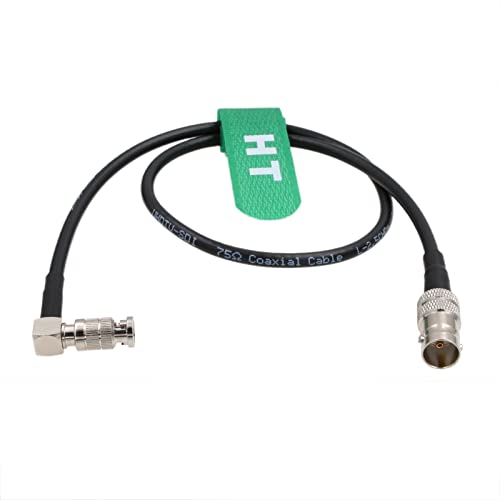
Best for: Tight spaces where a right-angle micro BNC helps routing to monitors and small devices. Why selected: Supports 4K at 30fps and standard HD SDI formats with 6G shielding, compatible with Blackmagic Video Assist 4K/5″ monitors and similar gear. The right-angle micro BNC (high-density) connector makes it easier to install in cramped racks. Limitation: It uses high-density HD BNC that differs from standard DIN 1.0/2.3; ensure driver compatibility with your equipment.
Superbat HD 3G SDI Cable DIN to BNC 3ft

Best for: Broadcast workflows and HyperDeck setups that rely on Belden 1855A’s performance. Why selected: The Belden 1855A construction provides low-loss, robust shielding; 3 ft length is versatile for studio and field layouts. The product emphasizes ease of plugging and high-speed data transfer. Limitation: The DIN 1.0/2.3 to BNC configuration may not fit all micro-connectors; verify connector type before purchase.
Cable Evolution 12G HD SDI Mini Coax Cable

Best for: Patch panels and stage boxes needing 12G SDI. Why selected: Made in America by a veteran-operated company, this HDBNC to BNC mini coax cable supports 12G SDI in a compact form factor. It’s a practical choice when space is limited yet high bandwidth is required. Limitation: Availability may vary by color and length; check stock if you need a specific variant.
Superbat 3G/6G SDI Cable (3 ft) Pack

Best for: Multi-device setups needing reliable dual-path SDI cables. Why selected: The pack includes 3 ft cables with Belden 1855A, delivering stable impedance and robust shielding for 3G/6G/12G SDI signals. It’s a solid choice for studio and HyperDeck workflows that require consistent performance across multiple connections. Limitation: The description emphasizes repeated phrasing about robustness; verify that the exact model meets your length and connector needs before ordering.
Buying Guide
What should you consider when choosing mini SDI to SDI cables?
- Connector compatibility: Confirm whether you need Mini BNC, DIN 1.0/2.3, or standard BNC, and ensure the other end matches your devices.
- SDI standard support: Look for cables that support 3G, 6G, or 12G SDI based on your camera, monitor, or deck requirements.
- Shielding and impedance: Double shielding reduces interference and return loss in busy environments; ensure 75-ohm impedance for broadcast-grade signals.
- Length and routing: Short lengths reduce signal loss; choose the shortest cable that fits the path between devices without strain.
- Durability and build: A strong connector form factor and robust jacket material extend life in mobile shoots and studios.
- Customization: If you need non-standard lengths, check whether suppliers offer custom runs and the associated lead times.
- Space considerations: Right-angle or micro BNC designs help in tight racks or monitor mounts.
Quick Comparison
- Best for Blackmagic setups: Alvin’s Cables with easy DIN plug and 6G shielding.
- Best for tight spaces: HangTon micro BNC to BNC with right-angle connector.
- Best for 4K stability: Superbat 3G/6G SDI with Belden 1855A.
- Best for 12G needs: Cable Evolution 12G Mini Coax for rack patches.
- Best value dual-path pack: Superbat 3G/6G SDI Twin Pack for multi-device setups.
FAQ
- What does 6G SDI mean for my gear?
It indicates support for up to 6 gigabits per second, enabling higher resolution and smoother frame rates on compatible devices. - Are mini BNC cables compatible with standard BNC ports?
In most cases, no; connectors differ. Use the cable type specified by your device’s port, such as Mini BNC to BNC or DIN to BNC. - Is shielding more important than length?
Shielding helps reduce interference, especially in busy environments. Length also affects signal loss; keep runs as short as practical. - Can I customize cable lengths?
Some vendors offer custom lengths; check lead times and pricing with the supplier. - Which SDI standard should I choose for 4K workflows?
Choose 12G SDI for the most demanding 4K/60 workflows; 6G covers many 4K 30fps scenarios, while 3G handles most 1080p needs. - Do these cables affect video quality?
Quality construction, shielding, and impedance matching are the primary quality influences; proper cable selection reduces signal loss and interference.