Best Camera Track Dolly Sliders for Smooth Video and Timelapse
Answering the demand for steady, cinematic moves, these camera track dollies and sliders help you achieve precise tracking, panning, and time-lapse shots. This guide highlights five top options, clarifying who each product is best for—whether you’re a beginner filmmaker, a vlogging creator, or a professional shooter needing rugged reliability. Each pick is evaluated for stability, compatibility, and ease of use to support confident buying decisions.
Summary table of selected products:
| Product | Best For | Key Benefit | Limitations |
|---|---|---|---|
| GVM 48″/120cm Motorized Slider | Advanced motion control shooters | Six-in-one shooting modes with app control | Carbon fiber build may be pricier |
| Zecti 24″/60 cm Slider | Travel-friendly setups | Quiet movement and portable | Manual variant noted for noise if screws overtighten |
| NEEWER 3 Wheels Wireless Dolly | Remote-controlled operations | Three speeds and wireless control | Remote distance limited to ~6 m |
| GVM 31″ Motorized Slider | Flexible point-to-point shots | Time-lapse and panoramic options | Smaller footprint than longer rails |
| GVM 27” Aluminum Slider | General purpose DSLR/phone setups | Aluminum, versatile mounting | Requires compatible head for full motion range |
GVM 48″/120cm Motorized Camera Slider

Best for: creators who need robust motion control with multiple shooting modes. The 6-in-1 design supports tracking, panoramas, time-lapse, and video capture, with adjustable start and end points and configurable motor torque. It includes six shutter release cables and an extension to cover longer setups, making it well suited for narrative sequences and professional timelapse work.
Why selected: The carbon fiber rail offers stiffness with lighter weight, contributing to smoother slides. The included versatility—panoramic 120-degree shooting and precise speed control—helps deliver cinematic motion for interviews, product demos, and travel storytelling.
Caution: Setup and alignment may require careful tightening of screws to avoid movement jitter. Ensure all mounting screws are securely tightened before shooting to minimize vibrations.
Zecti Camera Slider 24″/60 cm

Best for: compact, travel-friendly setups that still require stable motion and quiet operation. This model emphasizes lightness and portability, with four precision bearings and a double interior carbon fiber rail system for steadier slides on the go.
Why selected: Its slim footprint makes it ideal for backpack shoots, on-location projects, or small-crew productions where space is at a premium. The silent movement and multiple mounting options support both ground-level and elevated perspectives.
Caution: The product has noted noise issues in some manuals; loosening overtightened screws can reduce rattling and improve smoothness.
NEEWER 3 Wheels Wireless Dolly
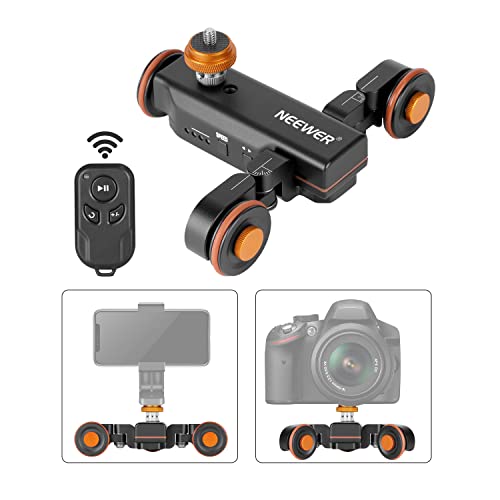
Best for: shooters who want remote control and hands-free operation for dynamic scenes, interviews, or product demos. The remote offers speed and direction changes, with a 6-meter control range and three speed settings to create varied motion profiles.
Why selected: The adaptable wheel angle up to 180° enables curved paths and creative circular moves, while the center screw adjustments influence wheel alignment for stable tracks. It’s a practical pick for mobile studios and lightweight rigs.
Caution: Wireless performance depends on battery life and interference; plan shoots with backup control if needed.
GVM 31″ Camera Slider
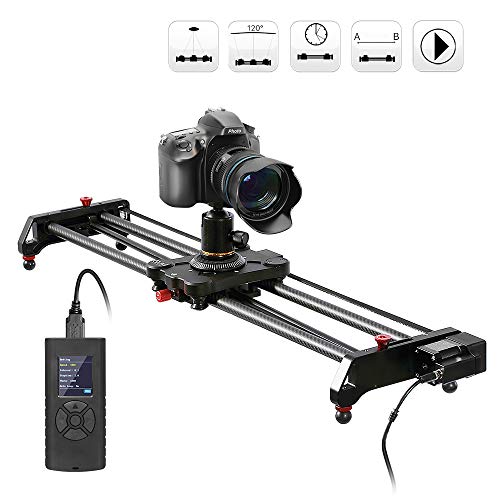
Best for: those seeking a balance between length and portability, with time-lapse and panoramic shooting capabilities. The 31-inch rail supports fixed-point shooting and two-side adjustments to facilitate 120-degree panoramas.
Why selected: The ability to set starting and ending points, plus red-knob adjustments for precise framing, makes this a versatile choice for medium-scale shoots and interview setups.
Caution: Ensure proper stabilization when used on uneven surfaces to prevent wobble in longer moves.
GVM 27” Aluminum Motorized Slider

Best for: standard DSLR and mirrorless setups that require dependable performance with multiple mounting options. The aluminum alloy construction delivers durability with a smooth motion profile for standard video work and basic time-lapse sequences.
Why selected: Its compatibility with a wide range of cameras and mounting points on both sides and the middle supports flexible configurations for standard tracking and looping shots.
Caution: Heavy or awkward camera builds may strain the slider; pair with a sturdy support or tripod to maximize stability.
Buying Guide
What should you consider when choosing a camera slider or dolly?
- Track length and weight: Longer rails enable bigger moves but require more support. Choose a length that fits your typical shot scale.
- Motorized vs. manual: Motorized units offer repeatable motion and time-lapse capacity; manual sliders are simpler and lighter for on-the-go shoots.
- Mounting options: Look for models with multiple 1/4″ and 3/8″ screw holes to fit tripods, ball heads, or clamps. This expands compatibility with different rigs.
- Stability and material: Carbon fiber rails are light and stiff but can be pricier; aluminum is durable and versatile for most productions.
- Noise and smoothness: Bearings, rail design, and tightness affect movement quietness and steadiness. Loosen overtightened screws if needed.
- Portability: For travel, prioritize lightweight builds with carrying bags and easy setup.
- Accessories and cabling: If you shoot with multiple cameras or need timelapse, look for extended cables and shutter triggers included or readily compatible.
How to compare between popular models?
- Best for precise, repeatable motion: Look for motorized sliders with programmable start/end points and speed control.
- Better for travel: Choose compact, lightweight, and easily portable rails with bag storage.
- Choose this if you need remote control: Models with wireless remotes offer hands-free operation and complex choreographies.
- Avoid this if heavy cameras are used: Some sliders struggle with high payloads; verify weight capacity per model.
What’s a practical setup checklist?
- Mount the slider securely on a stable tripod or support.
- Calibrate balance and align the track to avoid tilt or wobble.
- Attach the camera with appropriate ball head and ensure cable management for motorized units.
- Test slow, medium, and fast moves to confirm smoothness before recording.
- Use time-lapse or panoramic features only after framing and focus are locked.
Frequently asked questions
- What is a camera slider used for?
Sliders provide controlled horizontal or angled camera movement to create cinematic tracking shots, parallax effects, or dynamic timelapse sequences.
- Do motorized sliders require special batteries?
Motorized units typically use standard camera batteries or supplied power cables; always verify power requirements in the product spec.
- Can a slider be used with a smartphone?
Yes, many sliders feature 1/4″ and 3/8″ threads compatible with phones via clamps or adapters.
- Is carbon fiber better than aluminum for sliders?
Carbon fiber offers lighter weight and rigidity, improving stability. Aluminum is generally more affordable and sturdy for most setups.
- How do I reduce slider noise?
Loosen overtightened screws, lubricate moving parts if recommended by the manufacturer, and ensure bearings are clean and aligned.
- What size slider should I buy?
Choose length based on your typical shot distance and space. Longer rails provide sweeping moves but require more room and support.