Choosing a microscope with a mounted camera expands your ability to capture crisp specimens, electronics, and micro-scale details. This guide highlights five capable cameras designed to mount on standard microscope setups, offering robust HDMI and USB outputs, adjustable lighting, and precise magnification control. Whether you are a student, hobbyist, or professional, these options balance image quality, ease of use, and value. Use this overview to compare sensor resolution, working distance, and connectivity to pick the right camera-mount solution for your lab or workshop.
| Product | Brand | Video Resolution / Output | Mount Type | Best For |
|---|---|---|---|---|
| NICE-POWER 48MP 4K Microscope Camera | NICE-POWER | 4K video; HDMI; USB Type‑C; stills up to 48MP | C‑Mount lens | Electronics repair; high-detail imaging |
| Walfront 37MP USB Microscope Camera | Walfront | HDMI up to 37MP; USB 2MP; includes mounting adapter | Industrial inspection; quick mounting on existing setups | |
| Vabiooth Full 4K HDMI USB C‑Mount Camera | Vabiooth | 4K @30fps via HDMI; 3840×2160 USB; 41MP stills via HDMI | C‑Mount | High-resolution imaging; versatile HDMI/USB output |
| WnewTools 16MP USB C‑Mount Camera | WnewTools | 1080P; USB; HDMI; 16MP stills | C‑Mount | Clear live view on HDMI/HD display; straightforward use |
| NICE-POWER 14MP TV/HDMI USB Camera | HAYEAR | HDMI and USB output; 1080P @60FPS; 14MP sensor | C‑Mount | Entry-level imaging; DVR/recording options |
The following selections focus on five cameras that pair well with standard microscope setups, offering strong image quality, reliable outputs, and flexible mounting options. Each product balances build quality, connectivity, and practical features for regular use in labs, electronics workshops, or classrooms. The goal is to help you identify options that suit your existing hardware and intended applications while avoiding overpaying for features you may not need.
NICE-POWER 48MP 4K Microscope Camera

The NICE-POWER camera delivers 48MP still images and 4K video, with outputs over HDMI and USB Type‑C. It uses a C‑Mount lens for flexible mounting on most laboratory and industrial microscopes. A foldable stand and bright LED ring light support extended imaging sessions and stable positioning. The device is designed for electronics repair, coin or material observation, and other applications where high-detail captures matter. Storage is supported via SD/TF cards up to 64GB, enabling ready documentation of findings without a computer tether.
Users benefit from high resolution for static captures and smooth 4K footage for demonstrations or archival records. The camera’s dual-output design supports direct monitor viewing or computer-based workflows, making it suitable for teaching labs and remote demonstrations. While USB-C provides fast data transfer, ensure your system supports the required drivers for best performance. Overall, this model emphasizes image fidelity, robust mounting, and practical on-device lighting for close-up work.
Walfront 37MP USB Microscope Camera

This Walfront model centers on a 37MP HDMI-capable imaging path with a USB option, offering a flexible 2MP USB output for computer capture. It includes a conversion adapter that allows straightforward mounting on many industrial microscopes, simplifying setup. The combination of high-definition HDMI output and USB compatibility supports both live viewing and digital documentation. It is well-suited to electrical manufacturing, component inspection, and precision measurement tasks where rapid image capture is essential.
In practice, the adapter-assisted mount reduces the need for custom fittings, making it a practical choice for teams that frequently reconfigure their inspection stations. The package emphasizes ease of use and broad compatibility, which can shorten the time from unboxing to productive imaging. Users should consider the trade-off between the high HDMI resolution and the more universal USB capture workflow when planning their workflows.
Vabiooth 4K C‑Mount Microscope Camera
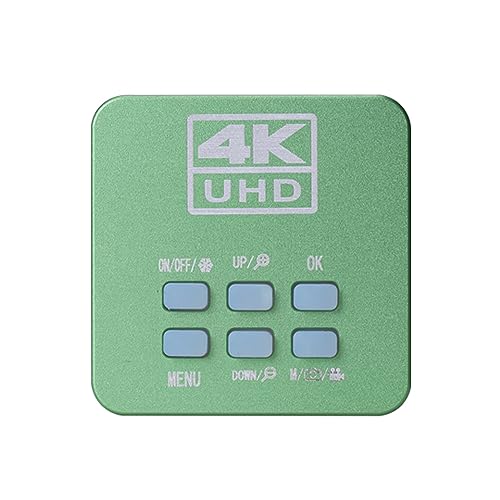
The Vabiooth camera provides high-resolution 4K video via HDMI and a USB path for computer-based capture. It supports 3840×2160 at 30fps over USB and offers still images up to 41MP through HDMI, with a 1/30–1/126 exposure range to accommodate varying lighting conditions. A 30mm and 25mm adapter set enables flexible mounting for different microscope heads, while the C‑mount design ensures compatibility with a wide range of objective lenses. This makes it suitable for detailed material science imaging, electronics inspection, and educational demonstrations requiring crisp visuals.
For workflow efficiency, consider the balance between HDMI’s high-quality live feed and USB’s straightforward capture. Users should verify software compatibility and any required drivers for their operating system. The Vabiooth model is positioned for users who want strong 4K output and reliable still-image performance without extensive calibration overhead.
WnewTools 16MP USB C‑Mount Microscope Camera

The WnewTools model emphasizes 16MP live imaging with 1080P playback, accessible through USB-C and HDMI outputs. It uses a C‑mount lens and is designed to work with existing microscopes, offering a straightforward plug-and-play experience. The camera is described as suitable for high-definition live viewing on monitors, projectors, or TVs, which makes it a practical choice for teaching demonstrations, electronics debugging, and quality control tasks that require real-time magnified viewing.
With a focus on ease of integration, this model suits users who want reliable image quality without complex calibration. It is compatible with a broad range of displays and recording setups, providing flexible options for both fieldwork and fixed lab stations. Consider whether you need the USB-C interface for modern laptops or prefer HDMI for direct monitor connections when evaluating this option.
HAYEAR 14MP TV/HDMI USB C‑Mount Camera

The HAYEAR model presents a 14MP sensor with HDMI and USB outputs, supporting 1080P at 60fps. It features a C‑Mount lens for easy attachment to most standard microscopes and includes a digital DVR capability for quick recording. This camera is well-suited for educational settings or basic inspection tasks where a robust, easy-to-use imaging solution is valued over ultra-high-end specs. The combination of HDMI, USB, and DVR capabilities provides versatility for demonstrations, documentation, and routine observations.
As an entry-level option, it emphasizes straightforward operation and dependable live imaging. Users should review compatibility with their current microscope head and ensure the recording workflow aligns with their documentation requirements. Overall, this camera provides a balanced mix of accessibility and functional performance for general microscopy tasks.
Buying Guide
Key purchase considerations
- Resolution and output: Higher still-image resolution matters for documentation, while HDMI output is ideal for real-time demonstrations. Consider whether you need USB for computer capture or HDMI for direct monitor viewing.
- Mount compatibility: Look for C‑Mount compatibility as a standard, and verify whether adapters are included for your existing microscope head. Some units include conversion adapters to fit various brands.
- Working distance and magnification: Check the maximum working distance and the magnification range provided by the lens. A longer working distance is helpful for delicate samples or larger stage areas.
- Lighting: A built‑in LED ring light improves image clarity in low-contrast samples. Adjustable brightness can reduce glare and enhance detail visibility.
- Frame rate and video performance: For live demonstrations or video capture, an HDMI output with 1080P or 4K at a stable frame rate (e.g., 30fps or higher) is desirable.
- Storage and compatibility: Some cameras include TF cards or rely on computer storage. Ensure compatibility with your operating system and editing or analysis software.
- Power and portability: Check power requirements (AC input range) and whether the device can operate from typical lab power supplies. Portability may be important for fieldwork or student labs.
Practical use cases
- Electronics inspection and soldering work: High resolution and fast frames help reveal tiny solder joints and circuit features.
- Educational demonstrations: HDMI live view assists in classrooms, while USB capture enables lesson recording.
- Material science and biology basics: Clear imaging across a range of samples helps with measurements and documentation.
- Quality control: Consistent illumination and high image fidelity support documentation and compliance workflows.
Comparison at a glance
| Camera | Mount | Output | Max Resolution | Notable Feature |
|---|---|---|---|---|
| NICE-POWER 48MP 4K | C‑Mount | HDMI, USB‑C | 48MP stills; 4K video | Foldable stand; 64GB TF storage |
| Walfront 37MP USB | Adapter included | HDMI, USB | 37MP HDMI; 2MP USB | Conversion adapter for quick mounting |
| Vabiooth 4K | C‑Mount | HDMI, USB | 4K@30fps; 41MP stills | High‑end 4K/USB workflow |
| WnewTools 16MP | C‑Mount | HDMI, USB | 16MP; 1080P | Compact, easy integration |
| HAYEAR 14MP | C‑Mount | HDMI, USB | 14MP; 1080P@60fps | DVR recording capability |
When selecting a microscope camera with a mount, balance image quality with practical workflow needs. If you frequently share live feeds with students or colleagues, prioritize HDMI output and a bright, adjustable light. For archival work and measurements, prioritize higher still-image resolution and reliable USB capture. Confirm that adapters are included for your current microscope head, and verify software compatibility with your computer system. Finally, consider the physical footprint and ease of use, as a compact, well‑balanced unit minimizes setup time and user fatigue during longer sessions.