Best Wireless Cameras for Live Streaming: Smooth, on-the-Go Video Solutions
Looking for reliable wireless cameras for live streaming? This guide presents five top options to fit different setups—from solo broadcasts to multi-camera sessions. Each pick is chosen for ease of use, stable wireless performance, and strong streaming capabilities. Best for creators, educators, and small teams seeking flexible, cable-free workflows. The following product snapshots help you compare at a glance and choose the right camera for your needs.
| Product | Best For |
|---|---|
| Logitech for Creators Mevo Start | Solo creators needing 1080p, mobile streaming via LTE or Wi-Fi |
| EMEET PIXY | Hands-free tracking and multi-platform streaming |
| Gsou Wireless Webcam | Budget-friendly, USB plug-and-play for meetings |
| TOALLIN 1080P Wireless Webcam | Conferencing with flexible wireless range |
| TONGVEO Wireless AI PTZ | Presentations and classes with auto-tracking |
The products below are organized to help you quickly scan features, connectivity, and best-use scenarios. Each section presents why the camera is a strong fit, who should buy it, and any notable limitation to consider before purchasing.
Mevo Start: Compact 1080p Live Streaming Camera

Best for solo creators who need flexible wireless streaming from anywhere. The Mevo Start delivers 1080p HD video right out of the box, with the option to stream over Wi-Fi, Ethernet, or a smartphone LTE connection. It also supports intelligent app controls that enable features like Auto-Director from a mobile device, helping you keep the scene professional without manual editing.
Why this choice: The combination of portable form, stable wireless options, and smart app features makes it ideal for on-location broadcasts or desk-to-field workflows. A potential limitation is that 1080p may be outpaced by 4K demands in certain settings, which this model does not natively offer.
EMEET PIXY Wireless 4K Dual-Lens AI Tracking

Best for hands-free operation and broader audience reach. PIXY uses a dual-camera setup with AI auto-tracking and gesture control to maintain subjects in frame as they move. It supports live streaming to platforms like YouTube and Twitch via bundled software, and works wirelessly with a PC or phone for quick setup.
Why this choice: The AI tracking and gesture controls enable dynamic live sessions without constant manual control. A caution: setup and software integration may require extra steps for some streaming platforms, depending on the workflow you choose.
Gsou Wireless Webcam: 1080P With USB Plug-and-Play

Best for budget-conscious setups needing simple conferencing and streaming. This webcam offers 1080p resolution and a built-in microphone, plus a detachable tripod and up to 65 feet wireless range with a 2.4GHz USB receiver. It is ideal for Zoom, Skype, and other common conferencing apps on PC or Mac.
Why this choice: It’s a straightforward plug-and-play option for office or home use. Limitation: 1080p is adequate for most streams, but not as robust for high-end production needs or 4K workflows.
TOALLIN 1080P Wireless Webcam

Best for flexible meeting spaces with 2.4G wireless connectivity. It supports up to 20 meters indoors and 50 meters line-of-sight, with a USB receiver for easy computer pairing. It delivers 1080p video with a 70-degree wide-angle view, suitable for conference rooms and group calls.
Why this choice: The longer wireless range makes it a good fit for larger rooms or slightly distant participants. A caveat: operation depends on a stable 2.4G connection and software compatibility with your conferencing tools.
TONGVEO Wireless AI PTZ with 5.8GHz
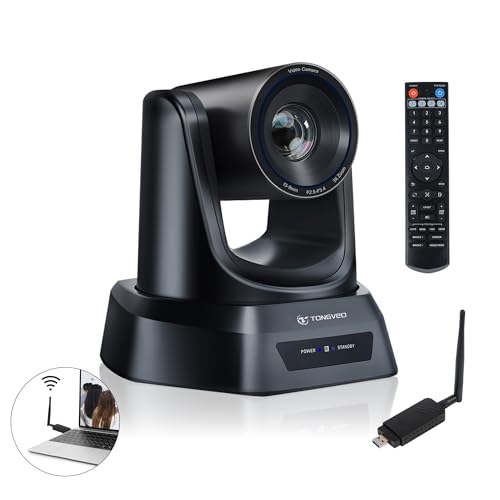
Best for presentations and hybrid classrooms requiring auto-tracking and smooth panning. The AI auto-tracking camera centers speakers as they move, while a built-in 5.8GHz receiver supports a wireless range up to 50 feet. It records at 1080p with 60fps and offers 3x optical zoom for closer detail on speakers or slides.
Why this choice: It excels in larger rooms and formal settings where keeping the speaker in frame is essential. Limitation: higher complexity and price compared with simpler USB webcams or single-shot cameras.
Buying Guide
- Connection type: Decide between wireless-only, USB receiver-based, or multi-device streaming. Wireless flexibility helps with mobility but may require stable networks.
- Resolution and frame rate: 1080p at 60fps suits most live streams; 4K is ideal for heavy production but demands more bandwidth and processing.
- Auto-tracking and PTZ: If hands-free operation matters, prioritize AI tracking, pan-tilt-zoom, and reliable subject detection.
- Audio quality: Look for built-in mics with reasonable pickup ranges or plan to pair with external mics for better sound.
- Platform compatibility: Ensure the camera can stream to your preferred platforms (YouTube, Twitch, Facebook, RTMP) or integrates with your streaming software.
- Power and portability: Battery life matters for field use; consider the trade-off between compact design and endurance.
FAQ
- What is the best camera for solo live streaming? – The Mevo Start is designed for solo streamers, offering versatile wireless connectivity and app-based control for streamlined broadcasting.
- Do these cameras support 4K streaming? – Some options like the EMEET PIXY offer 4K in certain configurations, while others are 1080p. Check each model’s specifications for streaming resolution.
- Can I use these cameras with any streaming service? – Most support common platforms via RTMP or built-in streaming apps; verify platform compatibility in product details or software guides.
- Is auto-tracking reliable in dynamic environments? – AI tracking improves framing in many scenarios, but performance can vary with lighting and crowd movement; manual override helps when precise framing is needed.
- Are wireless cameras meeting room-friendly? – For conference rooms, cameras with longer wireless ranges and stable USB receivers tend to perform best in larger spaces.