Best Wide-Angle Lens Webcams for Clear Video and Streaming
Answering the common need for a wider field of view without sacrificing image quality, these webcams are ideal for multi-person calls, online teaching, and streaming setups. The best options below are suited for different buyers—from students and remote workers to content creators and small teams.
| Product | Best For | Key Benefit |
|---|---|---|
| Shcngqio 1080P HD Webcam | Students & professionals needing crisp 1080p with wide view | Noise-canceling mic and auto light correction |
| NexiGo N60 1080P Webcam | Users who want plug-and-play setup on multiple devices | Broad compatibility and built-in mic |
| Angetube Wide Angle 4K Webcam | Business meetings and remote teams requiring ultra-wide 4K option | 120° FOV with AI noise cancellation |
| Gohero Full HD 1080P Webcam | Video creators and streamers seeking reliable wide angle | Auto light correction and noise-canceling mic |
| RUWBY Pro HD 1080p/30fps Webcam | Budget-conscious professionals needing dual mics | Dual mics and wide angle for clear calls |
The following sections highlight five top options. Each product is described with practical usage notes, who it’s best for, and a straightforward takeaway to help you compare quickly.
Shcngqio 1080P Wide-Angle Webcam

Best for individuals who value a balanced 1080p image with a wide field of view and a clear built-in microphone. This webcam offers 1080p clarity at 30fps and a wide-angle lens to capture more of the scene, making it suitable for online classes, webinars, and multi-person calls. The noise-reducing microphone helps reduce background chatter in busy environments. Auto light correction adapts to lighting changes so you look presentable in varying rooms. A privacy cover adds a simple, reliable privacy shield when not in use.
Who it’s best for: remote workers, online teachers, and streamers who want strong image quality with practical light handling and noise control.
Limitation: Some users may prefer higher frame rates or 4K for very detailed streams; this model focuses on stable 1080p performance.
NexiGo N60 1080P Webcam

Best for users who want easy, driver-free setup and broad device compatibility. The NexiGo N60 delivers Full HD 1080p video with a built-in noise-canceling microphone. It’s plug-and-play with USB 2.0/3.0 and works across major operating systems, including Mac, Windows, Linux, and Chrome OS. The fixed 3.6mm glass lens helps maintain consistent focus for common indoor distances, making it reliable for Zoom meetings, online classes, and casual streaming.
Who it’s best for: students, remote workers, and professionals who value quick setup and broad compatibility over specialized features.
Limitation: Not compatible with gaming consoles like Xbox/PS, so ensure your primary use case is PC or Mac-based video calls.
Angetube Wide Angle 4K Webcam
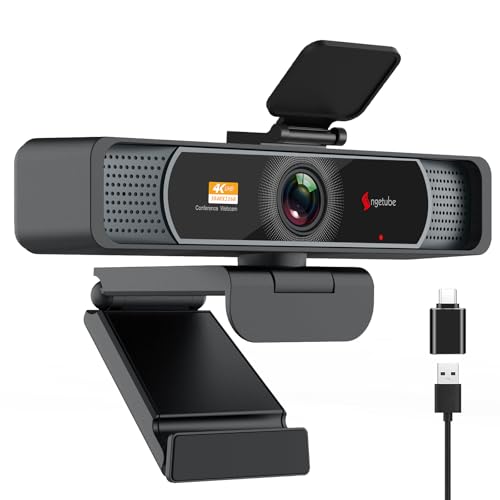
Best for teams and creators who want a wide, immersive view with advanced autofocus. Angetube offers crystal-clear 4K resolution at 30fps and a 120° wide-angle lens with PDAF (phase detection autofocus) to keep subjects sharp while moving. Dual microphones provide enhanced voice capture, and AI-based noise cancellation helps reduce background sounds. Note that 4K defaults to 1080p in many apps; enable 4K via software when needed.
Who it’s best for: business meetings, remote classrooms, and streaming scenarios where capturing a broad scene with clear speech matters.
Limitation: 4K output may require software adjustments to unlock the full resolution in some applications.
Gohero Full HD 1080P Webcam

Best for creators seeking dependable 1080p video with a wide field of view and practical privacy controls. Gohero mirrors the 1080p/30fps standard with a wide-angle lens and a privacy cover. The built-in microphone supports clear speech for meetings and live streams, while auto light correction helps maintain visibility in varied lighting. This model emphasizes plug-and-play simplicity for quick setup on laptops, desktops, or Mac devices.
Who it’s best for: educators, remote teams, and casual streamers needing reliable performance with straightforward features.
Limitation: While adequate for most uses, some users may want higher frame rates or 4K for high-detail content.
RUWBY Pro HD 1080p/30fps Webcam

Best for budget-conscious professionals who still want dual microphones and a wide view. The RUWBY Pro offers 1080p at 30fps, dual integrated microphones for clearer audio, and a wide-angle lens to capture more of the workspace. It’s a solid choice for calls, conferences, and simple streaming tasks. A caveat is that lower-cost components may show less nuance in challenging lighting, so consider lighting upgrades if needed.
Who it’s best for: freelancers, small teams, and students seeking an affordable, dual-mic solution with a wide field of view.
Buying Guide: What To Consider When Choosing a Wide-Angle Webcam
How wide should your field of view be? A 120° lens captures more participants but can distort edges. If you mostly sit at a desk, a 90–110° lens often balances space and natural perspective.
4K vs. 1080p: Do you need Ultra HD? 4K offers sharper detail but can require more processing power and bandwidth. For most video calls and streams, 1080p is sufficient and more universally compatible.
Microphone quality matters: Look for noise-canceling mics or dual mics if background noise is a concern. If audio quality is critical, consider an external microphone as a supplement.
Light handling: Auto light correction helps in inconsistent lighting. In very bright or very dark rooms, additional lighting or a light ring can improve overall image quality.
Compatibility and setup: Plug-and-play USB webcams work with most operating systems. Check for driver-free operation and whether the camera supports your preferred platforms (Zoom, Teams, OBS, etc.).
Privacy and security: A physical privacy cover protects against unintended camera exposure. Ensure the cover is sturdy and easy to operate.
FAQ
- What is a wide-angle webcam best for? It’s ideal for multi-person calls, small groups, classrooms, and streaming setups where more of the scene needs to be captured.
- Is 4K worth it for a webcam? For some users, yes, if you need ultra-high detail; for most daily calls, 1080p provides ample clarity with broader compatibility.
- Do these webcams work with Mac and Windows? Yes, all listed options are designed for broad compatibility and plug-and-play use on common operating systems.
- Should I upgrade my mic separately? If you frequently speak in noisy environments or require studio-quality audio, an external microphone can improve clarity beyond built-in mics.
- How important is the field of view? A wider FOV captures more of the room but can cause edge distortion. Choose based on whether you sit close to the camera or want everyone in frame.
- Do I need a privacy cover? Yes, it protects against accidental webcam exposure and is a simple privacy safeguard for most setups.