Best Wide-Angle Conference Room Cameras for Hybrid Meetings
For teams embracing hybrid work, a wide-angle conference room camera ensures everyone stays visible without crowding the frame. This guide highlights five top options, clarifying who each model serves best and why it stands out. Ideal buyers include small to medium meeting rooms, presenters needing active-tracking, and teams prioritizing clear audio and easy setup. Below is a quick comparison table of the chosen products.
| Product | Best For | Key Benefit |
|---|---|---|
| WYRESTORM 4K AI Tracking Conference Webcam | Teams in small meeting rooms | AI auto framing with presenter tracking |
| Angetube Wide Angle 4K Webcam | Remote teams and classrooms | Crystal 4K with distortion-free 120° view |
| Innex C831 180° Panoramic Webcam | Huddle rooms and collaborative spaces | Full 180° panorama with flexible presets |
| TONGVEO 4K Conference Room Camera | Large rooms and multi-person setups | AI auto-tracking with gesture control |
| AV Access 4K Conference Room Camera | Professional meetings with gallery view | 1/1.8″ CMOS sensor and AI gallery |
WYRESTORM 4K AI Tracking Conference Webcam

Best for small conference rooms, this WYRESTORM model is designed to keep every participant in view without crowding the space. Its AI Auto Framing detects attendees and adjusts the frame to include everyone, making it suitable for team meetings and boardroom discussions. Presenter Tracking follows the active speaker, enhancing training sessions and client presentations. The camera includes dual noise-cancelling mics and a privacy cover, with USB plug-and-play compatibility for quick setup. A potential limitation is that its optimized performance is strongest in smaller rooms; very large spaces may benefit from a PTZ alternative.
j5create 360 Degree All Around Meeting Webcam

Best for versatile viewing in open spaces, the j5create 360 Degree All Around Meeting Webcam offers a full 360° field of view with a built-in omnidirectional microphone. It supports multiple display modes to fit different room layouts and usage scenarios, and provides Full HD 1080p video at 30 fps. Choose this if you need flexible camera positioning, a broad coverage angle, and an all-in-one audio solution. Limitation: it may require careful placement to avoid dead zones and distortion in edge areas of the frame.
Angetube Wide Angle 4K Webcam
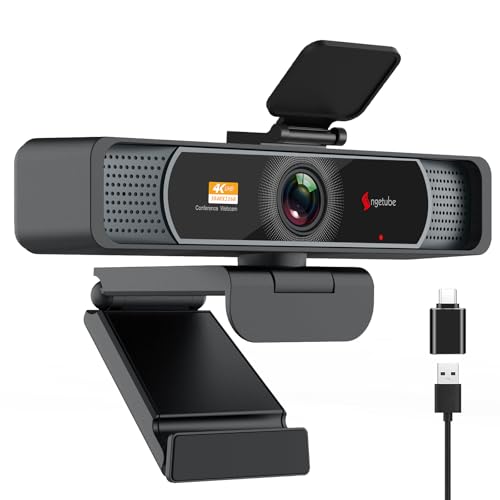
Best for high-detail remote meetings, this Angetube camera delivers Ultra HD 4K video and 1080p at 60fps, with a distortion-free 120° wide angle. Its PDAF autofocusing keeps subjects sharp even during movement, and dual mics with AI noise cancellation reduce ambient noise. It’s a strong pick for business meetings and remote learning. Caution: 4K mode is optional and may require enabling in software for optimal performance, which could affect bandwidth requirements.
Innex C831 180° Panoramic Webcam

Best for huddle spaces needing wide coverage, the Innex C831 captures a full 180° panorama with three 12MP cameras and an advanced stitching algorithm. It offers customizable view angles (180° to 75°) and AI-powered features like facial tracking and auto-zoom via Innex Studio software. Suitable for classrooms and small to medium meeting rooms. Limitation: the panoramic stitching relies on software; performance may vary with network conditions and PC specs.
TONGVEO 4K Conference Room Camera System

Best for mid-to-large rooms requiring reliable auto-tracking and flexible control, this TONGVEO system features AI auto-tracking, 6 gesture controls, and 5X digital zoom with a 120° wide-angle FOV. It supports remote control and multiple preset positions, plus a professional-sounding speakerphone. Caution: gesture controls may require careful environmental setup to avoid false tracking in busy rooms.
AV Access 4K Conference Room Camera
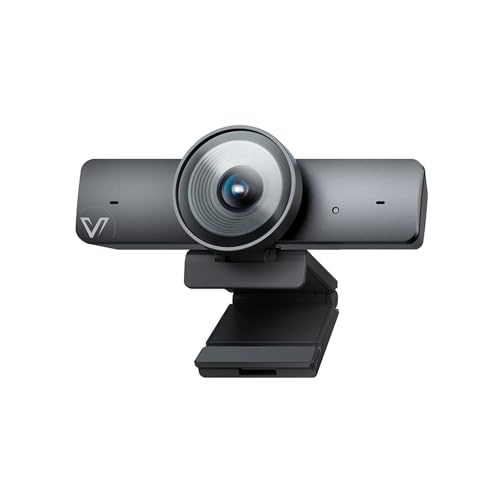
Best for professional meetings requiring a high-quality capture and gallery view, this AV Access model uses a 1/1.8″ CMOS sensor for improved image quality and low-light performance. It records 4K at 30fps and includes AI Gallery that can detect up to four participants before switching to group framing. Practical for virtual boardroom discussions and client presentations. Limitation: advanced features may require compatible software and stable bandwidth for full 4K operation.
Buying Guide
What to consider when choosing a wide-angle conference camera
- Room size and layout: For small rooms, AI auto-framing and single-camera coverage are often sufficient. For larger rooms, consider PTZ or panoramic options with effective zoom and multiple framing modes.
- Framing and tracking: AI tracking helps keep the speaker in focus. Decide between presenter tracking, group framing, or both based on meeting style.
- Image quality and sensors: Cameras with 4K sensors deliver more detail; however, bandwidth and processing power should be considered. Distortion management matters with ultra-wide lenses.
- Audiovisual integration: Dual mics and noise reduction improve audio clarity. Check compatibility with your conferencing platforms (Zoom, Teams, etc.) and USB plug-and-play readiness.
- Setup and flexibility: Look for easy setup, remote control options, gesture control, and preset views. Some models offer software that enhances AI features.
Frequently Asked Questions
- What is the benefit of a 120° wide-angle camera?
It captures more participants in a single frame, reducing the need to reposition the camera. - Do wide-angle cameras require special software?
Some models use companion apps for features like AI tracking and 4K mode; basic functions are usually plug-and-play. - Is 4K worth it for conference rooms?
4K provides crisper detail, but bandwidth and processing requirements increase; 1080p is often sufficient for many rooms. - What’s the difference between auto framing and presenter tracking?
Auto framing centers all participants; presenter tracking follows the active speaker to emphasize the main presenter. - Which camera is best for huddle rooms?
A panoramic or 180° wide-angle camera with easy setup and reliable autofocus is typically ideal for small shared spaces. - Are these cameras compatible with Zoom and Teams?
All listed models offer USB plug-and-play and are designed to work with common meeting platforms; verify software compatibility if needed.