For remote work, online teaching, streaming, or video conferencing, a webcam with zoom capability helps you tailor framing without moving your chair. The following five models offer reliable zoom features—whether via digital zoom, a manually adjustable lens, or a remote-controlled zoom—and include extras like privacy covers and built-in lighting. This guide compares top options in 1080p and 4K ranges, highlighting how each one handles image quality, focus, and ease of use across Windows, macOS, and popular video apps.
Summary of selected products
| Product | Zoom Type | Notable Feature |
|---|---|---|
| Creative Live! Cam Sync V3 2K QHD | 4X Digital Zoom | 2K QHD resolution for crisp detail |
| SVPRO 1080P With 5-50mm Lens | Manual Zoom (5-50mm Varifocal) | Remote focus and versatile framing |
| Angetube Streaming Webcam | 5X Digital Zoom | Ring light and RF remote control |
| Vitade Zoomable Webcam | 5X Digital Zoom | Ring light with adjustable brightness |
| NexiGo N950P Gen 2 | 5X Digital Zoom | 4K resolution with Sony Starvis sensor |
Note: All models are USB webcams designed for plug‑and‑play use with common software like Zoom, Skype, Teams, and OBS. Each option emphasizes different strengths—image clarity (4K or 2K), lighting, and user-friendly zoom controls—so you can choose based on whether you prioritize high resolution, ease of framing, or live communication features.
Creative Live! Cam Sync V3 2K QHD Zoom

The Creative Live! Cam Sync V3 delivers 2K QHD resolution (2560 x 1400) at 30 frames per second, providing sharp, detailed video ideal for professional calls and streaming. It uses UVC compliance for straightforward plug‑and‑play use on PC and Mac, with no driver installation required. The camera includes dual built-in microphones and noise management to help voices cut through background noise during webinars or online classes. A privacy lens cover adds physical security when the camera is not in use. While the zoom is digital (up to 4X), the higher resolution helps maintain clarity when cropped in post or during wide classroom layouts.
Key considerations: Digital zoom preserves image quality poorly at high magnification, so this model is best when you maintain a broader shot and crop in software if needed. It suits users who want higher resolution for screen sharing, document collaboration, and streaming that benefits from crisp text and color accuracy. Compatibility with major apps is strong, and the auto light correction helps maintain facial detail across mixed lighting conditions.
SVPRO 1080P USB Camera With Manual Zoom

The SVPRO webcam centers on a manual zoom mechanism with a 5-50mm varifocal lens, enabling precise framing for close-ups, demonstrations, or multi-person setups. It records at 1080p with options up to 30fps (and higher frame rates for 720p or VGA), and it features a CS mount for lens versatility. The camera uses a 1/2.7″ CMOS sensor with an infrared filter and supports MJPEG/YUY2 formats, ensuring broad compatibility and smooth motion in standard video calls. This model is well-suited for creators and professionals who want hands-on control of focus and field of view without software zooms.
Buying tip: Manual zoom can provide consistent framing in live demonstrations, but it requires physical adjustment. The device is particularly useful for studio setups, product showcases, and environments where critical focus is essential. If you value autofocus in addition to zoom, consider models with auto focus features, as this SVPRO option focuses manually but can deliver reliable results for fixed subjects.
Angetube 1080P 60FPS With Ring Light
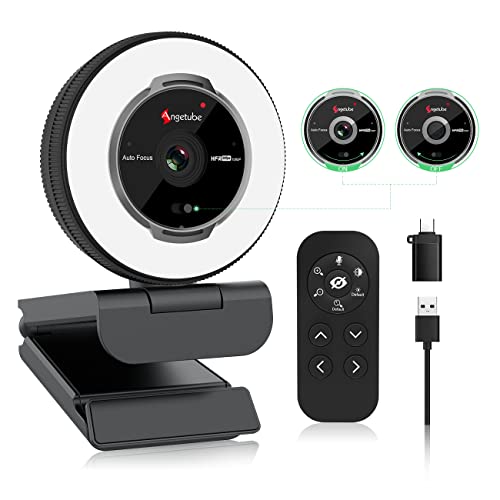
The Angetube Streaming Webcam combines 1080p at 60 frames per second with a built‑in ring light for improved illumination on camera. It includes a remote control for easy adjustments from anywhere in the room, plus a 5X digital zoom to fine-tune framing during streaming or video calls. A privacy cover provides on/off protection for the lens, and real-time autofocus helps maintain clear subjects as you or your surroundings move. The device is designed for streamers and remote workers who want straightforward lighting control and flexible on‑the‑fly zoom without software dependencies.
Considerations: Digital zoom complicates high‑magnification tasks, so plan on using the ring light and autofocus to maintain clarity at different distances. The RF remote adds convenience but ensure line-of-sight usage in your workspace. Compatibility with OBS and other streaming tools is a strong point for this model, making it a solid choice for live broadcasts and virtual meetings alike.
Vitade Zoomable Webcam With Remote

The Vitade camera emphasizes a user-friendly ring light and a remote‑driven 5X digital zoom. It records at 1080p with 60fps for smooth motion, and autofocus helps maintain sharpness during dynamic scenes. The built‑in ring light automatically adjusts brightness to match your environment, reducing the need for software tweaks. The webcam is designed for streaming, video calls, and content creation, with broad compatibility across Windows, macOS, and major streaming apps like OBS, Zoom, and Teams. The privacy cover adds essential security in shared workspaces.
Considerations: While digital zoom can degrade image quality if pushed too far, the combination of auto lighting and autofocus can compensate in many lighting conditions. The RF remote provides convenience, but you may want to check your room’s layout to maximize its range and minimize reflections from lights or monitors.
NexiGo N950P Gen 2 4K Zoomable Webcam
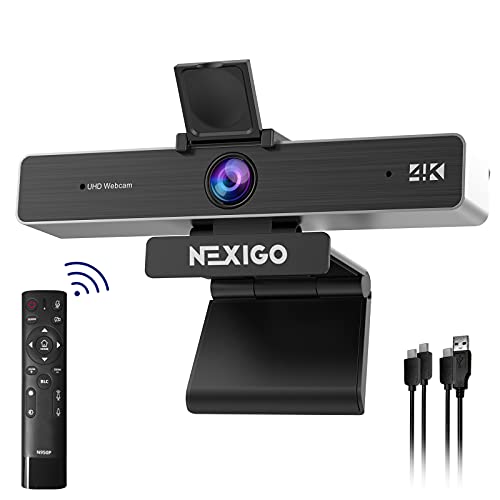
The NexiGo N950P Gen 2 brings 4K resolution at up to 30fps with a Sony Starvis sensor for strong low‑light performance and accurate color. It offers a 5X digital zoom controlled by an RF remote, which also allows muting, framing adjustments, and other quick controls during live sessions. Dual mics capture stereo audio, and a privacy cover provides security when the camera is not in use. USB‑A and USB‑C compatibility increases flexibility across modern laptops and desktops, making this model a robust choice for high‑quality virtual meetings and broadcasts.
Buying Guide
Resolution and image quality
Higher resolutions deliver crisper text and sharper video, but they demand more bandwidth and processing power. If your streaming needs include detailed screen sharing or on‑screen text, 4K (or 2K in some models) can be advantageous. For most business calls, 1080p at 60fps provides a smooth, clear image with broad compatibility.
Zoom capability and lens type
Digital zoom enlarges the image via software and may degrade quality at higher magnifications. Manual or varifocal lenses (like the 5‑50mm lens on the SVPRO) enable precise physical framing, which can be beneficial for demonstrations or controlled presentations. Remote zooms offer convenience, but assess whether you prefer electronic cropping or a physically adjustable lens for stability during movement.
Lighting and autofocus
A built‑in ring light or automatic light correction helps maintain consistent brightness, reducing post‑production tweaks. Autofocus keeps subjects sharp as you move, which is especially important for live Q&As or dynamic teaching sessions. If your environment is dim, prioritize models with lighting features or strong low‑light performance.
Privacy and security
A privacy cover is a practical feature to prevent accidental camera exposure. Look for a physical shutter or cover, especially in shared spaces or when the camera is left idle for extended periods.
Audio quality
Many webcams include built‑in mics; however, the quality varies. For meetings, consider models with dual mics or ring buffers, or plan to pair the webcam with a dedicated USB microphone if audio is mission‑critical.
Connectivity and compatibility
USB‑A and USB‑C options increase compatibility with modern devices. Ensure the webcam works with your operating system and major conferencing software (Zoom, Teams, Skype) and that it’s detected as a webcam in your preferred streaming application like OBS or WebEx.
Ergonomics and usage scenarios
Consider how you will use the camera: education, corporate meetings, or live streaming. If you frequently move between positions, a model with a remote or quick lens adjustment may improve your workflow. For fixed desk setups, a dedicated 4K camera with a stable mount can provide the best long‑term value.
With multiple zoom options, lighting features, and privacy protections, the listed webcams cover a range of needs—from high‑fidelity broadcasting to practical, everyday videoconferencing. When choosing, align the model’s strengths with your primary use: screen‑rich presentations, close‑up demonstrations, or flexible mobility during meetings.