Best Vlogging Equipment for YouTube Starters
Ready to elevate YouTube content with professional-looking videos? This guide highlights five top vlogging kits that optimize audio, lighting, and stability for new creators. Each option targets a different creator style—from hands-free tracking and live streaming to portable mobile rigs—so you can pick the best match for your setup and space. The buyer-friendly table below compares core features to help you decide quickly.
| Product | Main Benefit | |
|---|---|---|
| Vlogging Kit for iPhone/Android, 63” Auto Face Tracking Tripod | Hands-free tracking with dual LED lights and wireless mics | Vloggers who want automatic framing and mobile journaling |
| Yeaki Vlogging Kit for iPhone/Android, 71″ Selfie Stick Tripod | Long reach, remote control, dual mics, bright lights | On-the-go creators needing extended height and flexibility |
| Vlogging Kit with RGB Light, Wireless Microphones | All-in-one studio pack with stability and light control | Shoppers seeking a complete starter studio in one kit |
| yAyusi Magnetic Vlogging Kit, 71″ Auto Face Tracking | Magnetic mic options and easy wearability with AI tracking | Creators valuing clean looks and wireless mic practicality |
| Movo iVlogger-PRO Vlogging Kit | Comprehensive set with shotgun mic and RGB light | Users who want a robust, universally compatible starter kit |
Best All‑In‑One Face-Tracking Vlogging Kit
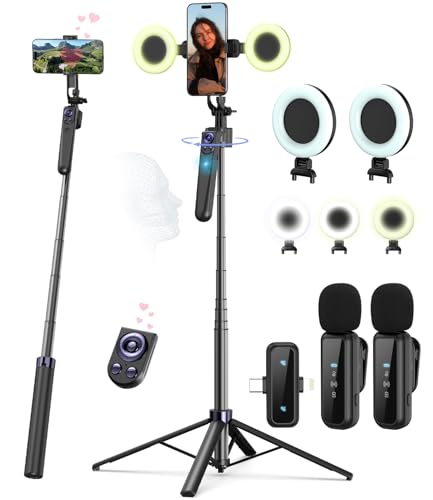
This complete vlogging kit targets creators who want hands-free operation. It includes a face-tracking tripod, a professional microphone, and dual LED lights. The AI tracking centers the user in the frame in real time, improving consistency during runs, streams, or beachy vlogs. Best for YouTube starters who prioritize automatic framing and simple setup.
Best for: YouTubers who film solo and need reliable tracking. Limitations: tracking accuracy may vary in extreme lighting or rapid camera movement.
Extended Reach Vlogging Kit With Lights and Remote

This kit pairs a tall selfie-stick tripod with dual fill lights and a smart remote. It suits creators who want high versatility for indoor and outdoor shoots. The dual-interface wireless mic supports Type-C/Lightning, enabling cross-device use. Best for: creators who need long reach, strong lighting, and easy remote control. Caution: ensure device compatibility with the included mount and mic system.
All‑In‑One Content Creator Kit with RGB Lighting

This kit blends a sturdy tripod, flexible setup options, RGB lighting, and a wireless microphone. It’s ideal for creators who want professional lighting and crystal-clear audio in a mobile package. Best for: YouTube and TikTok creators who need versatile shot angles. Limitation: weight and size may affect portability compared to lighter sets.
Magnetic Lavalier Kit With Auto Tracking

This kit emphasizes magnetic microphones and an auto-tracking tripod. The 360° rotation follows the creator, while the magnetic lav mics offer a discreet wearing option. Best for: creators aiming for clean looks and hands-free audio capture. Caution: ensure magnetic clips suit your clothing and mic placement needs.
All‑Purpose Content Creator Vlogging Kit

This kit provides crystal-clear wireless audio with no apps required, plus a 4‑in‑1 content creator set that expands from handheld to tripod use. It includes two lavalier mics, a flexible light setup, and a remote. Best for: YouTubers who value plug‑and‑play audio and adaptable shooting angles. Limitation: some users may prefer more rugged tripods for heavier devices.
Buying Guide
What should you prioritize for YouTube vlogging?
Consider audio quality, lighting, and stability as core pillars. A kit with a built‑in AI tracking reduces framing errors, while reliable wireless mics keep audio clear in varied environments. Lighting should offer adjustable color temperature to match natural light or creative mood.
How to match a kit to your channel style?
- Solo vlogging or travel: prioritize light, compact options with good battery life and a long reach tripod.
- Studio-style shoots: prioritize RGB lighting, wide-angle stability, and multiple mic inputs for interviews.
- Live streaming: pick kits with real‑time auto-tracking and quick setup for rapid start of streams.
What about compatibility?
Look for USB-C and Lightning compatibility, especially if you shoot on both iPhone and Android devices. A 1/4″ screw nut is common and helps attach various clamps, tripods, and mounts.
What are common trade-offs?
- Long reach tripods can be bulkier but enable dramatic overhead or shoulder-level shots.
- AI tracking adds convenience but may require good lighting to perform optimally.
- No apps setups simplify use but may limit advanced features found in app-based systems.
FAQ
- What is the primary benefit of an auto face-tracking tripod?
It keeps you centered in the frame automatically, reducing manual adjustments during shoots. - Do these kits work with both iPhone and Android?
Yes, most include USB-C and Lightning adapters or dual-interface receivers to support both platforms. - Which kit is best for beginners?
A complete starter kit with lights, mics, and a stable tripod is typically easiest for new creators. - Are magnetic microphones difficult to wear?
Magnetic mics are designed for discreet wear and simple clip-on use, with generally quick setup. - Is external lighting necessary for YouTube?
Lighting improves video quality dramatically, especially in indoor spaces or during low light.