Best 360 Virtual Reality Cameras for Immersive Tours
As 360-degree imaging becomes essential for immersive real estate tours, travel storytelling, and virtual showrooms, selecting the right camera and kit matters. This guide highlights five top options that balance image quality, stabilization, and ease of use. From all-in-one 360 cameras to smartphone-based kits, these picks support quick shooting, professional post-processing, and reliable sharing across platforms. Each entry includes a link to Amazon for quick access, plus practical notes on setup and workflow tailored to real-world use.
| Product | Brand | Primary Use | Key Benefit |
|---|---|---|---|
| Asteroom 360 Tour Kit | asteroom | Real estate virtual tours | Converts smartphones into 360 tours with 3D dollhouse and floor plans |
| Insta360 ONE X2 | Insta360 | 360 video and photos | 5.7K 360 capture with FlowState stabilization and horizon leveling |
| Manfrotto VR Kit | Manfrotto | Compact VR setups | Portable Pixi Evo tripod and extendable pole for flexible angles |
| Insta360 X3 Virtual Tour Kit | Insta360 | 360 tours and visuals | 72MP photos, 5.7K HDR video, long-life battery, easy transfer |
| Insta360 X3 Creator Kit | Insta360 | Creative VR productions | All-in-one kit with AI editing and high-res 360 capture |
Asteroom 360 Tour Kit

The Asteroom 360 Tour Kit uses a smartphone as the core capture device to produce 360-degree panoramas and 3D tours. The kit includes a tripod, a digital camera rotator, and a fisheye lens accessory, while the phone case is sold separately. Capture sessions are designed for speed, with a typical photo sequence completed in minutes and tools to upload and share tours online. In the accompanying mobile app, photos are transformed into a 3D dollhouse view, a 2D floor plan, and enhanced with image touch-ups for a polished appearance. HDR compatibility helps preserve detail in bright and shaded areas, and teaser videos plus analytics offer a basic performance overview of each tour. Turnaround times for tour rendering generally occur within a day or two after capture, depending on project scope and post-processing choices.
- Turns smartphones into 360-degree cameras for 3D tours
- Includes tripod, rotator, and fisheye lens accessory
- 3D Dollhouse view, 2D floor plan, and image touch up
- HDR photo compatibility and teaser videos
- Tours render in mobile apps with viewership analytics
Insta360 ONE X2 360 Action Camera
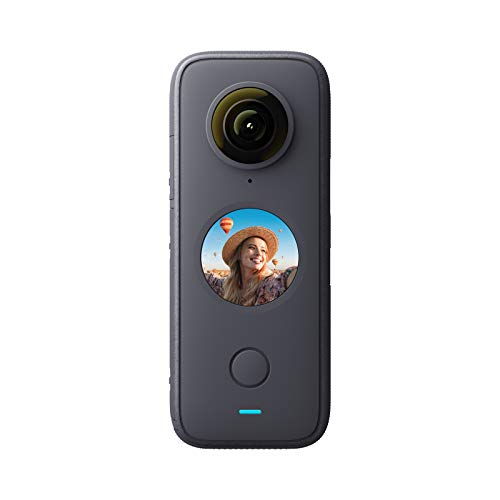
The Insta360 ONE X2 delivers versatile 360-degree capture with rugged, waterproof construction. It supports ultra-wide 5.7K 360 video and high-quality stabilization through FlowState, eliminating the need for a separate gimbal in many scenarios. The camera offers horizon leveling to keep footage visually steady, even during dynamic movements. In addition to immersive 360 footage, it supports a “single-lens” mode for conventional action-cam looks and can function as a webcam, expanding productivity options. The device integrates AI-assisted editing and live streaming capabilities, enabling fast publishing of polished content for listings, tours, or social channels. Its compact form makes it ideal for on-the-go shooting and client demonstrations.
- 5.7K 360 capture with FlowState stabilization
- Horizon leveling and AI editing tools
- Waterproof design for diverse environments
- Single-lens mode for traditional wide-angle footage
- Webcam and live streaming compatibility
Manfrotto VR Kit With Pixi Evo

This compact VR kit from Manfrotto is designed for quick setup and portability. It centers on a Pixi Evo mini tripod with adjustable legs and a four-section extension pole, offering flexible height and angle options without bulky gear. The kit is ideal for small 360-degree cameras and on-site shoots where speed and ease of use matter. Its lightweight design makes it suitable for real estate demonstrations, travel vlogs, or scenic showcases, allowing photographers to position the camera at natural eye level or get elevated angles with minimal effort. A simple, reliable solution for mobile VR filming workflows.
- Compact, lightweight VR setup
- Pixi Evo mini tripod with two leg angles
- Five-step leg extension for easy height changes
- Stable base for quick shooting in tight spaces
Insta360 X3 Virtual Tour Kit

The Insta360 X3 Virtual Tour Kit bundles 360 capture capabilities with a package designed for real estate and immersive showcases. It produces sharp 72MP 360 photos and 5.7K HDR video, enabling detailed walkthroughs with vibrant color and broad dynamic range. FlowState stabilization helps deliver smooth footage across different environments, while a long-life battery supports extended shooting sessions. The kit emphasizes easy WiFi preview and transfer, so clients and teammates can review progress without lengthy wait times. For users who want a strong all-in-one solution for virtual tours, this kit provides a balanced mix of image quality, stability, and workflow efficiency.
- 72MP 360 photos and 5.7K HDR video
- FlowState stabilization for steady footage
- Long-life replaceable battery
- WiFi preview and fast transfer
Insta360 X3 Creator Kit

The Insta360 X3 Creator Kit is geared toward creators who want an all-in-one VR production setup. It combines the X3’s high-resolution capabilities with AI-powered editing tools and practical accessories for streamlined workflow. Expect 5.7K 360 HDR video and 72MP stills, paired with features that simplify post-production directly in the app. The kit emphasizes a long-lasting battery and robust streaming options, making it suitable for virtual tours, live demonstrations, or cinematic VR projects. This kit is designed to help teams deliver polished, professional-grade VR content with less friction.
- All-in-one VR production kit
- 5.7K 360 HDR video and 72MP photos
- AI-assisted editing and efficient transfer
- Long-life battery and reliable performance
Buying Guide
Choosing the right 360 camera or VR kit depends on how you plan to shoot, edit, and share. Consider camera architecture (all-in-one versus smartphone-based), stabilization needs, and post-processing workflows. Real estate and tour creators often prioritize dollhouse or floor-plan features, HDR performance, and quick publishing capabilities. Content producers focused on travel or event coverage may value ruggedness, water resistance, and live streaming. Below are key purchase considerations and practical comparisons to help you decide.
Key purchase considerations
- Resolution and field of view: Higher resolution captures detail, while a wide field of view helps create immersive tours.
- Stabilization: Look for FlowState or similar stabilization to minimize shake without a gimbal.
- Post-processing and apps: Assess the ecosystem for editing, stitching, and exporting to common formats.
- Battery life and storage: Longer sessions require robust batteries and ample onboard or expandable storage.
- Durability and waterproofing: For outdoor shoots or active settings, consider rugged builds or waterproof ratings.
- Workflow integration: Compatibility with real estate platforms, hosting, and cloud sharing can reduce turnaround time.
- Portability and setup speed: Compact kits benefit on-site shoots with limited time.
All-in-one kits vs smartphone-based setups
- All-in-one kits (like Insta360 X3 or Creator Kit) offer streamlined hardware plus built-in editing tools, often with robust stabilization and HDR. They are ideal for teams prioritizing speed and professional-grade output.
- Smartphone-based setups (like Asteroom) leverage your phone as the core capture device, offering flexibility and lower upfront costs. These are suitable for quick, on-site tours and scalable workflows once you add external lenses or mounts.
Workflow considerations for real estate and virtual tours
- Dollhouse and floor-plan features: If your workflow hinges on quick property layouts, prioritize devices and apps that generate architectural views automatically.
- Shared access and analytics: Look for solutions that provide viewer metrics and simple sharing options for clients and team members.
- Turnaround time: Consider devices and apps with efficient stitching and rendering to meet client deadlines.
Cost and long-term value
- Initial investment vs ongoing costs: All-in-one kits may require a higher upfront cost, but can reduce post-production time and outsourcing.
- Software subscriptions: Some ecosystems rely on cloud services or editing software with ongoing fees—factor these into the total cost of ownership.
- Resale value: Popular brands with active ecosystems tend to retain value, which can ease upgrades later.
| Option Type | Pros | Cons |
|---|---|---|
| All-in-one kit | High image quality, integrated editing, easier workflow | Higher upfront cost, may be oversized for tiny spaces |
| Smartphone-based kit | Lower entry price, flexible hardware, scalable | Dependent on phone, stitching quality varies by device |