Choosing the right webcam for video conferences affects clarity, audibility, and collaboration. This guide highlights top cameras for American workplaces, classrooms, and remote teams, focusing on models that offer reliable HD or 4K video, strong built-in microphones, and easy USB connectivity. Whether you need 1080p for everyday meetings, 4K detail for presentations, or broad 360-degree coverage for group sessions, these picks balance performance, compatibility, and value.
| Product | Brand | Key Features |
|---|---|---|
| Logitech BCC950 Desktop Conferencing | Logitech | All-in-one video and speakerphone; 1080p; Carl Zeiss lens; Skype for Business; USB |
| Logitech C920x HD Pro Webcam | Logitech | 1080p video; auto light correction; stereo mics; desktop or monitor use |
| NexiGo N990 Gen 2 4K PTZ | NexiGo | 4K 3840×2160; PTZ; remote with 5x digital zoom; Sony sensor |
| j5create JVCU360 360 Degree Camera | j5create | 360° coverage; omnidirectional mic; 1080p; six display modes |
| EMEET C960 1080P Webcam | EMEET | 1080p; 2 mics; privacy cover; low-light adjustments |
Logitech BCC950 Desktop Conferencing

The Logitech BCC950 is designed for small to mid-size conference spaces, combining high-definition video with a built-in speakerphone for a streamlined room setup. Its 1080p camera delivers clear, natural-looking images at 30 frames per second, while the Carl Zeiss lens helps preserve color accuracy and detail during meetings. The integrated full-duplex speakerphone and noise-cancelling microphone ensure that voices stay crisp and understandable, even in room environments with ambient noise. USB plug-and-play compatibility supports a wide range of devices and platforms, including Skype for Business, WebEx, Zoom, and Cisco Jabber.
In practice, the BCC950 reduces clutter by merging video, audio, and mic into a single unit, which is especially useful for desk-based or huddle-room setups. The compact base, flexible mounting options, and room-filling audio make it a reliable default for teams that want a simple, dependable conferencing solution without additional gear. While some users may prefer external speakers for larger rooms, the BCC950 excels at delivering a balanced, all-in-one experience for everyday meetings and collaboration sessions.
Logitech C920x HD Pro Webcam

Logitech C920x HD Pro Webcam emphasizes versatile, reliable 1080p video with autofocus and automatic light correction. Its dual built-in microphones capture natural stereo sound, complementing the crisp video for a balanced video conference experience. The camera’s lens quality and color accuracy help maintain a professional appearance during calls, even with variable lighting. The C920x is widely compatible with Windows and Mac and works smoothly with popular platforms such as Zoom, Skype, Facetime, and WebEx, making it a staple choice for home offices and small teams.
Software features enhance usability, including straightforward setup on desktops and straightforward configuration options via Logitech’s companion software. The fixed-focus design and compact form factor fit neatly on a monitor or laptop, while the 1080p at 30fps delivers steady, clear footage during presentations and collaborative sessions. For users prioritizing affordability alongside dependable, high-quality video, the C920x remains a go-to option.
NexiGo N990 Gen 2 4K PTZ

NexiGo N990 Gen 2 is built for larger rooms and professional-grade conferencing with 4K resolution. Its 8.5-megapixel Sony sensor delivers crisp, detailed images at a native 3840×2160 resolution at 30fps, ensuring presenters, slides, and whiteboard content appear with outstanding clarity. The PTZ feature provides extensive control: pan from -170 to +170 degrees and tilt from -35 to +85 degrees, enabling smooth framing as participants move or the speaker shifts position. A remote control adds convenient, wire-free camera adjustments during calls.
A robust audio setup complements the video: two built-in stereo mics capture voices clearly, while the 5x digital zoom lets you focus on specific details without moving the camera. Remote presets streamline transitions between different viewpoints, and the camera integrates with mainstream conferencing software, making it suitable for boardrooms, lecture halls, and large hybrid meetings where flexible camera control matters.
j5create JVCU360 360 Degree Camera
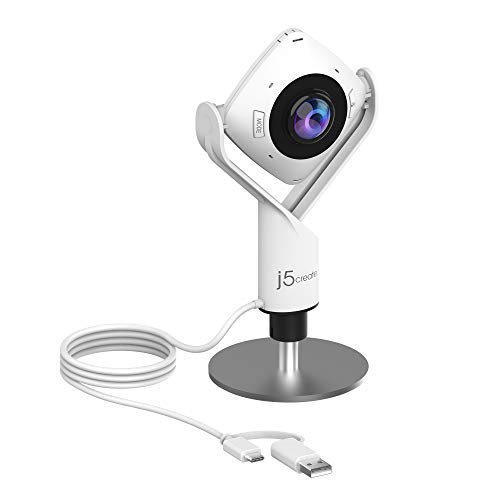
The j5create JVCU360 prioritizes inclusivity in group conversations with true 360-degree coverage. This design minimizes the need to reposition the camera during discussions, capturing all participants around the table. An integrated omnidirectional microphone array supports clear voice pickup, while six display modes adapt to various room layouts, maximizing viewing comfort and engagement. The 1080p video stream maintains smooth, natural motion at 30 frames per second, even as participants gesture or shift their seating positions.
Setup is notably straightforward with USB-C connectivity and flexible mounting options for desks, monitor tops, or tripods. The expansive field of view makes it well suited for classrooms, roundtable meetings, panels, and workshops where equal visibility for all attendees is important. Its simplicity and broad coverage can reduce the number of camera adjustments needed in dynamic collaborative spaces.
EMEET C960 1080P Webcam
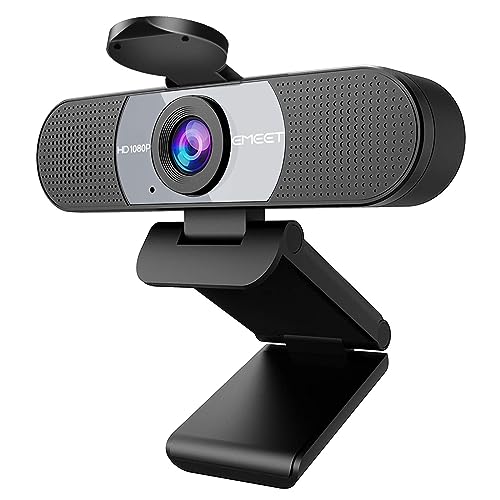
EMEET C960 offers an accessible 1080p full HD experience with practical image-enhancement features. The camera uses a 5-layer anti-glare lens and automatic exposure adjustments to maintain a clear picture in mixed lighting conditions, which is useful for home offices and busy workspaces. The built-in dual microphones employ noise reduction to focus on vocal clarity, supporting more natural conversations during calls and recordings. The device is plug-and-play USB, making it easy to use with Zoom, Skype, YouTube, and other platforms, while a privacy cover adds a straightforward privacy safeguard.
Its compact form factor and simple setup make the C960 a practical choice for students, remote workers, and professionals seeking reliable 1080p quality without extra complexity. The combination of decent video, solid audio, and a privacy shutter provides a balanced, worry-free option for everyday conferencing needs.
Buying Guide
Consider how you’ll use a webcam day-to-day. The right balance of resolution, field of view, audio, and ease of use depends on room size, participant count, and your preferred collaboration tools. Below are key purchase considerations and how different models stack up across common scenarios.
- Resolution and frame rate: 1080p at 30fps works well for most meetings and streaming. 4K cameras, like the NexiGo N990 Gen 2, deliver crisper detail in large rooms or when presenting high-resolution content, but require more bandwidth and processing power.
- Field of view and camera control: 360-degree cameras (j5create JVCU360) capture everyone in the room without repositioning, ideal for roundtable settings. PTZ cameras (NexiGo N990 Gen 2) offer remote framing and presets for dynamic layouts in bigger spaces.
- Audio quality: Built-in mics vary in coverage. Look for dual mics or an array with noise reduction for clearer voice capture, especially in echo-prone rooms. Some models pair well with external mics for larger spaces.
- Lighting and image processing: Cameras with auto light correction or low-light boosting help maintain visibility in fluctuating lighting. Anti-glare lenses and exposure adjustments improve image quality in mixed environments.
- Connectivity and compatibility: USB plug-and-play is common and compatible with Windows and Mac. Check platform compatibility (Zoom, Teams, Skype, WebEx) and whether the device works with your current conferencing software.
- Privacy and security: Privacy shutters are a simple, effective protection when cameras are not in use. Consider whether a product offers hardware or firmware updates for ongoing security and performance.
- Mounting and form factor: If desk space is limited, compact designs or easy-to-mount options matter. For larger rooms, consider cameras with robust mounting options or the flexibility of a tripod.
- Budget and total value: Higher-end models add features like 4K and advanced PTZ controls, but 1080p models with good audio may meet most needs at a lower price. Balance feature set with total cost of ownership.