Best Video Conference IP Camera Solutions for Modern Meetings
The top picks below target different buyer needs—from live streaming in houses of worship to small to mid-size conference rooms and hybrid meetings. Each product is explained with who it’s best for, its standout features, and practical limitations to consider before purchase.
| Product | Best For | Why It Stands Out |
|---|---|---|
Prisual AI Auto-Tracking PTZ Camera
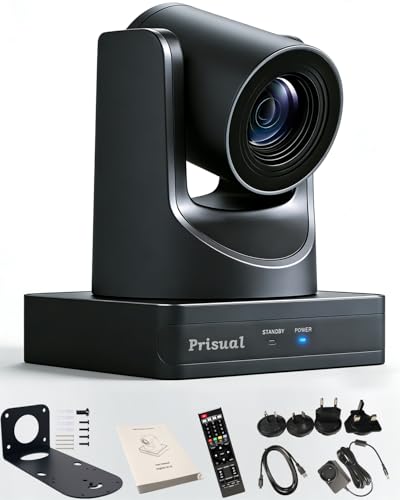
The Prisual PTZ camera combines 20x optical zoom with AI auto-tracking to maintain subjects in frame. It delivers true 1080P at 60fps for professional live workflows, ideal for church services, classrooms, or weddings where dynamic movement occurs. Its plug-and-play PoE support makes setup straightforward in existing IP networks, and it offers broad compatibility with live production systems. The camera is best for users needing smooth, reliable tracking without complex tuning.
- Best for dynamic live environments where subjects move quickly.
- Better for users who prefer plug-and-play networking and flexible mounting (desktop, tripod, wall, ceiling).
- Limitation: Some users may need to configure the web interface for advanced presets.
PANOCORE360 All-in-One Meeting Camera

The PANOCORE360 is designed for small to medium meeting rooms, delivering a full 360° capture with four integrated cameras and microphones. It outputs 1080P video and uses adaptive dual vision modes to either focus on the active speaker or present a dual 180° room view. This makes it suitable for hybrid sessions where in-room and remote participants need a shared perspective. It’s a strong choice when a single computer should manage a complete room view.
- Best for hybrid meetings with limited room deployment complexity.
- Better for teams needing a single-device solution that covers both speaker focus and room-wide context.
- Limitation: The 1080p output may be less crisp for very large venues or highly detail-rich presentations.
TONGVEO All-in-One Conference System

This TONGVEO system pairs an AI-powered HDMI/USB 3.0 PTZ camera with a Bluetooth conference speakerphone. It’s designed as a complete small-to-medium room solution, enabling simultaneous video and audio capture with clear full-duplex sound. The AI auto-tracking supports subject following, while the integrated microphone array provides a usable distance for meeting spaces. It’s best for rooms where a single, compact device handles both video and audio, reducing clutter.
- Best for streamlined spaces needing an all-in-one device.
- Better for users who want simple USB3.0/HDMI connectivity and quick setup.
- Limitation: Battery-powered operation is limited; rely on mains power for longer sessions.
KATOVJJTS 4K PTZ With 10X Zoom

The KATOVJJTS PTZ camera delivers 4K UHD at 30fps with a 10x optical zoom and wide 67° field of view. Its pan/tilt range (340°/120°) supports versatile room coverage, making it suitable for church services, worship events, or larger conference settings where high-resolution detail matters. It provides smooth movement for presentations and dynamic group shots, with a strong option for projects needing crisp live streaming quality.
- Best for high-detail live streams and wide room coverage.
- Better for users who require 4K output and a broad PTZ range.
- Limitation: 4K output may demand more network bandwidth and processing in some setups.
TONGVEO NDI PTZ With AI Auto-Tracking
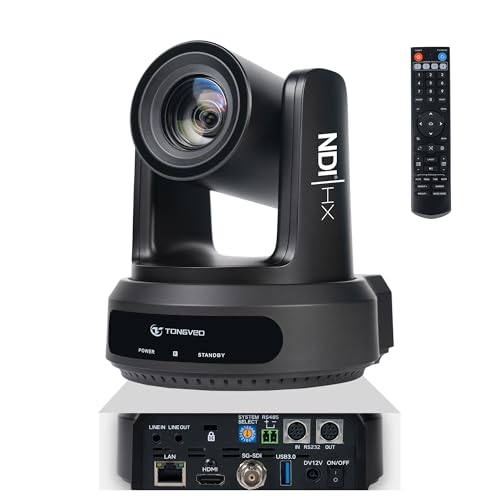
The TONGVEO NDI PTZ camera emphasizes professional live streaming with built-in NDI processing for low-latency, high-quality 1080P60 output. The included NDI license integrates smoothly with OBS, vMix, and Wirecast, making it a solid choice for church broadcasts and event productions requiring IP-based workflows. AI auto-tracking supports presenter-following across dynamic stages. It’s best for users who depend on NDI and a clean IP-based production pipeline.
- Best for IP-based streaming professionals using NDI workflows.
- Better for rooms that require low-latency streaming to multiple destinations.
- Limitation: NDI setup can be complex for first-time users; ensure network readiness.
Buying Guide
What should you consider when selecting a video conference IP camera?
- Room size and layout: Choose PTZ models with appropriate zoom and pan/tilt ranges to cover all participants without excessive movement.
- Video quality versus bandwidth: 1080p60 offers smooth motion, while 4K provides detail but demands more network bandwidth and processing.
- Tracking features: AI auto-tracking helps keep speakers centered, but verify reliability in your environment and whether you need standby manual control.
- Audio integration: Built-in mics and speakerphones simplify setup in small rooms; larger rooms may require separate audio solutions with echo cancellation.
- Connectivity and compatibility: PoE, USB3.0, HDMI, and NDI support affect how you deploy in existing systems and software like OBS, Zoom, Teams, or Webex.
- Ease of setup: Plug-and-play options reduce IT overhead; web interfaces and remote management aid day-to-day operation.
- Warranty and support: Look for devices with extended local or manufacturer support to minimize downtime in critical environments.
Frequently Asked Questions
- What is IP camera in video conferencing?
Answer: An IP camera streams video over a network protocol, enabling remote access and integration with meeting software and streaming workflows. - What is AI auto-tracking and who needs it?
Answer: AI auto-tracking automatically follows a subject, useful for lectures, worship services, or dynamic presentations where the speaker moves. - Do I need NDI for live streaming?
Answer: NDI provides low-latency IP video for professional workflows; choose NDI-enabled cameras if you use OBS, vMix, or Wirecast. - Is 4K worth it for conference rooms?
Answer: 4K offers sharper detail but consumes more bandwidth and processing power; 1080p60 is often sufficient for most meetings. - How many participants can these cameras cover?
Answer: Coverage depends on FOV and PTZ range; wider FOVs and longer zoom help in larger rooms, while auto-tracking assists in dynamic spaces. - What installation considerations matter?
Answer: Consider mounting options (desk, wall, ceiling), power needs, network layout, and compatibility with your conferencing platform.