Best Video Camera to PC Converter: Top Picks for Digitizing Memories
Looking to transfer old tapes and camera footage to your PC? These video capture and conversion devices turn analog signals into digital files, making it easy to preserve memories. This guide highlights five practical options, explaining who they’re best for and why they stand out. Whether you’re a casual user digitizing home videos or a semi-professional creator archiving footage, there’s a model here that fits your setup and budget.
| Product | Best For | Key Benefit |
|---|---|---|
| Oassuose VHS to Digital Converter | Families digitizing home VHS tapes | Plug-and-play capture of analog video to 1080P/30fps via USB-C/USB-A |
| ClearClick Video to Digital Converter 2.0 | Users with existing VCRs and tapes needing direct USB storage | Direct USB recording without a PC or software |
| VIXLW Video Capture Card | PC-based archiving and streaming from analog sources | USB capture from RCA/Hi8/DV to 720P/1080P with straightforward setup |
| Maketheone CCTV to VGA Converter Box | Older cameras and VCRs into modern displays | Convert VGA/S-Video/BNC to VGA with auto-save and OSF features |
| XMSJSIY BNC to VGA Video Converter | Video feeds needing VGA output for a monitor or capture card | Supports S-Video/BNC inputs to VGA output for easy display or capture |
Oassuose VHS to Digital Converter

Overview: This device captures video and audio from VHS, VCR, DVD, Hi8, DV tapes, or camcorders via RCA or S-Video to a PC or Mac. It outputs 1080P/30fps via USB-A or USB-C, enabling quick digitization of memories for sharing online or archiving. Auto-detection and simple plug-and-play setup appeal to non-technical users.
- Best for: Families and casual users digitizing old tapes without a steep learning curve.
- Why selected: It provides straightforward conversion to high definition and supports multiple analog sources.
- Limitation: Requires compatible acquisition software; no driver is needed, but software is required for capture.
What to consider
- Input types: RCA and S-Video; ensure your legacy device provides these outputs.
- Output: 1080P/30fps, which is adequate for most home videos but not 60fps or 4K.
- Software: Verify compatibility with your computer’s OS and preferred capture software.
XMSJSIY BNC to VGA Video Converter

Overview: This converter takes BNC/S-Video inputs and outputs VGA, enabling you to display or capture video on a PC monitor or VGA-capable capture device. It’s designed for simple operation with a single-button source switch and requires no driver installation.
- Best for: Users with legacy CCTV, DVR, or DVD gear wanting VGA display output without a computer driver.
- Why selected: Plug-and-play operation and straightforward source switching simplify workflow.
- Limitation: The device requires careful input/output configuration to avoid miswiring between inputs and the VGA output.
VIXLW Video Capture Card

Overview: This USB video capture device translates analog RCA or other sources into a digital USB stream for PC or Mac, enabling capture of VHS, VCR, Hi8, DV, and camcorder footage. It emphasizes compatibility with both older and newer systems via USB.
- Best for: Viewers looking for a reliable plug-and-play capture solution for PCs and Macs.
- Why selected: Combines broad source support with simple USB connectivity and straightforward capture workflows.
- Limitation: Some setups may need third-party capture software to finalize the digitization process.
Maketheone CCTV Camera BNC S Video VGA to Laptop Converter Box
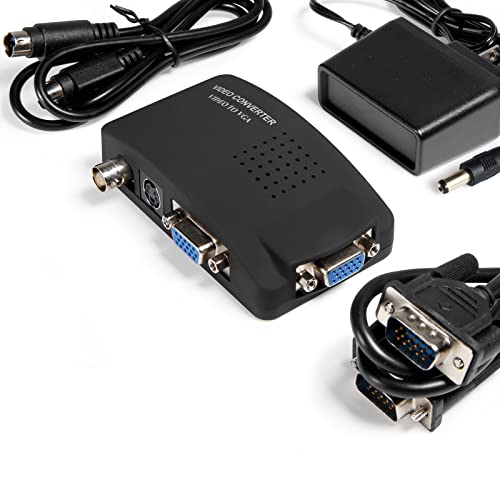
Overview: This converter box enables easy transfer from VGA, S-Video, and BNC inputs to VGA outputs suitable for a laptop or monitor. It highlights plug-and-play operation and a broad compatibility range with older devices to modern displays.
- Best for: Users seeking a simple upgrade path for older equipment to modern monitors or laptops.
- Why selected: It supports multiple legacy input formats and provides automatic saving of settings for ease of use.
- Limitation: Some users may need an external power source for stable operation on certain setups.
VHS to Digital Converter: VIXLW USB Video Capture Card

Overview: This USB video capture device digitizes video and audio from VHS, VCR, Hi8, DV tapes, or other analog sources via RCA or S-Video. It outputs 720P via USB for PC use, with plug-and-play convenience and no external power required.
- Best for: Budget-conscious buyers who want straightforward USB capture for older media.
- Why selected: Emphasizes ease of use with a direct USB connection and capable SD-resolution capture.
- Limitation: Higher resolution options beyond 720P may not be available on all setups.
Buying Guide: How To Choose The Right Video Camera To PC Converter
What’s your source format?
If you primarily digitize VHS or camcorder tapes, look for a model that explicitly supports RCA, S-Video, or DV inputs. For CCTV or older equipment with BNC connectors, choose a device with BNC/S-Video compatibility and clear input labeling.
What computer setup do you have?
Consider your PC or Mac’s USB ports (USB-A vs USB-C) and whether you need plug-and-play with no driver. Some devices require specific capture software, so verify OS compatibility before purchase.
What resolution do you need?
Most home digitization tasks are best served by 720P or 1080P at 30fps. If your source is standard definition, higher resolutions won’t improve quality and may stress older hardware.
Is direct USB recording important?
Some models like the ClearClick offer direct USB recording to a flash drive or SD card without a PC. This is ideal for quick archival projects or when computer space or software is limited.
Software and workflow considerations
Check whether the device requires specific software, what file formats are generated, and whether the software supports basic edits or only capture. A simple workflow reduces post-processing time for beginners.
Portability and power needs
Plug-and-play USB devices are typically portable and easy to use with laptops. External power requirements matter if you’re pairing devices with older laptops or travel setups.
Compatibility and future-proofing
While analog-to-digital must-haves are clear, consider whether a device supports multiple input types so you can reuse it with newer gear as you upgrade equipment over time.
FAQ
- Do I need any software to use these converters? Some models are plug-and-play with no software, while others require acquisition software for capture.
- Can these convert all types of tapes? Most support VHS, VCR, Hi8, and DV via RCA or S-Video; ensure your tape format is listed in the product features.
- Is 1080P always possible? Output resolution depends on the device and source. Many offer 720P or 1080P at 30fps or 60fps depending on compatibility.
- Will these work with Mac computers? Several models advertise compatibility with macOS; verify driver requirements for your macOS version.
- Do I need external power? Some devices are USB-powered, while others may require an external power supply for stable operation.
- Can I digitize audio and video simultaneously? Most devices capture both audio and video via RCA or S-Video; confirm supported formats if you have audio-only or mixed signals.