Best Video Camera Solutions for TV Enthusiasts and Remote Professionals
Looking for a high-quality video camera to connect to your TV for video calls, streaming, or online meetings? This guide highlights five reliable options that work well with TVs, PCs, and consoles. Each pick is evaluated for clarity, ease of use, and where it shines—so you can choose the right camera for home offices, classrooms, or casual streaming.
The following table summarizes the five selected products, focusing on who they’re best for and why they stand out for TV-based use.
| Product | Best For | Why It Stands Out |
|---|---|---|
| Septekon 1080P HD Webcam | Casual video calls on TV and PC | Solid 1080p, built-in mic, driver-free setup |
| TONGVEO 3-in-1 4K Webcam | Professional meetings and streaming | 4K video, AI auto-tracking, remote control |
| EMEET C60E Dual-Camera 4K Webcam | Presentations and teaching | Dual cameras with flexible framing, remote control |
| EMEET C960 4K Webcam | Remote work in bright/dim environments | 4K sensor, PDAF autofocus, dual mics |
| EMEET S600 4K Webcam | Live streaming and gaming from a TV setup | 4K sensor, noise reduction mics, adjustable FOV |
Septekon 1080P HD Webcam with Microphone
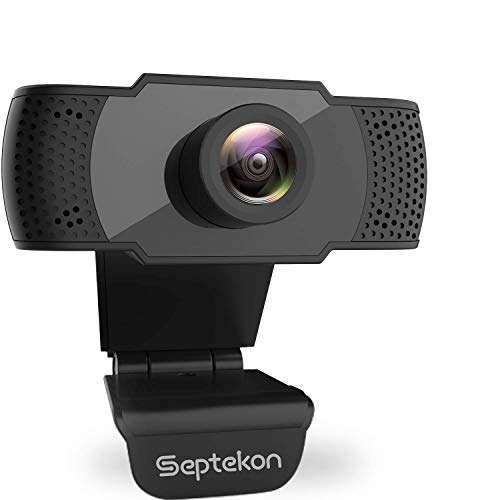
Key features include 1080p Full HD video at 30fps and a built-in stereo microphone with noise reduction and echo cancellation. It is plug-and-play for easy use with TV, computer, or gaming consoles via USB, making it a practical choice for TV-connected video calls or streaming.
- Best for: Casual video calls and TV-connected use where simple setup matters.
- Why selected: Strong baseline 1080p image quality with straightforward installation.
- Caution: Sound quality relies on the built-in mic; environments with heavy background noise may benefit from an external mic.
TONGVEO 3-in-1 4K Webcam with Microphones and Speaker

This 4K webcam offers a high-end option for TV-connected calls and professional meetings. It includes AI auto-framing and voice tracking, plus remote control for quick adjustments. The 3W built-in speakers and dual microphones deliver stronger audio than typical single-mic webcams.
- Best for: Professional conferences, large group calls, and teaching scenarios where framing matters.
- Why selected: 4K resolution with advanced auto-framing helps ensure everyone is clearly visible on TV or monitor.
- Caution: 4K performance may require compatible software to fully realize 3840×2160 output at 30fps.
EMEET C60E Dual-Camera 4K Webcam

Best for presentations, remote teaching, and scenarios needing diverse framing. The dual-camera setup provides a wide view and a detailed close-up view, with a 11x hybrid zoom and PDAF autofocus to keep subjects sharp.
- Best for: Remote teaching and demonstrations where switching between wide and close-up views improves communication.
- Why selected: Flexible framing without repositioning the camera simplifies TV-based or classroom setups.
- Caution: 4K zoom behavior notes—zoom in 4K may not be supported at the highest frame rate depending on software.
EMEET C960 4K Webcam for PC

Ideal for remote meetings and classrooms, the C960 uses a true 4K sensor with PDAF autofocus and dual omnidirectional mics for clearer audio. It balances exposure in varied lighting, making it suitable for TV-based conferencing in diverse environments.
- Best for: Video calls in mixed lighting with emphasis on crisp visuals and clear audio.
- Why selected: True 4K capture and automatic light correction improve on-screen presence during TV-facing calls.
- Caution: Default video may be 1080p in some software; switch to 4K via compatible apps for full resolution.
EMEET S600 4K Webcam for Streaming

Best for live streaming and gaming when used with a TV setup. The S600 offers a Sony 1/2.55” sensor and 4K at 30fps, with 1080p at 60fps and two noise-reduction mics. The adjustable FOV helps tailor the view for different TV mounting scenarios.
- Best for: Live streamers and gamers who need high-quality video and robust audio on a TV-connected setup.
- Why selected: Advanced noise reduction and flexible field of view adapt well to TV viewing distances.
- Caution: Software controls may be required to unlock full 4K capabilities on some platforms.
Buying Guide: Key Considerations for TV-Based Cameras
- Resolution and frame rate: For TV use, 1080p at 30fps is common and reliable; 4K options are available for sharper detail on larger displays but may require compatible software and higher system resources.
- Field of view and framing: Wide FOV helps capture larger rooms or groups; dual-camera systems offer flexible framing between wide and close-up views.
- Audio quality: Built-in mics are convenient but may pick up ambient noise. Look for cameras with noise reduction and autofocus or plan to pair with an external mic for best results.
- Ease of setup: Plug-and-play devices reduce setup complexity, especially when connecting to TVs and streaming boxes. Drivers and software vary across models.
- Remote control and AI features: Auto-framing, voice tracking, and remote control can simplify TV-based conferencing and presentations.
- Compatibility: Ensure the camera works with your TV’s USB input or the streaming device you use, as well as meeting platforms (Zoom, Teams, Meet, etc.).
- Privacy: Many models include physical privacy covers; consider privacy features if you’ll use the camera in shared spaces.
FAQ
- What camera works best with a smart TV for video calls?
Any of the 1080p or 4K webcams listed can work with a smart TV that supports USB webcams, with the TONGVEO or EMEET models offering advanced framing features for larger displays.
- Do I need a microphone with a webcam for TV use?
No, the built-in mics on many models are adequate for basic calls, but if you need clearer audio in noisy rooms, consider a separate USB mic.
- Can I use 4K webcams with my TV?
Yes, but ensure your TV or streaming device and software support 4K output, and be aware that not all meetings require 4K to look great on a TV.
- Is AI auto-framing beneficial for TV conferencing?
Yes, auto-framing helps keep participants visible when you’re presenting from a large space or when you’re moving while talking.
- What should I consider for lighting when using a webcam on TV?
Auto light correction helps, but stable, moderate lighting improves image quality significantly, reducing noise and improving exposure on TV displays.
- Are dual-camera webcams worth it?
Dual-camera setups are advantageous for switching between wide room views and close-ups without repositioning the camera, which can be useful for teaching or presentations viewed on a TV.