Best Video Camera for Stop Motion Animation: Top Kits for 2026
Finding the right video camera setup for stop motion starts with understanding what you need: precise frame control, reliable software, and a friendly learning curve. This guide highlights five top Amazon kits ideal for beginners through seasoned animators, spanning built-in lighting, dedicated stop motion software, and kid-friendly options. Each pick is evaluated for who it’s best for, with clear pros, cons, and practical buying considerations.
Buyer’s snapshot table: the five featured kits and who they suit
| Product | Best For | Key Benefit | Limitations |
|---|---|---|---|
| HUE Animation Studio Pro Stop Motion Kit (Full HD 1080p) – Black | Creators seeking integrated lights and audio | High-quality 1080p capture with built-in lights and mic | Manual focus may require careful handling |
| HUE Animation Studio Complete Kit – Blue | Educators and homeschooling groups | Includes mini stage, book, and classroom-friendly kit | May need external lighting for dim rooms |
| HUE Animation Studio Complete Kit – Blue (Carrying Case) | Travelers and makerspaces | Carrying case adds portability | Similar setup to other HUE kits; same software |
| Stopmotion Explosion Complete HD Kit | LEGO and toy brickfilm fans | Dedicated HD camera with easy focus ring | May feel basic for advanced users |
| Zu3D Complete Stop Motion Software Kit | Families wanting all-in-one software | Two software licenses and comprehensive tools | Requires computer and compatible OS |
HUE Animation Studio Pro Stop Motion Kit

The HUE Animation Studio Pro Kit focuses on full HD 1080p video capture with a built-in LED lighting array and a noise-reducing microphone. The manual focus lens helps animators avoid constant refocusing, keeping frame sequences consistent. Best for creators who want a plug-and-play solution with tight control over lighting and audio in one package.
Why it’s selected: The combination of high-resolution capture, a controllable field of view, and a bundled stop motion software suite supports detailed brickfilms, claymation, and cutout animation. The 1 cm to infinity focal range enables close-up character work without sacrificing scene depth.
Caution: The star of this kit is the camera hardware; ensure your workspace allows for stable lighting and a quiet environment to maximize the built-in microphone’s benefits.
HUE Complete Stop Motion Kit – Blue

This complete kit bundles a HUE USB camera with integrated microphone, easy stop motion software, a 64-page animation book, a mini stage with background, and printable activities. It’s particularly well-suited for teachers, homeschooling groups, and classrooms seeking a ready-to-use educational setup.
Why it’s selected: The kit’s educational framing, plus teacher endorsements and global classroom use, support a structured learning path. The included stage and backgrounds help beginners stage scenes quickly, reducing setup friction.
Better for: educators and families who want a classroom-grade toolset with guided projects. Avoid this if you need advanced camera control beyond the included software.
HUE Complete Stop Motion Kit – Blue (No Carry Case)

This Blue edition offers the same core kit features with a focus on education and creativity. It’s ideal for households and makerspaces that want a robust, classroom-ready solution for stop motion with a broad range of materials to animate, including brickfilms and paper sets.
Why it’s selected: It provides a balanced mix of hardware and educational materials without extra accessories, making it accessible for first-time animators. Choose this if you want a solid learning kit with proven instructional value.
Caution: The absence of a dedicated carrying case means more careful handling during transport or storage.
Stopmotion Explosion: Complete HD Kit

Stopmotion Explosion offers a complete HD stop motion solution with a 1920 x 1080 camera, an easy-focus ring, and low-profile design for stable framing. The kit includes step-by-step instructions and a library of sounds and effects, making it a strong pick for LEGO brickfilms and clay animation.
Why it’s selected: The integrated camera and straightforward software workflow reduce setup time, helping new animators achieve consistent frame progression quickly. Best for: LEGO enthusiasts and hobbyists seeking a cohesive, all-in-one experience.
Limitation: While feature-rich, it may be less flexible for advanced stop motion artists who require higher-end camera controls or external lighting options.
HUE Animation Studio Green Kit

The Green edition mirrors the Blue complete kit with a carry case for on-the-go animators. It emphasizes a classroom-ready setup and is endorsed by educators, making it suitable for after-school programs, homeschooling, and community makerspaces.
Why it’s selected: Portability with a protective case supports travel between sets or classrooms, while the 64-page book and stage provide dependable instructional value.
Caution: The carry-case variant adds bulk; plan storage space accordingly if you rarely move your setup.
Zu3D Complete Stop Motion Software Kit
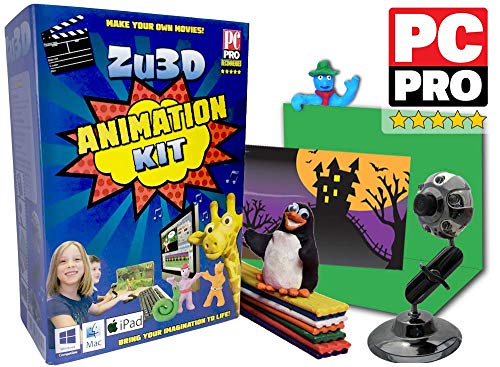
Zu3D focuses on complete software tools with an animation webcam package, green screen, modeling clay, and an included handbook. It’s designed for families and classrooms wanting a straightforward, feature-rich software experience for Windows, macOS, and iPad OS X compatibility.
Why it’s selected: The two licenses support family use and school groups, offering flexibility across devices and learning environments. The bundled green screen and starter kit ease initial scene creation.
Better for: families seeking an intuitive, cross-platform setup. Avoid this if you need advanced editing features beyond the included software suite.
Buying Guide: Key Purchase Considerations
- What is your primary use case? Classroom instruction, family play, or independent projects?
- Do you need built-in lighting and audio or will you supplement with external gear?
- Which software ecosystem best fits your workflow (Windows, macOS, iPadOS)?
- How important is portability? Do you need a carrying case or a compact stage?
- What is your budget for a starter setup versus a long-term build?
- Are you teaching brickfilms, claymation, or paper cutouts? Some kits are optimized for specific styles.
- How important is education-focused content (books, printable activities, and lesson plans)?
Practical comparison tips
- Higher resolution (1080p) improves frame detail but may require more storage and processing power.
- Manual focus is valuable for stop-motion stability; autofocus can introduce jitter between frames.
- Integrated lighting helps in variable indoor lighting but verify color accuracy for skin tones and props.
- Software licensing terms matter if you plan to use on multiple devices or with students.
- Consider future expansion: Will you want to add a macro lens, external lights, or more advanced controls later?
FAQ
- What is the best kit for beginners without prior editing experience?
Kits with complete software, a teaching book, and a mini stage are typically best for beginners, offering guided projects and clear steps.
- Is built-in lighting essential for stop motion?
While not strictly essential, built-in lighting helps maintain consistent exposure and reduces the need for external light rigs, boosting frame-to-frame consistency.
- Can these kits be used for school projects?
Yes, several kits are marketed for classrooms and homeschooling, with teacher endorsements and included activity books.
- Do I need a powerful computer to run the software?
Most stop motion software runs on standard Windows or macOS machines; moderate RAM and storage are usually sufficient, but check each package’s requirements.
- Are there kit options for traveling or field use?
Carrying-case variants and compact stages cater to on-the-go use, making them suitable for field shoots or travel.