Best Video Camera 8mm Tape to Digital Transfer Options for Easy Digitization
If you’re looking to digitize old 8mm, Hi8, or Digital8 tapes, this guide highlights practical transfer solutions and hardware you can buy on Amazon. This list helps different buyers—from casual hobbyists to enthusiasts—choose the right setup for playback, transfer, and preservation. The top picks cover standalone camcorders, transfer bundles, and dedicated 8mm players with USB digitizing support. Below is a quick reference table of the featured products to compare at a glance.
| Product | Best For | Why It Stands Out |
|---|---|---|
| Sony Camcorder for 8mm Digital8 Hi8 Tape Transfer to Computer USB and DVD | Everyday digitization with built-in USB capture | Supports playback of multiple formats; USB transfer to PC or DVD ready |
| Tech Collector 8mm, Digital8, and Hi8 Transfer Bundle for Digitizing 8mm Tapes | Complete bundle for first-time digitizers | Includes camcorder, USB adapter, and AV cables for easy transfer |
| Sony Standard Grade 8mm Camcorder Videotape Cassette, 120 Minutes | Budget-friendly original recording media | Long recording time per cassette; compatible with older hardware |
| Hi8 8mm VCR Video Cassette Recorder, Play and Digitize Your Old 8mm and Hi8 Tapes | Playback and digitization in one unit | Hi8/8mm playback with USB digitizing option |
| Tech Collector Sharp 8mm Tape Player Camcorder w/Blank Tape, USB | Vintage look with direct-to-tape shooting | Built-in USB adapter and digitizing software |
Sony Camcorder for 8mm Digital8 Hi8 Tape Transfer to Computer USB and DVD
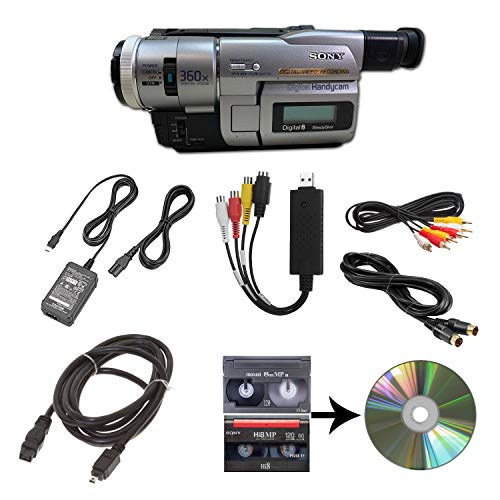
The Sony camcorder serves as a versatile playback device and transfer hub. It supports 8mm, Video8, Hi8, and Digital8 tapes, and includes a USB capture pathway to computer files or DVDs. It also ships with a power supply and AV/S-Video cables for direct TV playback. Best for buyers who want an all-in-one solution that can both play and digitize without additional adapters.
Best for: casual digitizers and hobbyists who prefer a single, cohesive transfer workflow. Caution: USB capture software compatibility may depend on computer OS and drivers.
Tech Collector 8mm, Digital8, and Hi8 Transfer Bundle

This bundle bundles a camcorder with a USB capture device and AV cables, designed to playback and transfer 8mm/Hi8/Digital8 tapes. It’s ideal for first-time digitizers seeking a complete kit without hunting for compatible accessories. It’s best for families preserving vintage footage or collectors digitizing multiple formats.
Best for: beginners who want an all-in-one kit with straightforward transfer. Limitation: may require additional software setup on some computers.
Sony Standard Grade 8mm Camcorder Videotape Cassette, 120 Minutes

This is a classic 8mm camcorder tape cassette with 120 minutes of recording time. It’s best for buyers who need reliable, long-duration tapes for archival use or for testing a digitization workflow with standard media. Caution: These are consumables and require a compatible player or recorder for playback before transfer.
Hi8 8mm VCR Video Cassette Recorder, Play and Digitize Your Old 8mm and Hi8 Tapes

This device plays Hi8 and 8mm tapes and includes a USB adapter to digitize tapes on a PC. It’s best for buyers who want a dedicated playback unit with direct USB transfer. Limitation: may require compatible PC software to complete a clean digitization workflow.
Tech Collector Sharp 8mm Tape Player Camcorder with USB

Combining vintage camcorder playback with a built-in USB option, this unit supports shooting directly to tape while offering a digitizing path via USB. Best for those who want a nostalgic aesthetic and the ability to digitize without a separate capture device. Caution: Built-in features may be more limited than dedicated transfer kits.
Buying Guide: Key Considerations for 8mm Tape Digitization
- Format compatibility: Confirm your tapes (8mm, Hi8, Digital8, Video8) are supported by the device or bundle. Some units handle multiple formats, reducing the need for separate players.
- Transfer method: USB capture is common, but some options rely on AV cables or TV playback followed by separate capture. Choose the path that matches your computer setup and preferred workflow.
- Media condition: Older tapes may need cleaning or more careful playback to minimize audio/video dropouts. Consider a test tape first.
- Storage output: Decide whether you want digital files (MP4, MOV, etc.) or DVDs. USB-based devices often provide direct MP4/AVI outputs, while some bundles focus on DVD burning.
- Power and portability: Some kits include power adapters and batteries; others rely on mains power. If you plan on digitizing on the go, portability matters.
- Software compatibility: USB capture devices often pair with PC software. Ensure the software supports your OS version and offers straightforward editing if needed.
- Future-proofing: Digital preservation benefits from maintaining high-resolution copies and organizing files with metadata. Look for devices that export widely compatible formats and provide simple file naming.
FAQ
- What is the easiest way to start digitizing 8mm tapes?
Use a bundle or camcorder with USB capture to directly transfer to a computer, then organize files with a simple editor. - Do I need a special player for each tape format?
Some devices support multiple formats (8mm, Hi8, Digital8). If you have mixed formats, a multi-format device reduces the need for several players. - Can I burn transferred tapes to DVD?
Yes, many devices include or support DVD burning or offer a straightforward workflow to export video files for burning later. - Will older tapes degrade during transfer?
Tapes can degrade over time; handle tapes gently and perform transfers in a stable environment to minimize further wear. - Is software required for digitization?
Some USB capture devices pair with dedicated software; others generate files directly. Check compatibility with your computer’s OS. - What’s a good first purchase for a beginner?
A transfer bundle or a single camcorder with USB capture is ideal for beginners aiming to digitize multiple tapes efficiently.