Best USB Pan Tilt Zoom Cameras for Clear, Flexible Video
Finding the right USB pan-tilt-zoom (PTZ) camera can boost broadcast quality, meeting efficiency, and classroom engagement. This guide highlights five top USB PTZ webcams or cameras, chosen for reliability, tracking ability, and ease of use. Each option targets a specific buyer type—from streamers and educators to small teams and corporate users. Read on to compare features, ideal use cases, and practical trade-offs.
| Product | Best For | Key Benefit |
|---|---|---|
| OBSBOT Tiny SE | Streamers, content creators | High-frame-rate 1080p at 100FPS with AI tracking |
| Prisual PTZ Camera | Houses of worship, education | 20x optical zoom with PoE, easy web control |
| EMEET PIXY | Online instructors, presenters | Dual-camera AI tracking with 4K main sensor |
| Logitech MeetUp | Small rooms, quick setups | All-in-one conference system with wide FOV |
| Monoprice PTZ Conference Camera | Mid-size meeting rooms | USB PTZ with remote and presets |
These selections emphasize ease of setup, smart tracking capabilities, and flexible mounting options. Each product section below provides a concise snapshot, including best-for guidance and a practical note to help you decide quickly.
OBSBOT Tiny SE 1080P PTZ Webcam

Best for streamers and solo creators who need smooth, intelligent tracking without complex rigs. OBSBOT Tiny SE offers 1080P at up to 100FPS and 720P at 150FPS, delivering ultra-smooth motion for fast action. It includes zone tracking and body-part tracking to keep you centered during dynamic scenes. The AI features help maintain consistent framing during live streams or video calls. A potential limitation is that high-frame rates may require a capable computer and stable network for optimal performance.
- Official partnership highlights its target use in esports and broadcast-style content.
- Smart tracking with zone customization and body-part tracking for precise control.
- Affordable AI-assisted camera suitable for desktop streaming and video calls.
Prisual AI Auto-Tracking 20x PTZ Camera
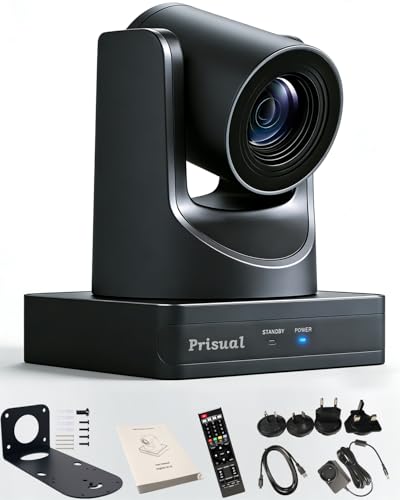
Best for worship, education, and large classrooms that require wide coverage plus significant zoom. Prisual offers 20x optical zoom with AI auto-tracking, true 1080p/60fps output, PoE for simple power and network integration, and flexible mounting. The built-in DHCP-friendly setup makes on-site deployment straightforward. One limitation is that the web interface may require initial familiarity to unlock full control, especially for nuanced preset management.
- Plug-and-play with PoE support reduces cabling complexity.
- Broad compatibility with live production setups and remote control options.
- Three-year local warranty and 24/7 support provide long-term reassurance.
EMEET PIXY Dual-Camera AI PTZ 4K Webcam

Best for professional creators and hybrid productions needing strong reliability and fluid tracking. PIXY pairs a 4K main camera with a secondary AI camera to optimize focus and exposure. It uses 3-chip AI for smoother tracking, offers gesture control, and includes EMEET STUDIO software for preset management. The dual-camera approach can improve framing in moving scenes but may introduce extra setup steps for those preferring single-camera systems.
- Gesture control enables hands-free interaction.
- Presets and whiteboard mode support varied production needs.
- Multiple outputs and software support suit OBS/Twitch workflows.
Logitech MeetUp Conference System

Best for small rooms and quick deployment with integrated audio. MeetUp consolidates camera, microphones, and speakers in one unit with a wide 120° field of view and 4K-ready capture options. It’s optimized for PC, Mac, and tablets in huddle rooms, making setup fast for teams that prioritize simplicity over advanced PTZ controls. A limitation is its fixed, wide field of view, which may not suit rooms needing frequent tight shots or far-subject tracking without external PTZ hardware.
- All-in-one design minimizes setup time.
- Beamforming mics and adjustable speakers enhance voice pickup.
- Wide FOV is ideal for small meeting spaces; not ideal for long-range zoom needs.
Monoprice PTZ Conference Camera

Best for mid-size meeting rooms seeking flexible USB PTZ with preset ability and remote control. Monoprice offers 3x optical zoom and pan/tilt control via included remote, plus USB 2.0 connectivity for power, video, and audio. It’s straightforward for teams that want reliable PTZ with simple software compatibility. A practical constraint is that USB 2.0 bandwidth may limit high-frame-rate options in very active rooms; consider network or system capacity accordingly.
- Remote for convenient preset management and zoom control.
- No-driver requirement simplifies cross-platform use.
- Suitable for mid-sized rooms where advanced features are not essential.
Buying Guide: Key Considerations For USB PTZ Cameras
What should you prioritize when selecting a USB PTZ camera? Consider these questions to align features with your use case:
- What environment will you use it in? Small huddle spaces benefit from wide FOVs, while larger rooms need long-range optical zoom and precise tracking.
- Is tracking essential? AI auto-tracking helps keep speakers in frame, but may require processor headroom and reliable power.
- Do you require multiple angles? Dual-camera setups or easy presets help capture dynamic scenes without manual repositioning.
- What connectivity is available? USB 2.0/3.0, PoE, and network control affect installation complexity and power needs.
- What software will you use? Compatibility with OBS, Zoom, Teams, or custom studio software affects setup time and controls.
- Audio needs? Integrated mics are helpful in compact spaces; consider external mics for larger rooms or higher audio quality.
Practical Comparisons
- Best for high-speed action and solo streaming: OBSBOT Tiny SE for smooth 1080p at 100FPS with AI tracking.
- Best for large rooms with long reach: Prisual PTZ with 20x optical zoom and PoE.
- Best for dual-camera logic and studio setups: EMEET PIXY offers a main 4K sensor plus AI-assisted secondary tracking.
- Best for effortless setups in small spaces: Logitech MeetUp provides an all-in-one conference solution with a wide FOV.
- Best for mid-size meetings with presets: Monoprice PTZ provides reliable USB connection and straightforward PTZ control.
FAQ
- What is a USB PTZ camera good for?
USB PTZ cameras provide flexible framing, pan/tilt/zoom control, and often AI tracking for dynamic scenes in streaming, teaching, and video conferencing.
- Do I need special software to use these cameras?
Many work with common platforms (Zoom, Teams, OBS). Some include software for presets and tracking, while others are plug-and-play with minimal setup.
- Is AI tracking necessary?
Not always, but it helps maintain focus on speakers or subjects in motion. It may require more CPU resources and a stable network.
- What should I consider about zoom capabilities?
Optical zoom preserves detail better than digital zoom. Higher optical zoom is preferable for larger rooms or podium setups.
- How important is audio integration?
Built-in mics simplify setup in small spaces; for larger rooms or higher fidelity, external mics or speakers are recommended.