Best USB Camera to HDMI Converters for Easy Live Streaming
If you need a reliable way to turn a USB webcam into HDMI video for a monitor, TV, or capture card, these adapters deliver plug‑and‑play options, low latency, and wide compatibility. Ideal buyers include live streamers, educators, and content creators who want simple, driver‑free setups or expanded workflow flexibility. Below are five top choices with clear pros, who they’re best for, and a practical caveat for each.
| Product | Best For | Notes |
|---|---|---|
| SZXLCOM USB to HDMI Adapter for UVC Cameras | UVC webcam users needing simple HDMI output | 1080P60 with embedded audio; plug & play |
| SZXLCOM UVC to HDMI Converter 1080P 60Hz | Live streaming with MJPEG UVC cameras | Direct HDMI output; confirm MJPEG support |
| Rybozen Capture Card 4K HDMI Video Capture Card | Gaming/PC streaming with external capture | 4K input, 1080p output; USB 3.0 |
| OBSBOT UVC to HDMI Adapter 2.0 | OBSBOT cameras and similar UVC devices | 4K/1080P, low latency, power passthrough |
| J-Tech Digital UVC to HDMI Converter 4K30 | On‑screen control and 4K output | USB mouse control; built‑in charging |
SZXLCOM USB to HDMI Adapter for UVC Cameras

Best for: Users with compatible UVC USB cameras who want a simple, driver‑free HDMI output. This adapter converts MJPEG UVC cameras to HDMI for monitors, switchers, encoders, and live streaming setups. It supports 1920×1080 at 60 Hz with synchronized UAC audio through a single HDMI connection. The device is plug & play, requiring no computer or drivers. Use this when your camera’s format aligns with MJPEG UVC and you need straightforward live video output.
Why selected: It emphasizes a clean, real‑time HDMI path with embedded audio, making it a reliable choice for basic streaming or presentation setups where simplicity matters.
Caution: Not compatible with H.264/H.265, YUY2/YUYV, NV12/NV21, RGB, or proprietary USB video formats. Verify your camera’s format before purchase.
SZXLCOM UVC to HDMI Converter 1080P 60Hz

Best for: Users with UVC cameras that support MJPEG and want a direct, low‑latency HDMI feed for monitors, switchers, or capture devices. This device is plug‑and‑play with no extra software required, ensuring smooth integration into streaming workflows. It’s well suited for on‑camera monitoring and quick live setups.
Why selected: It offers reliable 1080P60 output with stable compatibility for MJPEG cameras, aligning with common consumer webcam workflows.
Caution: Confirm your camera’s MJPEG format compatibility; it does not support YUY2/YUYV, NV12/NV21, RGB, H.264, or H.265.
Rybozen Capture Card 4K HDMI Video Capture Card

Best for: Streamers and content creators who want to capture video from HDMI sources to a computer using USB 3.0. This device supports up to 1080p60 output for most streaming software, and can handle 4K input signals (unused at 4K60) with smooth real‑time transfer to OBS, Twitch, and other platforms.
Why selected: It emphasizes direct plugin handling with automatic device detection, fitting easy, driver‑free operation typical of PPC or PC streaming setups.
Caution: Output is up to 2K30 if you need maximum compatibility with older capture tools; ensure your software supports your target resolution.
OBSBOT UVC to HDMI Adapter 2.0
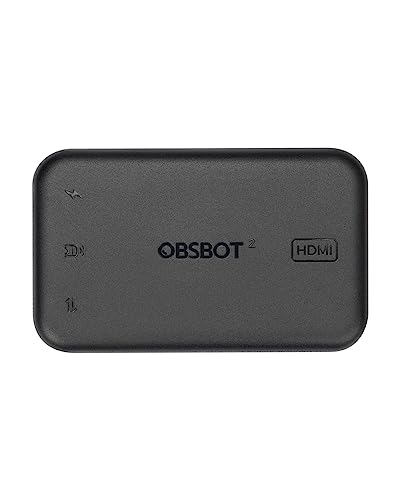
Best for: OBSBOT and other UVC webcam users who need flexible HDMI output with power support. The adapter provides 4K and 1080p outputs, enabling expanded display options for large monitors or live streaming setups. It is designed for low latency and straightforward integration with PCs, Macs, smart TVs, or ATEM devices.
Why selected: The device focuses on expanding OBSBOT cameras’ capabilities, offering a reliable path to HDMI displays without extra software.
Caution: Confirm device compatibility with your camera’s USB protocol; some cameras may require specific firmware or settings for optimal color and timing.
J-Tech Digital UVC to HDMI Converter 4K30

Best for: Users seeking on‑screen controls and 4K output from UVC cameras. This converter supports up to 4K at 30 Hz and provides on‑screen control via a USB mouse for adjusting resolution, audio, and color—handy when software control isn’t available. It also includes camera charging for extended shoots.
Why selected: It combines real‑time HDMI conversion with user‑adjustable on‑screen parameters, which helps tailor the output to different displays and environments.
Caution: The on‑screen controls require a compatible USB mouse and camera that supports UVC control; software independence varies by device.
Buying Guide: Key Considerations For USB Camera To HDMI Converters
- Camera compatibility: Confirm the camera’s video format (MJPEG vs H.264/H.265) and UVC support. Many converters advertise MJPEG compatibility and may not work with H.264/H.265 cameras.
- Resolution and latency: If you need high‑quality monitoring or live streaming, prioritize 1080P60 or 4K30 options with low latency specifications. Check output limits for HDMI and whether your capture card or display supports the same resolution.
- Power and charging: Some adapters offer USB power passthrough to the camera. This is useful for long sessions but may require a separate power source or specific USB ports.
- Driver and software needs: Most listed devices are plug‑and‑play, but a few require drivers or driver uninstall steps if other USB adapters are installed on the system. Plan for a quick setup and potential driver updates.
- Device use case: For simple monitoring or classroom demos, a straightforward MJPEG adapter may be best. For gaming or professional streaming, a capture card or 4K capable converter with low latency and on‑screen controls may be preferable.
FAQ
- Do USB to HDMI adapters require drivers? For most listed adapters, the goal is driver‑free operation. Some models may require drivers in specific environments or when used with particular cameras.
- Will these converters work with any USB webcam? Not all; many rely on UVC compatibility and MJPEG or other supported video formats. Check camera support before purchasing.
- Can I use these with a game console or a DSLR? Yes, HDMI input devices can often accept HDMI output from cameras or capture devices, but verify input resolution and USB compatibility for your camera.
- Is 4K output common for USB to HDMI converters? Several models support 4K, but many operate at 1080p60. Confirm your target resolution and frame rate before buying.
- Do these require external power? Some provide power through USB while others may not. If using a high‑quality 4K or long cable, battery or wall power may be beneficial.