In the world of digital photography, a dependable USB data transfer cable is essential for moving images from camera to computer, backing up precious memories, or charging gear when you’re on the go. The right cable should fit your camera family, support fast transfers, and withstand regular use. This guide highlights five USB cables favored by American photographers for Canon and Nikon systems, offering a mix of lengths, durability, and broad compatibility. Whether you own a PowerShot, an EOS Rebel, a Nikon DSLR, or a Coolpix, these picks help keep your workflow smooth and predictable.
The table below provides a quick snapshot of each option, focusing on compatibility, length, and primary benefit. Use it to compare at a glance before diving into detailed product notes.
| Product | Brand | Model / Notes | Key Benefit |
|---|---|---|---|
| SCOVEE Camera USB Cable Cord for Canon Rebel/PowerShot | SCOVEE | Mini B USB data transfer; 6 ft | Broad Canon compatibility; reliable data transfer |
| Ancable UC-E6 USB Cable, 3-Feet USB Mini-B | Ancable | UC-E6; Nikon Coolpix and DSLR series | Plug-and-play, tangle-free cable for Nikon systems |
| USB Cable Photo Transfer UC-E6 for Nikon | ienza | UC-E6; Nikon D3300, D750, D5300, D7200, D3200 | Wide Nikon compatibility for quick transfers |
| SCOVEE Replacement USB Cable for Nikon | SCOVEE | 3 ft; UC-E20 compatibility | Replacement cable with Nikon and Canon compatibility |
| Camera IFC-400PCU USB Data Cable for Canon | ienza | IFC-400PCU; Canon Rebels and PowerShot | Supports many Canon models needing IFC-400PCU |
SCOVEE USB Cable For Canon Rebles
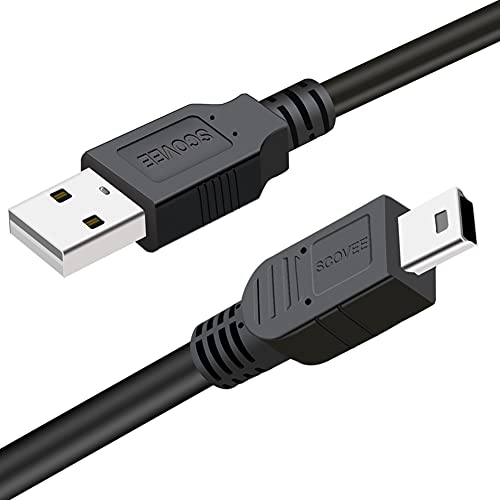
The SCOVEE Camera USB Cable is a versatile Mini-B USB cord designed to work with Canon Rebel, PowerShot, EOS DSLR, and ELPH models. Its six‑foot length provides flexible setup options—whether you’re tethering a camera at a desk, backing up shots from a conference, or transferring files during travel. The cable supports data transfer from camera to PC or Mac, a common need for photographers who want to curate, edit, and share images quickly. The included compatibility range spans many older and mid‑range Canon cameras, making it a practical, affordable option for households with multiple Canon devices.
In addition to general compatibility, this SCOVEE cable is described as supporting a broad line of Canon models, including several ELPH and SX series cameras. The Mini‑B 5‑pin interface is a standard connection for many legacy devices, helping ensure reliable data transfer without the hassles of Wi‑Fi or memory card readers. For users who need a straightforward, dependable link between camera and computer, this cable offers a simple, ready‑to‑use solution that minimizes setup time and technical confusion.
Ancable UC-E6 USB Cable For Nikon
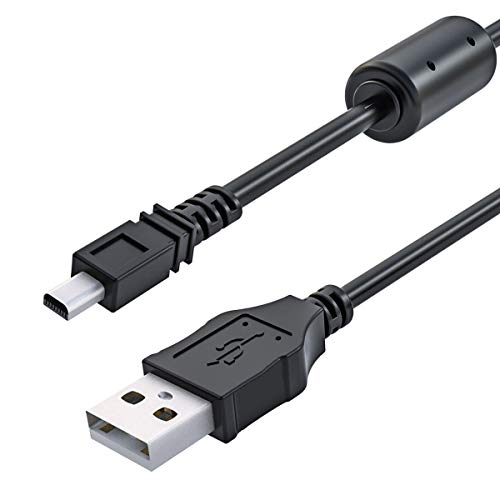
The Ancable UC-E6 USB Cable is a 3‑foot USB Mini‑B data transfer cord designed for Nikon Coolpix models as well as various Nikon DSLRs. It provides a straightforward plug‑and‑play connection to a computer, allowing you to download photos directly without removing the SD card or relying on wireless transfers. The cable is marketed as tangle‑free and high quality, with an emphasis on maximum conductivity to minimize data loss during transfers. This makes it a practical option for photographers who frequently move large photo batches from camera to computer during shoots or at home studios.
As a broad Nikon‑oriented solution, the UC‑E6 supports a range of Nikon devices, including compact Coolpix cameras and a variety of DSLR models. Its build focuses on durability and dependable performance, suitable for travel, outdoor shoots, or classroom use where you need a reliable cable with predictable results. If your workflow centers on Nikon hardware, this cable offers a simple, cost‑effective way to keep your images moving quickly from camera to workstation.
UC-E6 Nikon USB Cable For Nikon D3300

This USB cable is described for Nikon D3300, D750, D5300, D7200, D3200, and additional Coolpix models, expanding its usefulness across a wide Nikon lineup. It enables straightforward image downloads via the computer’s USB port on both Mac and PC platforms. The listing also mentions compatibility with various Nikon DSLRs and Coolpix cameras, including older models and popular entry‑level bodies. For Nikon shooters who want a single, dependable transfer cable that covers multiple bodies, this UC‑E6 variant provides a useful balance of compatibility and value.
The product notes also illustrate how the cable is commonly cataloged as UC‑E16 or similar variants, reflecting Nikon’s familiar mini‑USB transfer standard. If you own more than one Nikon camera or share files across devices with friends or clients, keeping a few reliable UC‑E6 cables on hand can streamline your photo workflow and minimize downtime between shooting and post‑production.
SCOVEE Replacement USB Cable For Nikon

SCOVEE’s replacement USB cable is pitched as a practical option for Nikon DSLR users who need a dependable backup or replacement cord. The product specifies compatibility with Nikon D3400, D3500, D5600, and D7500 series cameras, along with 1J5 and other Nikon models that use UC‑E20 connectors. It’s advertised as a 3‑foot USB charger and data transfer cable, which suits desk setups, studio work, or on‑location shoots where a shorter, sturdy cable reduces clutter while delivering reliable performance.
Additionally, this SCOVEE item notes compatibility with Canon PowerShot SX720 HS, positioning it as a versatile option for households or small studios that mix Canon and Nikon devices. As a replacement cable, it emphasizes ease of use and straightforward replacement for worn or broken cords. For photographers who prefer a single, budget‑friendly cable to cover several Nikon bodies and a few Canon cameras, this SCOVEE offering can be a convenient choice without sacrificing reliability.
Camera IFC-400PCU USB Data Cable For Canon

The Camera IFC-400PCU USB data transfer cable is presented as a versatile option for Canon Rebel EOS T1i through T7i models, along with select PowerShot and Vixia camcorders. The listing highlights its use for transferring pictures and other files from Canon cameras to a PC or Mac and notes compatibility with a wide list of Canon models that require IFC‑400PCU, IFC‑200U, or IFC‑500U cables. The included emphasis on a “mini USB 5‑pin” device suggests broad compatibility with older and current Canon devices that rely on this interface, making it a familiar choice for Canon shooters who prefer standardized data transfer across multiple bodies.
Canon owners often manage large photo libraries, and a reliable cabling option helps keep backups and transfers efficient. This IFC‑400PCU cable is positioned as a robust data link for photographers who operate across a range of Canon cameras, from classic Rebels to newer EOS models. By focusing on widely compatible Canon configurations, this cable aims to minimize the need for model-specific adapters while maintaining solid transfer performance for daily workflows.
Buying Guide
Choosing the right USB cable for your camera setup involves balancing compatibility, length, and durability with your workspace habits. Here are key considerations to help you decide which option best fits your needs:
- Camera compatibility: Confirm your camera’s model and port type before buying. Some Canon models use Mini‑B USB 5‑pin connectors, others rely on newer interfaces or model‑specific cables like IFC‑400PCU. Nikon users should verify whether a UC‑E6 or UC‑E20 variant matches their DSLR or Coolpix line.
- Cable length: Length affects desk and field workflows. Shorter cables (3 ft) reduce clutter and signal loss risk in tight spaces, while longer cords (6 ft) offer more flexibility when shooting away from a computer or during on‑site transfers.
- Data transfer speed and reliability: Most of these cables operate over USB 2.0 at up to 480 Mbps, which is more than sufficient for still photos and standard videos. For higher‑end video work, ensure the cable supports your device’s data bandwidth needs.
- Build quality: Look for solid connectors, a robust jacket, and durable housings. Nylon braiding or metal shells help withstand daily use, especially in busy studios or on location.
- Durability features: Some cables offer anti‑interference elements, magnetic rings, or reinforced strains to resist everyday wear. These features can improve reliability in environments with electromagnetic noise or frequent bending.
- Cross‑brand flexibility: If you own both Canon and Nikon gear, consider cables that are compatible with multiple model families, or keep separate cables for each brand to simplify compatibility checks during shoots.
- Data vs charging capability: Some cables are strictly data transfer links, while others can also supply charging power to devices. If you rely on charging via USB, verify the cable’s power delivery specs for your camera or accessory battery.
- PC and Mac compatibility: Ensure the cable is compatible with your computer’s operating system. Most of the listed options work with both Mac and Windows, but it’s worth confirming if you use specialized photo management software.
- Brand reliability and warranties: Reputable brands with clear support channels reduce the risk of compatibility issues and often provide replacement under warranty if a cable fails prematurely.
By aligning your choice with these factors, you’ll optimize transfer speed, minimize downtime, and keep your photo library well organized. The five cables reviewed here cover a broad range of Canon and Nikon needs, from budget replacements to flexible, multi‑model solutions. When you pick the right one, you’ll spend less time tethered to a computer and more time behind the lens capturing memories.