Best USB 3.0 Streaming HD Video Cameras for Live Streaming
Looking for reliable USB 3.0 streaming cameras that deliver smooth 1080p to 4K visuals for live streams, tutorials, or video calls? This guide highlights five compatible options that leverage USB 3.0 for low-latency capture and broad device compatibility. Each pick targets different needs—from plug-and-play simplicity to higher-resolution outputs and adjustable optics. The top picks are best suited for beginners building a streaming setup, content creators needing reliable performance, and professionals requiring versatile connection options.
| Product | Brand | Best For |
|---|---|---|
| Capture Card Nintendo Switch, 4K HDMI Video Capture Card, 1080P 60FPS | Rybozen | Streamers using consoles or cameras via HDMI to USB 3.0 |
| 4K HDMI Capture Card for Streaming, Full HD 1080P 60FPS USB 3.0 | VIXLW | Multi-device streaming with strong compatibility |
| Logitech C920x HD Pro PC Webcam | Logitech | Desktop streaming, meetings, and general webcam use |
| Logitech Brio 101 Full HD 1080p Webcam | Logitech | Professional-grade video with privacy features |
| Guermok Video Capture Card, 4K USB3.0 HDMI to USB C | Guermok | Portable 1080p/60fps capture for mobile/desktop setups |
Rybozen 4K HDMI to USB 3.0 Capture Card

Best for budget-conscious streamers who want Plug and Play setup with broad device support. It supports 1080p input and outputs up to 2K30Hz, with 4K30/60Hz input recognition. It works with Windows and Mac OS and is designed to minimize CPU load, making it suitable for Twitch, YouTube, OBS, and similar platforms. This option is ideal for console-based streaming or using cameras and camcorders as a webcam. Caution: It does not support 4K60Hz output; ensure your host system uses USB 3.0 for best results.
VIXLW 4K HDMI Capture Card for Streaming

Better for users needing broad compatibility and a straightforward plug-and-play experience. It handles 1080p at 60fps from HDMI sources and uses USB 3.0 for low-latency streaming to OBS, Twitch, YouTube, and more. It’s a solid all-around choice for game consoles, cameras, and camcorders. Caution: Like many capture devices, real-world performance depends on host PC performance and software configuration; ensure your software is set to the correct input format.
Logitech C920x HD Pro Webcam

Best for desktop-focused streamers who want reliable color, autofocus, and integrated audio. The C920x is widely used for streaming and meetings with strong lighting correction, making it a strong baseline camera for those starting a streaming setup. Caution: Lower light performance compared with premium webcams; external lighting can improve results.
Logitech Brio 101 Full HD 1080p Webcam

Best for professionals seeking high-quality video with privacy features and automatic light balance. The Brio 101 includes RightLight and a privacy shutter, making it suitable for work-from-home setups, streaming, and presentations. Caution: Higher price point than entry-level webcams; consider feature needs before purchasing for casual use.
Guermok 4K USB3.0 HDMI to USB C Capture Card

Choose this for portable, mobile-friendly capture needs with USB-C compatibility. It supports 1080p60fps output and 4K input at 30Hz, enabling efficient live streaming and screen capture. Caution: Not intended for direct display output; requires capture software on a computer.
Acer Video Capture Card with USB 3.0
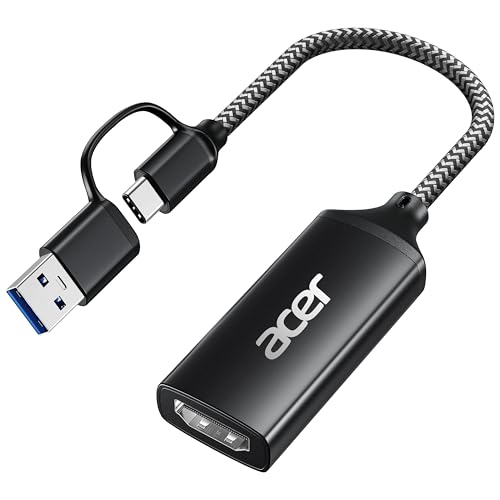
Best for users needing a versatile USB 3.0 solution with 1080p60 capture and simple plug-and-play setup. It supports HDMI input up to 4K30 and uses a dual USB-A/Type-C interface for broad compatibility. Caution: Ensure the host USB 3.0 port is used to achieve the stated performance.
Buying Guide: Key Purchase Considerations
- Resolution and frame rate: Match the device’s output to your content needs. For streaming, 1080p60fps is common; 4K inputs are beneficial if you plan 4K output or future-proofing.
- Connection type and latency: USB 3.0 provides lower latency and higher bandwidth than USB 2.0. Verify compatibility with your PC or Mac and with your capture software (OBS, Streamlabs, etc.).
- Plug-and-play vs. driver-dependent: Plug-and-play devices are easier for beginners, but some setups may require software configuration for optimal performance.
- System compatibility: Check operating system support (Windows or Mac) and ensure your hardware meets the USB 3.0 requirements for steady streaming.
- Use-case alignment: For console gaming, prioritize devices with strong HDMI input handling and minimal latency. For webcam needs, consider built-in features like autofocus, lighting correction, and privacy shutters.
- Portability and size: If you travel or stream on the go, a compact, lightweight capture card is advantageous.
FAQ
- What is USB 3.0 capture card good for?
USB 3.0 capture cards provide high-bandwidth video transfer from HDMI sources to a computer, enabling smooth live streaming and recording with low latency.
- Do I need drivers for these devices?
Many are plug-and-play, requiring no drivers. Some may work best with specific software settings; consult the user guide for optimal setup.
- Can these capture cards work with consoles?
Yes. Several listed devices support HDMI inputs from PS4/PS5, Xbox, Nintendo Switch, and other HDMI sources when connected to a computer via USB 3.0.
- Is 4K input necessary for streaming?
Not always. If your output is 1080p60, 4K input can still be beneficial for future-proofing or higher-quality capture when downscaled.
- Will these work with Mac and Windows?
All listed options claim compatibility with Windows and Mac OS, but verify with your specific system version and required software (OBS, Zoom, etc.).
- What should I consider when choosing between a webcam and a capture card?
Webcams encode video directly with built-in processing, while capture cards transfer raw HDMI output to a computer for processing by software. Choose based on desired control, flexibility, and hardware setup.