Best USB 2.0 UVC HD Webcams for Clear Video Conferencing and Streaming
For buyers seeking reliable USB 2.0 UVC HD webcams, this guide highlights five models with strong image quality, built-in mics, and practical privacy features. Each pick targets a different typical user: corporate video calls, streaming and content creation, flexible lighting and motion handling, or compact setups for travel. The summary table below helps you compare at a glance and identify the right fit for your needs.
| Product | |
|---|---|
| Gohero Full HD 1080P Webcam | Small to mid-size meetings; clear audio with dual mics |
| Logitech Brio 101 | Privacy-minded users and better light handling for meetings |
| Arducam 1080P Low Light WDR USB Camera | Low-light environments and wider angles |
| EMEET C960 1080P Webcam | Plug-and-play home offices with dual mics |
| Arducam 4K 8MP IMX219 Autofocus | Detail-rich video and close-up work at varying distances |
Gohero Full HD 1080P Webcam

The Gohero webcam uses a Full HD 1080p sensor and H.264 encoding for sharp video during video calls, streams, or recordings. It features dual autofocus systems to maintain sharp focus, and a built-in dual microphone setup with noise reduction to minimize background chatter. This model is best for compact home offices or small conference rooms where clear audio and stable focus are priorities.
Who this is best for: remote workers who need reliable focus and clear voice pickup in moderate lighting. Why chosen: strong autofocus, clean 1080p video, and privacy-conscious design with a physical cover.
Caution: Autofocus performance can vary with rapid scene changes; ensure adequate lighting for best results.
Logitech Brio 101 Full HD 1080p Webcam

Logitech Brio 101 emphasizes meeting-ready performance with right-light balance and privacy shading. It supports a robust light optimization feature to reduce shadows, helping you look your best in variable environments. A built-in privacy slide adds quick concealment when not in use, making it suitable for shared spaces and open offices.
Who this is best for: professionals needing dependable lighting performance and privacy controls in Zoom, Teams, or collaborative apps. Why chosen: advanced lighting feature, simple privacy control, and broad compatibility.
Caution: The 1080p frame may feel limited in very bright or very dark rooms; consider additional lighting if your environment is inconsistent.
Arducam 1080P Low Light WDR USB Camera

This Arducam model emphasizes low-light performance and a wide 100-degree diagonal field of view. It supports 1920×1080 video with H.264 and offers an M12 lens with IR filtering. An integrated microphone enables basic audio capture for everyday conferencing or streaming in dim environments.
Who this is best for: users who frequently video in darker rooms or rooms with uneven lighting. Why chosen: superior low-light performance and wide field of view for more on-screen context.
Caution: Wide-angle appearance can distort perceptual size at close range; place the camera slightly above the monitor for best results.
EMEET C960 1080P Webcam

EMEET’s C960 offers a pair of omnidirectional microphones and a fixed focus design with automatic light adjustment. It emphasizes plug-and-play compatibility with common video apps and is described as a solid choice for home offices, education, and casual streaming. The fixed focus helps keep costs down while delivering reliable everyday video quality.
Who this is best for: light-duty video calls and streaming setups where ease of use matters. Why chosen: dual mics, automatic exposure adjustments, and reliable performance for standard environments.
Caution: Fixed focus means objects at varying distances may blur if you move too close or too far from the camera; maintain a consistent working distance for best results.
Arducam 4K 8MP IMX219 Autofocus USB Camera
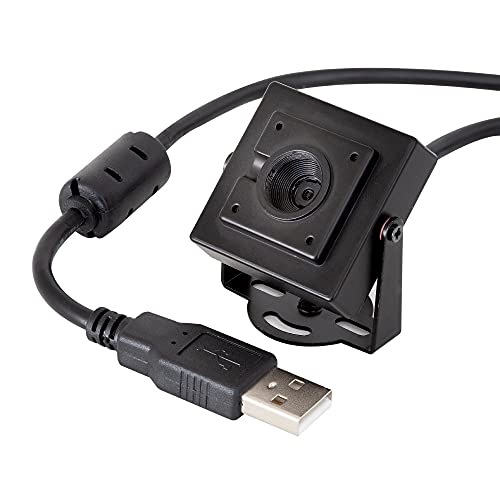
This Arducam model rises above with an 8MP IMX219 sensor for higher still resolution and more accurate color reproduction. Autofocus is designed to handle objects at millimeter distances and greater distances on the same camera. It includes a built-in microphone and supports multiple HD frame rates, offering flexibility for applications that require sharper detail.
Who this is best for: users needing enhanced detail and autofocus across variable distances, such as content creation or technical demonstrations. Why chosen: higher still resolution and reliable autofocus across a range of depths.
Caution: Higher resolution may require more processing power; if your system is limited, 1080p with standard settings might perform more smoothly.
Buying Guide: Key Considerations For USB 2.0 UVC HD Webcams
What should you focus on when choosing a USB 2.0 UVC webcam? The following bullet points address practical questions and buyer intent.
- Resolution and image quality: Most models here target 1080p; a few offer higher still-image capability. For routine video calls, 1080p with reliable autofocus and decent dynamic range is sufficient.
- Autofocus vs fixed focus: Autofocus helps with moving subjects or varying distances; fixed focus keeps price and setup simple but requires stable distance from the camera.
- Low-light performance: Look for sensors with wider dynamic range or WDR features to reduce grain in dim rooms.
- Microphone quality: Built-in mics vary in pickup range and noise reduction. Dual mics can improve voice clarity in busy environments.
- Privacy features: A physical cover or privacy shutter is valuable for immediate, obvious privacy control when not in use.
- Software compatibility: Ensure compatibility with common video apps (Zoom, Teams, YouTube, Switch) and operating systems (Windows, macOS, Linux).
- Mounting and field of view: A wide angle can capture more of your desk or room, but may distort close-up subjects. Consider placement height for the best framing.
- Plug-and-play simplicity: USB 2.0 UVC webcams are designed to work without extra drivers, reducing setup time and compatibility concerns.
Frequently Asked Questions
- What does UVC stand for and why does it matter?
– UVC means USB Video Class. It ensures plug-and-play compatibility with most operating systems and video apps without extra drivers. - Is 1080p enough for professional meetings?
– For standard meetings, 1080p with good lighting and a quality microphone is typically sufficient. Higher-end models offer better color and dynamic range. - Should I choose autofocus or fixed focus?
– Autofocus is better for varying distances or moving subjects. Fixed focus is fine for stationary desks and simple setups, usually with lower cost. - Do privacy features matter if I’m in a private office?
– Yes, a physical privacy cover provides immediate assurance when you’re away from the camera, and some covers also prevent accidental exposure. - Will a USB 2.0 webcam work on a modern PC?
– Yes. USB 2.0 UVC webcams are designed for broad compatibility with current PCs and most laptops, with straightforward setup. - Can I use these webcams with gaming consoles or streaming platforms?
– Many offer compatibility with streaming software and some console modes (for example, Nintendo Switch in certain configurations). Check device specs for platform support.