Best Studio-Quality Video Camera and Setup for Professionals
The modern studio demands gear that captures crisp, true-to-life visuals and clear audio for broadcasts, conferencing, and content creation. This guide highlights five top options that deliver studio-grade video quality, network-ready features, and reliable performance across home studios and small to mid-size production spaces. Each product section below includes core specs and what to consider when building or upgrading a studio rig.
| Product | Brand | Key Value |
|---|---|---|
| Elgato Facecam 4K | Elgato | 4K60, DSLR-like sensor, Camera Hub controls |
| Blackmagic Design Micro Studio Camera 4K G2 | Blackmagic Design | Live production-ready, dual native ISO, RAW options |
| Poly Studio 4K USB Video Conference System | POLY | 4K, AI framing, NoiseBlockAI |
| Poly Studio P15 Personal Video Bar | POLY | 4K, integrated mics and speakers, AI framing |
| Poly Studio R30 4K Video Conferencing Bar | POLY | Automatic framing, 4K, Teams/Zoom Certified |
Elgato Facecam 4K Features And Studio-Grade Clarity

Ultra HD clarity defines this webcam, delivering 4K at 60 frames per second for streaming, content creation, or professional conferencing. It uses a premium Sony STARVIS 2 CMOS sensor and Elgato Prime Lens technology to produce sharp detail and vibrant color. The Camera Hub software provides creative control, enabling adjustments to color, exposure, and effects to match a studio aesthetic or brand style. This camera is designed for desktop use yet offers DSLR-like image quality for a polished, broadcast-ready look.
Blackmagic Micro Studio Camera 4K G2 Overview

Engineered for live production, the Micro Studio Camera 4K G2 features a compact carbon fiber body, dual native ISO options, and Blackmagic RAW recording. It includes built-in color correction, microphone input, and support for remote control and tally. This camera is ideal for studio setups that require robust performance with flexible lens options, integration with ATEM switchers, and high dynamic range to handle complex lighting environments—great for broadcast or large-scale productions.
Poly Studio 4K USB Video Conference System

Poly Studio 4K USB Video Conference System combines a high-resolution camera, microphone array, and built-in speakers into a single device. It offers AI-powered features including auto-framing and tracking, which keeps participants centered on camera. Noise reduction and Acoustic Fence technologies help minimize background disturbances, making it suitable for small meeting rooms or home studios that require clear, professional video and audio for Teams, Zoom, or other conferencing platforms.
Poly Studio R30 4K Video Conferencing Bar
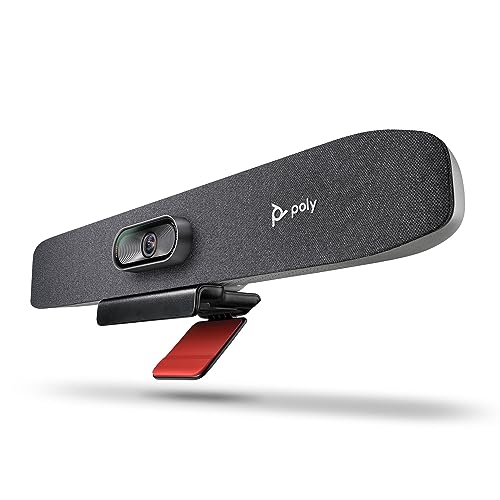
The Studio R30 blends a 4K camera, microphones, and speakers within a single bar designed for mid-to-large rooms. It supports automatic camera framing with DirectorAI technology, ensuring all participants remain visible. The system emphasizes clear audio via an intelligent mic array and noise reduction, with Teams and Zoom interoperability to streamline virtual meetings in professional environments.
Poly Studio P15 Personal Video Bar

The Studio P15 packs 4K video with integrated microphones and speakers into a single compact device. Automatic camera framing centers the user, while AI-powered features optimize audio and video quality for personal or small-team use. It’s a plug-and-play option that reduces setup complexity for desk-based workflows, offering strong performance for home studios, remote work, and livestreams where space is at a premium.
Buying Guide: Key Considerations For Studio-Quality Video Cameras
- Resolution and frame rate: Higher resolutions (4K) and higher frame rates (60 fps) deliver smoother, more realistic footage, especially for fast motion or broadcast-grade footage. Consider whether you need RAW or 10-bit color for post-processing.
- Sensor technology: Large, quality sensors (e.g., Sony STARVIS, CMOS variants) improve low-light performance and color fidelity. Sensor size and pixel pitch influence dynamic range and noise levels.
- Lens system and compatibility: Interchangeable-lens cameras offer flexibility for different scenes, from tight interview setups to wide-stage shots. Check mount compatibility (MFT, EF, PL, etc.).
- Autofocus and exposure features: In-studio setups, AI framing, auto-exposure, and face tracking help maintain consistent composition without manual adjustments.
- Color management: Built-in color correction, LUT support, and RAW recording options give you more control in post-production or live color grading.
- Audio integration: Mics, speaker systems, and noise reduction features influence overall video quality. Some systems include built-in mics; others rely on external mics for best results.
- Workflow and ecosystem: Consider compatibility with conferencing platforms (Zoom, Teams), streaming software (OBS), and switchers or control hubs for overall studio control.
- Portability vs. size: Desktop webcams and compact cameras suit small spaces; larger studio cameras are better for dedicated rooms and higher production values but require more setup and space.
- Power and connectivity: USB-C, HDMI, and network options affect installation and scalability. Consider redundant power and durable sleeves for long shoots.
- Budget and value: Balance camera quality with the required features (AI framing, built-in audio, remote control) to maximize return on investment for your use case.
When selecting gear for a studio, align the camera capabilities with your room size, lighting plan, and preferred workflow. A combination of a high-quality camera, a reliable audio solution, and a flexible lighting setup often yields the best overall results for studio-grade productions.