Best Studio-Quality Video Cameras for Professional Video Calls and Content
Whether you’re upgrading a home studio or equipping a small conference space, the right camera setup makes a measurable difference in clarity and presence. This guide highlights five studio-quality video cameras and related kits that help you look your best on Zoom, Teams, and other platforms. It’s ideal for remote workers, content creators, educators, and small meeting rooms. Each option is evaluated for image quality, AI framing, audio integration, and ease of use in real-world settings.
Here’s a quick summary of the selected products to help you compare at a glance. The table focuses on who each product is best for and key strengths.
- Poly Studio P15 Personal Video Bar — Best for desk‑based professionals who want 4K video, built‑in audio, and easy Zoom/Teams certification.
- Poly Studio X52 All‑in‑One Video Bar — Best for small to medium conference spaces needing an all‑in‑one solution with strong processing and simple setup.
- Poly Studio R30 4K Video Conferencing Bar — Best for small rooms that require automatic framing and reliable noise reduction.
- Elgato Facecam 4K — Best for streamers and content creators who want DSLR‑like image quality and flexible customization.
- Poly Studio X50 — Best for mid‑sized rooms needing comprehensive camera, mic, and speaker integration with easy control.
Poly Studio P15 Personal Video Bar

Best for desk‑based professionals who want a 4K camera with integrated microphone, speaker, and privacy shutter. The P15 provides automatic camera framing to keep you centered in frame and 4K video for sharp detail. It includes a powerful microphone array and a premium speaker for clear two‑way conversations. NoiseBlockAI and Acoustic Fence reduce distractions, improving meeting flow. Best used in personal offices or focused workstations where a streamlined, all‑in‑one setup is preferred.
Limitations: As a single unit designed for personal use, it may be overkill for larger rooms or teams that require multiple participants in expansive spaces. Compatibility is strongest with Zoom and Teams environments where Poly devices are certified.
Poly Studio X52 All‑in‑One Video Bar

Best for small to medium conference rooms that require an all‑in‑one solution with plug‑and‑play setup. The X52 combines camera, mics, and speakers in a single bar and includes a controller kit for simple meeting control. It supports high‑quality video at 60 fps and offers reliable wired networking for stable connectivity. This option is well suited for teams that want a compact device with minimal setup and robust performance in collaborative spaces.
Limitations: As an all‑in‑one unit, room acoustics and camera positioning have a direct effect on performance. It may be less flexible than separate components in larger rooms or for non‑standard layouts.
Poly Studio R30 4K Video Conferencing Bar
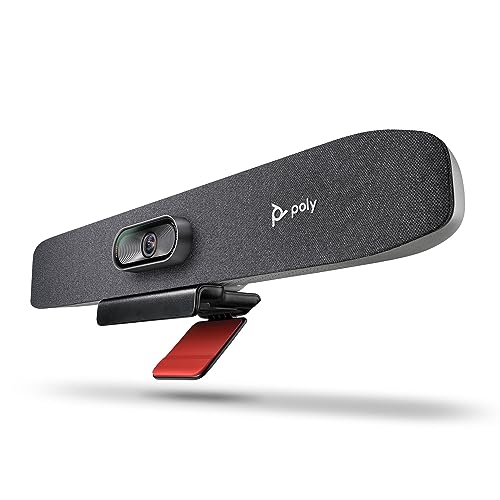
Best for small rooms that require automatic framing and strong AI features. The R30 delivers 4K video with a wide 120‑degree field of view and uses DirectorAI auto‑framing to keep participants centered. It includes NoiseBlockAI for clearer conversations, making it a solid pick for classrooms or private meeting areas where consistent framing is essential. This model fits spaces where you want reliable tracking without manual camera adjustments.
Limitation: The camera’s tracking works best when participants stay within the framing area; rapid movement to the edges may briefly reduce tracking accuracy. Connectivity relies on compatible conferencing platforms and network conditions.
Elgato Facecam 4K

Best for creators and content producers who want DSLR‑like image quality in a compact webcam. The 4K60 video is paired with a Sony STARVIS 2 CMOS sensor and Elgato Prime Lens technology for sharp detail and vibrant colors. Camera Hub software provides customizable effects and settings, enabling a studio‑grade look for streams, tutorials, or professional calls. This option is ideal when you need high‑resolution video from a laptop or desktop without a dedicated camera body.
Limitation: While excellent for stationary setups, it lacks the built‑in AI framing found in some Poly devices. It relies on software adjustments for dynamic scenes and may require a stable lighting setup for best results.
Poly Studio X50 All‑in‑One Video Bar

Best for mid‑sized rooms requiring integrated camera, mic, and speaker with controlled meeting experiences. The X50 combines a 4K video camera with a full audio system in a single bar and includes simple control options via the TC8 Touch Controller. Poly’s machine‑learning features help reduce distractions with NoiseBlockAI, while automatic framing improves participant visibility. It works with Teams, Zoom, and other platforms for flexible collaboration in denser spaces.
Limitation: As an all‑in‑one device, room shape and seating can influence framing and mic pickup. It’s most effective where there is consistent seating and a clear line of sight to participants.
Buying Guide: Studio‑Quality Video Cameras And Setups
- Image quality matters: Choose true 4K for sharp detail, especially if you publish or stream content. Consider sensor size and lens quality—for example, Elgato Facecam 4K uses a premium sensor and lens to deliver DSLR‑like results.
- Framing and tracking: AI framing (DirectorAI, auto‑framing) helps if you move, stand, or have multiple participants. For fixed desks, a camera with a good field of view and reliable autofocus can be sufficient.
- Audio integration: Built‑in mics and speakers simplify setup, but external mics or room acoustics can still improve sound. Look for noise reduction features like NoiseBlockAI when background noise is present.
- Room suitability: Small rooms benefit from compact, all‑in‑one bars; larger rooms may need flexible cameras plus separate mics and speakers. Consider tripods, mounts, and display connections when planning installation.
- Platform compatibility: If your team uses Zoom or Teams, opt for devices with official certification or strong compatibility to minimize configuration time and ensure reliable performance.
- Future‑proofing: A kit that offers easy updates, software control, and scalable options (additional mics or displays) can extend the life of your studio setup.
Frequently Asked Questions
- What is the advantage of a 4K camera for video calls? It provides crisper detail and more flexible zooming, especially on large displays or when recording content.
- Do all‑in‑one video bars replace separate cameras and mics? They can simplify setup and space, but may offer less customization for larger rooms.
- Is AI framing essential for home studios? It helps with dynamic movements and keeps participants centered, but a fixed framing camera can be sufficient in static setups.
- What are NoiseBlockAI and Acoustic Fence features? They reduce background noises to improve voice clarity during calls.
- Should I choose a camera bar or a standalone camera? Bars are ideal for compact spaces with simple installation, while standalone cameras offer more placement flexibility and customization in larger studios.
- Can these devices work with several platforms? Yes, many Poly models support Teams, Zoom, and other common conferencing platforms with certification and optimized performance.