Best Stop Motion Camera Kits for Kids: Creative Ways to Animate Today
Exploring stop motion empowers kids to tell stories with imagination and precision. The following hand-picked kits pair kid-friendly cameras with easy software, guided projects, and classroom-ready activities. Whether used for homeschooling, after-school clubs, or family play, these picks help young creators learn sequencing, storytelling, and basic film concepts while having fun.
| Product | Brand | Key Focus |
|---|---|---|
| HUE Animation Studio: Blue Complete Kit | HUE | Camera, software, book, mini stage |
| Stopmotion Explosion: Complete HD Kit | Stopmotion Explosion | HD camera, software, book |
| Zu3D Complete Stop Motion Kit | Zu3D | Software licenses, webcam, props |
| HUE Animation Studio: Green Complete Kit | HUE | Camera, software, book, mini stage |
HUE Animation Studio Blue Complete Stop Motion Kit

The Blue kit from HUE combines a HD USB camera with integrated microphone, user-friendly stop motion software for Windows and macOS, and a 64-page full-color animation book. A mini stage with background, printable activities, and sound effects expand creative options. It’s designed as a teacher-recommended, gender-neutral activity suitable for homeschooling, after-school clubs, and classrooms. This kit has STEM.org authentication and has earned accolades from toy guides and learning organizations.
Stopmotion Explosion: Complete HD Stop Motion Kit

This complete kit delivers Full HD 1080p capture with an upgraded focus ring and a low-profile camera. The package includes easy-to-follow stop motion instructions and a book, plus access to online tutorials. It’s well-suited for LEGO brickfilms, modeling clay, action figures, and other toys. The kit connects to a computer directly and does not require detaching components, making it approachable for kids and educators alike.
Zu3D Complete Stop Motion Kit
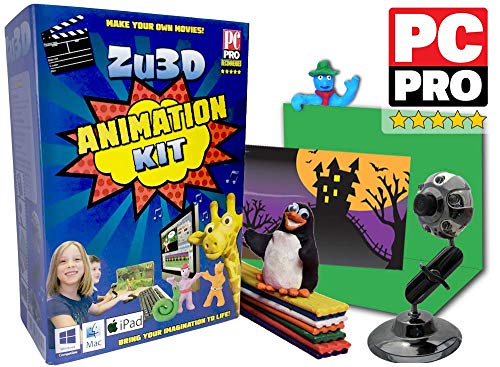
Zu3D blends an animation software suite with a dedicated webcam, green screen, modeling clay, a mini-set, and a handbook. It supports Windows, macOS, and iPad, providing a broad ecosystem for kids to craft stop motion stories. The software offers a library of sound effects, music, and artwork, helping learners experiment with timing, pacing, and storytelling across multiple devices.
HUE Animation Studio Green Complete Kit

The Green variant mirrors the Blue kit’s core components with the same camera, software, and 64-page animation book, plus the mini stage and background. It’s positioned as a classroom-friendly, gender-neutral activity, suitable for homeschool projects or after-school science and art clubs. This kit emphasizes accessible entry into stop motion with guided activities and celebrated educational credentials.
HUE Animation Studio Red Complete Kit

The Red edition offers the same complete setup: HUE HD USB camera with built-in microphone, Windows/macOS compatible software, an illustrated 64-page book, and a compact stage with a background. It’s marketed as a versatile, family-friendly activity that fosters STEM learning through arts-focused storytelling. Like its blue and green siblings, it carries recognition from education-focused organizations and toy guides.
Buying Guide
Choosing a stop motion kit for kids involves balancing ease of use, durability, and creative flexibility. Consider the camera quality, software accessibility, available instructional materials, and whether the kit includes a stage or backdrops for immediate play. For younger children, look for simple drag-and-drop interfaces and guided projects; for older kids, more advanced features and expandability can be beneficial. Evaluating educational credentials may help determine alignment with classroom goals or homeschooling curriculums.
Key purchase considerations include:
- Ease of setup and user interface: Is the software beginner-friendly with step-by-step projects?
- Hardware durability: Is the camera robust enough for frequent handling and possible classroom wear?
- Project variety: Does the kit offer enough subjects (green screen, backdrops, props) to sustain engagement?
- Educational value: Are there lesson plans, teacher guidance, or STEM-based activities?
- Cross-device compatibility: Can the software work across Windows, macOS, and tablets or iPads?
- Community and tutorials: Availability of online tutorials or user communities for troubleshooting and inspiration.
Perspective considerations:
- Parents seeking quick-start play: Favor kits with guided activities and an intuitive interface, such as the HUE Blue or Green sets.
- Educators planning curricula: A kit with robust instructional materials and official recognition (STEM.org, Good Toy Guide) can support lesson planning.
- Older kids or advanced creators: Look for kits offering more control over animation timing, frame rates, and export options, as seen in the Stopmotion Explosion and Zu3D offerings.
- Budget and longevity: Durable hardware plus expandable software licenses can provide more long-term value than single-use kits.
Across these options, the choice depends on the user’s age, learning goals, and how deeply families or classrooms want to explore stop-motion storytelling. All highlighted kits emphasize safe, gender-neutral, and educationally oriented play, helping kids build skills while making creative films.