Best Standalone Webcams for Clear Video and Presentations
Answering the question: what are the best standalone webcams for reliable, high-quality video across desks, laptops, and desktops? The following picks are well-suited for different buyers—from students and remote workers to content creators. The top options emphasize ease of setup, built‑in microphones, privacy features, and reliable performance across common platforms. Below, you’ll find concise product comparisons and practical advice to help choose the right webcam for your needs.
| Product | Best For | Key Benefit |
|---|---|---|
| Tewiky Full HD Webcam | General use, streaming, online teaching | Wide-angle, plug-and-play, privacy cover |
| RUWBY Pro HD Webcam | Professional calls, noise control | Dual mics, fast autofocus |
| ToLuLu 1080P Webcam | Multi-angle setups, conferencing | Tripod-ready, 110° wide view |
| FWV 1080P Webcam | Streaming, Zoom/Teams use | Autofocus, dual noise-canceling mics |
| EMEET C960 Webcam | Presentations, office calls | Privacy cover, adjustable height tripod |
Tewiky Full HD Webcam With Built-In Microphone

Tewiky’s 1080p HD webcam delivers crisp video at 30fps with a wide-angle lens for a broad field of view. It uses plug-and-play USB connectivity with a 5ft cable, compatible across Windows, Mac, and Linux devices. The built-in noise-canceling microphone reduces background noise, helping your voice come through in busy environments. Automatic light correction adjusts brightness and color for clearer appearance in varied lighting. A detachable tripod and built-in privacy cover add practical security and flexible placement. Best for casual streaming, online classes, and general video calls. Limitation: performance relies on USB-2.0 or higher and may not suit high-end broadcasting setups without third-party software.
Best for: general use, classrooms, and family calls. Choose this if you want an affordable, easy-to-use webcam with privacy protection and flexible mounting.
RUWBY Pro HD 1080p/30fps Webcam With Dual Microphones

RUWBY offers 1080p at 30fps with a high-performance CMOS sensor for crisp video. Dual integrated microphones capture sound up to about 10 feet and use noise-canceling tech to reduce background noise. Fast auto-focus keeps faces centered during dynamic moments, while low-light correction brightens scenes for clearer footage. A wide-angle lens expands the visible workspace, making it suitable for meetings or webinars. Best for: professional-friendly video calls and streaming where clear audio is essential. Limitation: some users may prefer more advanced lighting options for very dark rooms.
ToLuLu 1080P Webcam With Microphone And Tripod

ToLuLu provides 1080p at 30fps with auto light correction and HDR for natural colors in varying lighting. It includes a tripod-ready clamp and a 6-foot USB power cable, supporting multiple devices from laptops to desktops. The 110-degree wide-angle view captures a broad workspace, and built-in stereo microphones support clear conversations. Best for: streaming and conferencing setups that require flexible positioning. Limitation: fixed focus may not suit scenarios that require precise, close-up framing over time.
FWV Webcam With Microphone And 1080P HD
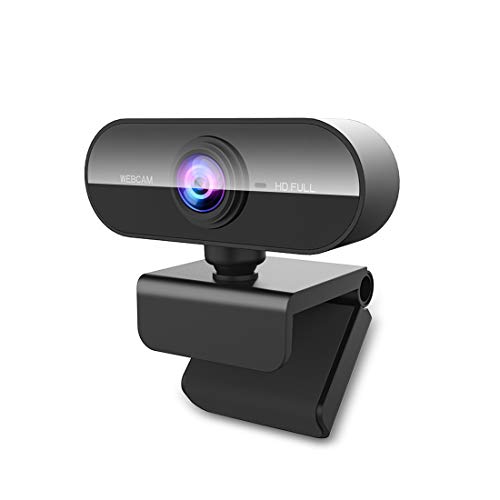
FWV’s 1080p webcam features a full HD glass lens for sharp video and a built-in dual-microphone array that reduces ambient noise. Autofocus ensures subjects stay sharp as you move, while low-light performance helps in dim environments. It’s widely compatible with streaming software like OBS, XSplit, Zoom, and Teams, and supports Windows, Mac, and Linux. Best for: home offices and educators needing reliable, plug-and-play performance. Limitation: autofocus can occasionally hunt in rapidly changing lighting conditions; manual focus isn’t available.
EMEET C960 Webcam With Tripod And Privacy Cover

EMEET C960 offers 1080p video with a tripod kit and privacy cover. Adjustable height (6.7 to 18.5 inches) and a 360° swivel head provide flexible framing for portraits or group calls. It maintains fixed focal length for consistent subject distance and includes two built-in noise-canceling microphones for clearer audio. Best for: office calls, online presentations, and multi-person meetings. Limitation: the 1080p resolution may not satisfy users seeking 4K detail in broadcasts and streams.
Buying Guide
- Resolution and frame rate: For most video calls, 1080p at 30fps is sufficient. If you plan to stream or create content, consider 1080p at 60fps or 4K if supported by the software and PC.
- Microphones: Dual or built-in noise-canceling mics improve audio in noisy environments. Consider external mics only if you need studio-quality sound.
- Autofocus and exposure: Fast autofocus helps with dynamic movement; low-light correction maintains visibility in dim rooms. HDR can enhance color in variable lighting.
- Privacy and security: A privacy cover protects your lens when not in use. Some models offer physical shutter for extra security.
- Mounting flexibility: Tripod compatibility and wide-angle lenses expand placement options and field-of-view.
- Compatibility: Ensure USB connectivity (USB-C or USB-A) and OS support (Windows, macOS, Linux) align with your devices and software.
- Price-to-performance: Balance feature needs with your budget. The best value pairs essential features with easy setup.
Frequently Asked Questions
- Do I need special software to use these webcams? Most are plug-and-play and work with standard video apps; some may benefit from optional drivers for enhanced features.
- Is 1080p sufficient for professional video calls? Yes for most contexts, including meetings and classes. 4K is beneficial for high-detail content creation.
- Are built-in microphones good enough for meetings? Dual mics improve sound, but external mics can offer higher fidelity for recording or larger groups.
- What about lighting when using a webcam? Automatic light correction helps, but positioning near natural light or improving room lighting yields the best results.
- Is a tripod necessary? Tripod-ready designs provide flexible angles and stability, especially for desk setups or shared workspaces.
- Can these webcams be used with laptops and desktops? Yes. They are designed for broad compatibility across USB-enabled devices.