Best Small Photo Printers Portable for Quick Snapshots
Looking for a compact, battery-free or battery-friendly way to turn your mobile photos into physical prints? This guide highlights five small photo printers that fit in a bag, pocket, or desk drawer while delivering solid results. Each pick is suited to different types of buyers—from students and travelers to scrapbookers and party planners. The table below compares key notes to help you choose quickly.
| Product | Best For | Paper Size | Connectivity |
|---|---|---|---|
| Kodak Step Instant Smartphone Printer | Casual mobile printing, social media scraps | 2×3 inches | Bluetooth/NFC |
| Liene M100 4×6 Printer | Vibrant family albums, longer prints | 4×6 inches | Wi‑Fi |
| Nelko PP01 Mini 2×3 Printer | School, on-the-go activity, adhesive pics | 2×3 inches | Bluetooth |
| HP Sprocket Portable Printer (2nd Ed) | Friends and group printing, AR fun | 2×3 inches | Bluetooth |
| YOTON Photo Printer | Compact, durable travel prints | 4×6 inches | Wi‑Fi |
KODAK Step Instant Smartphone Printer

The KODAK Step is a compact, no-ink micro printer that connects via Bluetooth or NFC to iOS and Android devices. It uses ZINK 2×3 sticky-back paper, so prints can be peeled and stuck into albums or planners. The device includes a starter pack of ZINK paper and a complete editing suite in the KODAK app for filters, borders, stickers, and text. Best for casual point‑and‑shoot printing from a phone, especially when you want instant, tamper-proof photos that resist moisture and smudges. A small caution: ongoing paper costs add up if you print frequently, and the 2×3 size may be too small for some wants.
- Best for: quick social-media ready prints on the go
- Limitations: limited print size, ongoing paper costs
- Notes: zero-ink technology keeps the printer compact and maintenance light
Liene M100 4×6 Photo Printer

The Liene M100 uses thermal dye sublimation to deliver vibrant 4×6 prints. It ships with a robust paper and cartridge bundle, including a total of 100 sheets and three color cartridges. Built for family memories, this model emphasizes durable, water and fade-resistant photos with a laminated surface. It supports wireless printing from iPhone, Android, and PC via a built‑in hotspot, avoiding external networks. Best for: households or travelers who want larger prints with strong color fidelity. Caution: you’ll want to monitor the paper/cartridge supply for ongoing projects.
- Best for: larger, long-lasting 4×6 prints
- Limitations: hotspot setup is unique, may require initial configuration
Nelko PP01 Mini 2×3 Printer (White)

The Nelko PP01 uses advanced inkjet technology to deliver vivid 2×3″ prints on sticky-backed paper. Weighing about 0.6 pounds, it’s ultra-portable for school trips and travel. Bluetooth connectivity pairs with iOS and Android via the Nelko app for easy printing. An ink cartridge can produce up to 80 full-color 2×6 photos, providing a practical balance of size and output. Best for: students and travelers needing adhesive photos for scrapbooks. Caution: the paper size is small, so large image crops may occur.
- Best for: adhesive 2×3″ prints on the go
- Limitations: smaller print size limits image detail
HP Sprocket Portable Photo Printer (2nd Edition)
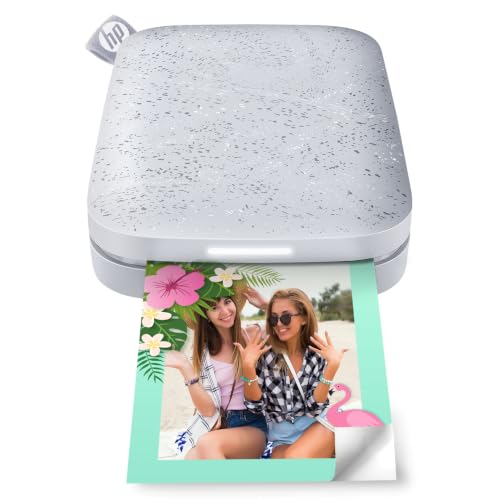
The HP Sprocket 2nd Edition is designed for party moments and group printing. It supports 2×3″ sticky-backed prints from multiple devices and integrates AR features via the Sprocket app. The LED indicator helps manage print queues when several users print at once. Best for: friends who want a social printing experience and quick sharing of memories. Limitation: print quality is solid for casual use, but not a premium photo standard compared to larger formats.
- Best for: social printing with friends
- Limitations: AR features require compatible app use and may vary by device
YOTON Photo Printer

The YOTON printer blends a compact 7.1″ x 4.9″ x 2.2″ footprint with 4×6 inch printing, using dye-sublimation for rich color and durable finishes. It includes 54 sheets and an ink ribbon, and supports AR video printing for enhanced creative outputs. Best for: travelers and students who want 4×6 prints with AR options. Limitation: one ribbon handles a limited number of prints—planning ahead helps prevent mid-project shortages.
- Best for: compact travel-ready 4×6 prints
- Limitations: ink ribbon print count may require frequent replacements
Buying Guide: Key Considerations For Small Portable Photo Printers
What size print fits your needs? If you mainly want wallet-sized or planner-friendly photos, 2×3 inch printers like the KODAK Step or Nelko PP01 are ideal. For albums and wall displays, 4×6 formats like the Liene M100 work best. How will you connect? Bluetooth is simple and universal, while Wi‑Fi often provides steadier connections and direct device hubs. Do you care about durability? Dye-sublimation tends to be more durable and water-resistant than basic inkjet, a point where the Liene and YOTON shine. Consider paper costs and availability; sticky-back paper is convenient for crafts, but ongoing purchases can add up. Finally, features like app editing, borders, filters, or AR can add enjoyment but may complicate setup. Choose based on your primary use: casual quick prints, family albums, or group scrapbook sessions.
Practical Comparison At a Glance
- Best for on-the-go snaps: KODAK Step, Nelko PP01
- Best for larger, lasting memories: Liene M100
- Best for group printing and social sharing: HP Sprocket
- Best for compact travel with AR features: YOTON
FAQ
- What is the most portable photo printer here? The KODAK Step and Nelko PP01 are among the smallest and lightest options, suitable for pockets or small bags.
- Which printer uses the fewest consumables? ZINK-based printers like KODAK Step use sticky-back paper and are easy to stock in bulk, potentially lowering per-print costs for casual use.
- Is 4×6 a good choice for travel albums? Yes, 4×6 prints are versatile for albums and frames; the Liene M100 is a strong option for this size.
- Do these printers require internet access? Most rely on Bluetooth or local Wi‑Fi; a constant internet connection is not required.
- Are AR features important? HP Sprocket offers AR queue viewing; if you don’t need AR, it’s not essential.