Best Slide-to-Digital Converters for Preserving Your Photos
Looking to convert old film negatives and slides into modern digital files? This guide highlights five reliable slide and film scanners that suit different needs—from all-in-one units with large displays to compact, computer-free options. Best for casual family memories, hobbyists digitizing large collections, or anyone who wants a built-in gallery view while scanning.
| Product | Best For | Format Support | Display |
|---|---|---|---|
| KODAK Slide N SCAN Film & Slide Scanner | All-in-one, easy setup, family memories | 135, 126, 110 slides; 50mm slides | 5” LCD |
| Magnasonic All-in-One 24MP Scanner | High-resolution scanning with built-in memory | 35mm/126/110 film; 135/126/110 slides; Super 8 | 5” LCD |
| DigitPro 22MP Film & Slide Scanner | Low-cost, one-step scanning without a PC | 35mm, 135, 110, 126 negatives; 50mm slides | 5” LCD |
| KODAK Slide N Scan Max Digital Film Scanner | Premium display, quick-feed tray, portable | Color & B&W negatives; 135/126/110 slides | 7” tiltable LCD |
| HP Touch Screen Film & Slide Scanner | Modern touchscreen workflow with gallery mode | 35mm/135/110 film; slides | 5” touchscreen |
Notes: All models listed support saving to internal storage or an SD card where applicable. Image quality and speed vary by model and film type. The table above highlights each option’s core strengths to help you choose the best fit for your collection.
KODAK Slide N SCAN Film & Slide Scanner

Best for: Beginners and families who want a straightforward, all-in-one solution. Why selected: It combines a 5” LCD gallery view with quick-load film inserts and supports multiple film formats (135, 110, 126) for versatile archiving. The included 50mm slide holder and adapters simplify scanning large batches. Limitation: High-definition output relies on the built-in process; external editing may be needed for professional-grade color work.
DigitPro 35mm Film & Slide Scanner

Best for: Quick, PC-free digitizing of 35mm negatives and slides. Why selected: This standalone scanner handles 135 negatives, slides, and B&W modes directly on-device, with a 2.4” LCD for immediate viewing and a TV-out option for larger sharing. Caution: The 2.4” screen is compact; reviewing fine detail may require transferring files for editing.
DigitPro 22MP Film & Slide Scanner

Best for: Photographers seeking higher resolution for 35mm and other formats without a computer. Why selected: It provides a 5” LCD and 22MP capture, plus one-touch scanning for fast digitization. Limitation: External storage or SD card capacity may constrain large archives; ensure adequate memory before scanning many files.
Wolverine Titan 8-in-1 Film To Digital Converter
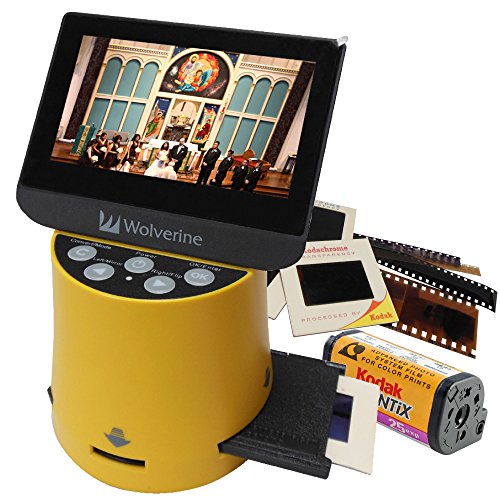
Best for: Home users digitizing a mixed media collection with HDMI viewing. Why selected: It supports 35mm, 127, 126, 110, and APS formats with a built-in 4.3″ color screen for quick previews and HDMI output for high-definition viewing. Caution: Output quality depends on the source film condition; degraded negatives may require additional restoration in post-processing.
KODAK Slide N Scan Max Digital Film Scanner

Best for: Intensive archive projects with large slide collections. Why selected: The 7-inch tiltable LCD offers superior viewing, and the 13MP sensor enables vivid previews. The quick-feed tray supports continuous scanning for efficiency. Limitation: Larger display and faster scanning come at a higher initial cost compared to entry-level models.
HP Touch Screen Film & Slide Scanner

Best for: Users who want an interactive, touchscreen workflow with gallery mode. Why selected: The 5” touch display allows direct preview and editing, while a 13MP CMOS sensor with 22MP interpolation aims to balance clarity and file size. Caution: Interpolation does not replace native resolution; consider originals for best detail when possible.
Buying Guide: Key Considerations For Choosing A Slide And Film Scanner
- Purpose and format support: Determine which film types you need to digitize (35mm, 110, 126, APS) and if you also want to capture Super 8 or positive/negative options. Pick a model that natively supports those formats.
- Display and workflow: Decide between a built-in LCD for instant viewing versus a connected monitor. Large screens and tilting displays help with framing and sharing.
- Storage options: Check whether the scanner saves to internal memory, a replaceable SD card, or requires a computer. Plan for card size based on your scanning volume.
- Resolution and quality: Higher megapixels typically yield sharper results, but file sizes increase. Consider your final usage (archival prints vs. on-screen viewing).
- Ease of use: One-touch scanning and simple navigation reduce setup time, especially for large batches. Consider whether PC-free operation is important to you.
- Connectivity: HDMI output and TV-out features enable sharing on larger displays. USB-C and standard USB may be relevant for transferring files to a computer.
- Reliability and future-proofing: Look for versatile feeders, quick-feed trays, and compatibility with common memory cards to minimize handling and frame-jipping during batch scans.
Frequently Asked Questions
- What is the difference between 22MP and 24MP film scanners?
Higher megapixels generally provide finer detail, but actual image quality also depends on lens, sensor, and scanning software. Choose based on your archival needs and storage capacity. - Do I need a computer to use these scanners?
Many models offer PC-free operation with built-in screens, while others save to SD cards and require a computer for further editing. - Can these scanners handle Super 8 film?
Some models support Super 8, while others focus on 35mm, 126, and 110 formats. Check format lists for each model. - Is an external viewer necessary for large collections?
An external monitor or TV can help with detailed review, but several units provide adequate viewing on built-in screens for most tasks. - How should I organize scanned images after saving?
Use consistent folders (by year, event, or film type) and consider metadata tagging to simplify future searches.