Best Slide Duplicators for Digital Cameras: Top Scanners and Digitizers
Preserving old memories stored on film requires reliable tools that can convert slides and negatives into high-quality digital images. Whether you prefer a dedicated film scanner with a built-in display or a camera-based digitizer that uses your own DSLR or mirrorless camera, the right device makes a big difference in ease of use and final image quality. This guide reviews five top options that cater to different workflows, budgets, and expertise levels, helping American readers choose the best slide duplicator for their digital camera setup.
| Product | Brand | Notable Feature | Notes |
|---|---|---|---|
| Kodak SCANZA Digital Film & Slide Scanner | KODAK | 14/22MP, 3.5″ LCD, multiple film inserts | Versatile for 35mm, 126, 110, Super 8 & 8mm; built-in display |
| KODAK Slide N SCAN Film & Slide Scanner | KODAK | 5″ LCD Display; easy-load inserts | Converts 135, 110, 126 slides/negatives to JPEG; SD card save |
| Magnasonic All-in-One 25MP Film Scanner | Magnasonic | 5″ LCD; 25MP resolution | Handles 35mm/110/126/8mm and slides; HDMI output option |
| Kodak Slide N Scan Max Digital Film Scan | KODAK | 7″ LCD with gallery mode | Supports 13/22MP; SD card save; robust loading tray |
| JJC Photo Slide and Film Digitizer Kit | JJC | Camera-based digitizing with LED backlight | Uses select macro lenses for a flexible DIY approach |
Kodak SCANZA Digital Film & Slide Scanner

The Kodak Scanza is a dedicated film scanner designed to convert a range of film formats into JPEGs quickly and with straightforward operation. It supports 35mm, 126, 110, Super 8 and 8mm negatives and slides, delivering high-resolution digital files that preserve color and detail. The device features a large, bright 3.5-inch LCD display that tilts for comfortable viewing and editing, which is ideal for previewing results before saving. A one-step scan button and a suite of adapters make it easy to process a batch of photos with minimal fuss.
Key workflow details show the Scanza excels in ease of use and reliability. Images are saved to an SD card (not included), and the scanner ships with a variety of film inserts and adapters to accommodate different film sizes. The unit also provides USB and HDMI connection options for viewing scans on a larger display. While it offers a simple, user-friendly experience, it remains best suited for those who want an all-in-one, stand-alone device without relying on a computer.
- Supports multiple film types: 35mm, 126, 110, Super 8, and 8mm
- 14/22MP scanning options for JPEG outputs
- 5″ LCD display for immediate review and editing
- Includes adapters, slide holders, and cleaning tools
Kodak Slide N SCAN Film & Slide Scanner

The Kodak Slide N SCAN delivers a compact, user-friendly option for digitizing slides and negatives, with a crisp 5-inch display that makes it easy to preview and edit on the device itself. Quick-load film inserts keep the workflow smooth, and the included 50mm slide holder plus adapters for 135, 110 and 126 films enable fast batch scanning. The device stores results directly to an SD card, and a simple set of USB and HDMI cables helps you share or display your scans on larger screens.
In practice, this model is ideal for hobbyists who want a straightforward, dedicated scanner without the complexity of external software. It provides a good balance of resolution, display quality and load efficiency, making it an excellent middle-ground choice for families and aspiring archivists who value simplicity and reliability.
- 5″ LCD display with gallery editing
- Easy-load trays for fast scanning
- Adapters for 135, 110, 126 film formats
- Direct SD card saving; USB/HDMI outputs
Magnasonic All-in-One 25MP Film Scanner

The Magnasonic All-in-One scanner combines strong resolution with a large display for easy viewing and verification of scans. Capable of handling 35mm, 110, 126, Super 8, and 8mm film as well as 135/126/110 slides, it delivers JPEG outputs at up to 25MP, providing crisp color and detail. The built-in memory and HDMI output offer options for saving to the device and viewing on a television or monitor. Its fast-loading trays help keep scanning times short when processing batches.
This model is well-suited to users who want a self-contained unit with a modern display and minimal setup. The HDMI option adds flexibility for presenting images on larger screens, while the variety of supported media formats helps households and small offices archive diverse photo collections with one device.
- 25MP resolution for sharp detail
- Supports 35mm, 110, 126, Super 8 & 8mm film; slides supported
- Large 5″ LCD; HDMI output for TV/monitor
- Fast-loading trays for efficient scanning
JJC Photo Slide and Film Digitizer Kit
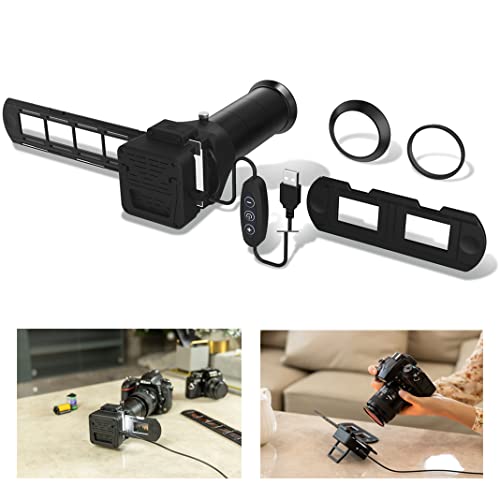
The JJC digitizer kit offers a camera-based approach to slide and negative copying. By leveraging select Canon, Nikon and Sony macro lenses, the kit enables re-photography of 35mm slides and negatives with a controlled LED backlight. It includes multiple lens adapters—seven in total—for compatibility with a range of cameras. A 6500K CRI=95+ LED backlight provides consistent color, while adjustable brightness controls let you optimize exposure. This setup appeals to photographers who want to repurpose their existing camera gear for digitizing film.
Because it relies on a camera and macro lenses, the JJC kit requires a camera body and some setup knowledge, but it offers flexibility and high potential image quality for users who already own compatible gear. It is particularly attractive to those who want to customize lighting and framing, or who already shoot with Canon, Nikon or Sony systems and prefer a DIY workflow.
- Camera-based digitizing with macro lenses
- Seven lens adapters for multiple cameras
- 6500K LED backlight with adjustable brightness
- Natural light performance and distance considerations advised
Buying Guide
What to consider when choosing a slide duplicator for a digital camera setup
The best choice depends on your preferred workflow and the types of media you want to digitize. If you want a simple, all-in-one solution with a built-in display, a dedicated scanner like Kodak’s Scanza or Slide N SCAN can save time and minimize setup. If you already own a camera and want to apply professional-level control over lighting and framing, a camera-based kit such as the JJC option can unlock higher creative potential, albeit with a steeper learning curve.
Media formats and compatibility
Consider which film formats you need to digitize: classic 35mm, 126, 110, Super 8, 8mm, or a mix. Dedicated scanners often advertise broad compatibility and quick inserts for multiple formats, while camera-based setups depend on the adapters, macro lenses, and lighting you own or plan to buy. If your archive includes a wide variety of media, a model with multiple film inserts and a robust backlight may reduce the need for additional accessories.
Resolution and color fidelity
Resolution directly affects detail—typical options range from 14MP to 25MP in many consumer devices. Some models advertise 22MP scans with rich color reproduction and anti-glare displays. When using a camera-based solution, the final resolution is tied to your camera’s sensor and the macro setup, which can yield high-quality results but depends on technique and lighting consistency.
Display quality and user experience
A built-in LCD simplifies reviewing and editing on the device itself, reducing the need to export files for quick checks. Larger displays, such as 7″ or 5″, provide easier visual assessment and can serve as a reference for color accuracy. If you plan frequent batch scanning, a dependable, glare-free display with adjustable brightness is a meaningful plus.
Storage, connectivity and future-proofing
Most dedicated scanners save to SD cards and support USB or HDMI for output. If you have a sizable archive, consider models with larger internal memory or faster card slots. Camera-based kits rely on your camera body and memory card, and you’ll often connect to a PC for storage or editing. HDMI output can be valuable for immediate viewing on larger screens, while USB enables straightforward transfer to a computer.
Ease of use vs. customization
Dedicated film scanners are designed for plug-and-play operation, with software-free workflows and streamlined loading. They excel in simplicity and consistency across scans. Camera-based digitizers offer customization: lighting, lens choice, distance, and camera settings can tailor color and sharpness, but require more setup and practice to achieve uniform results across an entire collection.
Budget and long-term value
Entry-level dedicated scanners provide affordable, reliable archiving without needing your camera. If you already own compatible cameras and lenses, a camera-based kit can extend the life of your existing gear and enable high-end results, potentially reducing future purchases. Balance initial cost, expected volume, and how much you value consistent color and quick batch processing when deciding.
Maintenance and compatibility considerations
Regular cleaning of film holders and light sources helps maintain image quality. If you plan to replace components or upgrade gear, check compatibility with current film formats and lenses. For the software-free scanners, updates are less common, but hardware reliability and service support can be decisive for long-term archiving projects.
Summary for quick decisions
If you want a straightforward, all-in-one solution with a built-in display and simple operation, choose a Kodak Scanza or Kodak Slide N SCAN. If you already shoot with a DSLR or mirrorless and want maximum control and potential image quality, a JJC kit paired with a suitable camera may be the best route. For versatile media support and a larger viewing display, Magnasonic and Slide N Scan Max offer compelling features with easy batch loading. Your choice should align with your archive size, timeline, and comfort with DIY workflows.