Best Skype Camera for TV: Top TV-Compatible Webcams for Large-Screen Video Calls
Finding the right camera setup for TV-based video calls, streaming, or presentations can be tricky. The following selections are designed for easy plug-and-play use with Smart TVs, streaming devices, or large-screen setups, while delivering clear audio and reliable autofocus. Each option below is tailored to enhance Skype, Zoom, Google Meet, and other conferencing platforms when you’re using a TV as the display and focal point.
| Product | Brand | Key Benefit |
|---|---|---|
| Samsung Slim Fit Camera | Samsung | Slim design with magnet attachment for TVs |
| RayBit 4K Pro Conference Cam | RayBit | All-in-one camera with speakers and mic |
| ELP 4K HDMI USB Camera | ELP | Dual outputs for simultaneous USB/HDMI use |
| NexiGo N60 | NexiGo | 1080p, built-in mic, simple plug-and-play |
| Galyimage 4K Webcam | Galyimage | 4K with ring light and TOF autofocus |
Samsung Slim Fit Camera For TV
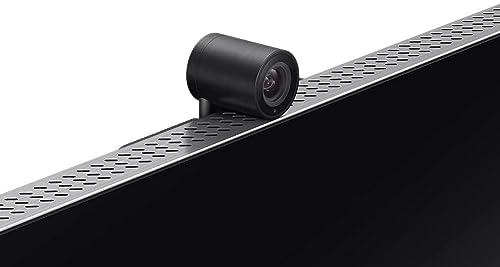
The Samsung Slim Fit Camera is designed to attach magnetically to a television, delivering a compact profile that blends with most TV aesthetics. It records at Full HD 1080p at 30 frames per second, making it suitable for video conferencing and TV-based calls. The magnetic attachment minimizes obstruction to viewing content, while maintaining a stable, level angle for clear eye contact during Skype or video calls. This option emphasizes seamless TV integration and ease of use for home offices or shared spaces where a screen is the focal point.
Key considerations: You gain a space-saving mount that doesn’t intrude on the viewing area, but you should verify TV compatibility with your wall or stand. The camera’s 1080p output is reliable for most calls, yet users seeking 4K detail may prefer higher-resolution models when the TV supports 4K conferencing. This camera prioritizes convenience and unobtrusive placement over ultra-high-resolution video.
RayBit 4K Pro Conference Room Camera

RayBit combines a 4K camera, built-in HiFi speakers, and noise-canceling microphones in a single device, plus a remote control for easy adjustments. The AI-powered auto framing keeps the focus centered as participants enter or move within the room, which is particularly useful for larger living rooms or home offices turned conference spaces. The presenter-tracking feature can follow the person who is speaking, helping remote teammates feel more connected and engaged during Skype or Zoom sessions on a TV display.
Key considerations: All-in-one designs reduce gear clutter but may require more table space than a small webcam. The AI framing and speaker quality are strong advantages in TV-based setups, yet compatibility with your TV’s HDMI input and external audio system should be confirmed. This option suits larger viewing areas and scenarios where voice clarity and presence are priorities.
ELP 4K HDMI USB Camera

ELP’s camera outputs both USB and HDMI signals, enabling flexible use with a computer and a TV or monitor at the same time. It offers 4K video at 30 Hz, along with a 2.8-12mm zoom range to adjust framing for different room sizes. The camera is suitable for people who want a versatile setup—streaming to a big screen while maintaining a native computer workflow. This is especially helpful for Skype calls routed through a computer connected to the TV, or for presentations using an external display.
Key considerations: You’ll need to manage two outputs and potential syncing between devices. The 4K 30fps specification is solid for most calls, but latency can vary with HDMI-to-TV configurations. If you want concurrent computer and TV display, this camera is a practical choice with flexible zoom capabilities.
NexiGo N60 1080P Webcam

NexiGo’s N60 offers a straightforward 1080p webcam experience with a built-in microphone, designed for quick plug-and-play use on Windows, Mac, and Chrome OS devices. It is compatible with common video conferencing platforms such as Skype and Teams and is optimized for clean, crisp calls when paired with a larger TV display. Its ease of setup makes it an appealing choice for users who want reliable performance without complex configuration.
Key considerations: While 1080p is widely supported and sufficient for many calls, some users may want higher resolution when using a 4K TV as the display. The built-in microphone helps reduce the need for an external mic in smaller rooms, but the overall impression depends on room acoustics and background noise. This option emphasizes simplicity and compatibility for everyday video calls.
Galyimage 4K Webcam With Ring Light

The Galyimage camera supports up to 4K at 30fps and includes a built-in ring light with three color temperatures, helping to maintain flattering lighting when you are on camera in a living room or home office. With TOF autofocus and dual noise-canceling microphones, it aims to deliver crisp video and clear audio for Skype, Zoom, or Google Meet through a TV screen. The adjustable lighting is a notable benefit for calls in rooms with uneven lighting or backdrops that require more balanced illumination.
Key considerations: Ring light adds a useful lighting option, but it increases the overall footprint of the device. For best results, ensure the TV’s input method and any connected audio system work smoothly with the camera’s USB connection. This model is well-suited for users who want reliable autofocus and improved lighting in a TV-based conferencing setup.
Buying Guide: Key Purchase Considerations For TV-Based Skype Cameras
- Display compatibility: Confirm whether your TV supports USB or HDMI input from a camera, and whether you’ll connect via a computer, a streaming device, or directly to the TV’s camera input if available.
- Resolution vs. room size: 4K cameras provide superior detail, but the perceived benefit depends on your TV size and seating distance. For smaller rooms, 1080p often suffices.
- Audio quality: Built-in microphones vary in performance. In busy rooms, consider models with noise reduction or plan to pair with an external microphone or speaker system.
- Autofocus and framing: Auto framing and present tracking are helpful in larger spaces or when participants move. If you frequently have multiple attendees, look for AI-driven or wide-angle capabilities.
- Lighting: Ring lights or automatic light correction can improve image quality in dim rooms. Consider your typical lighting conditions and whether you’ll frequently adjust lighting during calls.
- Plug-and-play vs. driver requirements: Many options are USB plug-and-play. If you use a non-Windows PC or a smart TV with limited app support, ensure compatibility with your device ecosystem.
- Mounting and placement: Slim, TV-mounted cameras reduce clutter but may affect angle. Measure your TV’s bezel and space around the screen to ensure stable placement.
- Privacy and security: Look for built-in privacy covers or physical shutters, especially for devices that sit on desks near living spaces.
Overall, the best choice depends on your TV setup, room size, and preferred conferencing software. For a minimal footprint with TV-friendly mounting, the Samsung Slim Fit Camera offers easy installation. If you want an all-in-one solution with superior framing and audio, RayBit provides advanced features in a single unit. For flexible connections and room versatility, the ELP camera’s dual outputs are valuable. Those prioritizing affordability and simplicity may opt for NexiGo N60 or Diccik equivalents, while Galyimage delivers strong lighting and autofocus for brighter, more polished video.