Best Remote Control PTZ Cameras for Precise Pan-Tilt-Zoom
Remote controls for PTZ cameras simplify live streaming, video conferencing, and security setups by providing fast, precise camera movement and quick access to presets. This guide highlights five compatible remotes designed for PTZ cameras, including popular models from PTZOptics, Logitech, and other brand ecosystems. Each listing covers compatibility, usability, and range to help you choose a reliable control solution for classrooms, houses of worship, meeting rooms, and production studios.
| Product | Brand | Compatibility Focus |
|---|---|---|
| PZL New Replacement Remote Control for PTZOptics | PZL | PT20X-USB-GY-G2 K2, PT12X-SDI-WH-G2 and more |
| PZL Replacement Remote for Logitech PTZ Pro 2 | PZL | Logitech PTZ Pro 2 CC2900ep CC3000E |
| TONGVEO Remote Control for VL20N | TONGVEO | VL20N PTZ cameras |
| PTZ Replacement Remote for PTZOptics PT20X-USB-Camera | Meeasier | PT20X-USB-Camera family |
| FoMaKo KC608 Pro NDI PTZ Controller | FoMaKo | NDI PTZ cameras, VISCA/PELCO protocols |
Note: Always verify model numbers before purchasing, as remotes are often model-specific and not universal across all PTZ cameras.
PZL New Replacement Remote Control For PTZOptics

The PZL replacement remote is tailored for specific PTZOptics models, ensuring an ergonomic design and responsive keys. It claims a control range up to 12 metres (40 feet) with a rapid device response under 0.2 seconds. The build uses durable ABS material for comfortable handling, and the remote is tested for extensive click life to support continuous use during meetings or productions. Compatibility notes emphasize matching exact model numbers to avoid nonfunctional units, making this a strong option for PTZOptics setups needing a reliable spare or replacement.
PZL Replacement Remote for Logitech PTZ Pro 2

This PZL remote is designed for Logitech CC2900ep CC3000E PTZ Pro 2 cameras, delivering plug-and-play setup with no programming required. The remote supports strong signal integrity and wide-angle reach (over 26 feet) with an expansive control angle, enabling efficient operation in conference rooms. Ergonomic construction and responsive keys contribute to smooth camera control during long sessions, making it a practical option for Logitech PTZ Pro 2 users seeking a dependable spare.
TONGVEO Remote Control For VL20N

The Tongveo VL20N remote supports pan, tilt, and zoom with 10 preset positions. It also provides a configurable menu for picture parameter adjustments, making it suitable for classrooms or houses of worship where preset angles can speed up video sessions. The ergonomic design aims for comfortable use over extended periods, and the remote features straightforward controls geared toward PTZ camera operators who value quick, repeatable movements.
PTZ Replacement Remote For PTZOptics PT20X-USB-Camera

The Meeasier remote is designed to work with the PT20X-USB-Camera family, providing enhanced control for pan, tilt, and zoom with quick response times (sub-0.2 seconds). The device emphasizes uninterrupted conferencing by serving as a reliable spare remote, ensuring camera operations remain uninterrupted during critical meetings. Setup is described as straightforward, with intuitive button layout for fast access during video conferences and live streams.
FoMaKo KC608 Pro NDI PTZ Controller
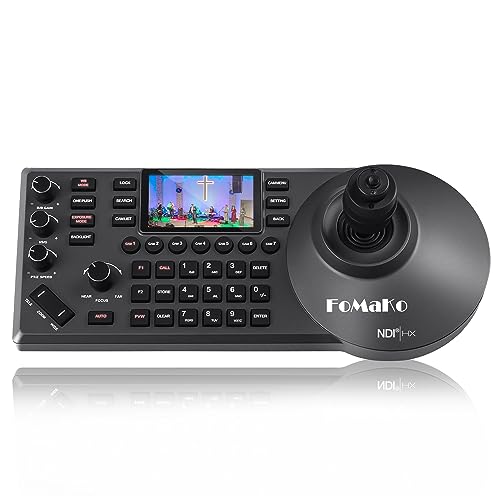
The FoMaKo KC608 Pro is a comprehensive PTZ control keyboard with PoE power and an LCD preview. It supports VISCA, Pelco-P, and Pelco-D protocols, plus RS232/RS422/RS485 and Ethernet IP connections. The unit includes an NDI license and is designed for IP-based control of PTZ cameras, making it a strong choice for church, education, and broadcast environments that rely on NDI workflows and professional-grade PTZ control. It emphasizes precision, network-ready operation, and compatibility with FoMaKo video equipment.
Buying Guide: Key Purchase Considerations For PTZ Remote Controls
- Compatibility: Confirm exact camera models and brands the remote supports. Some remotes are model-specific and will not pair with other PTZ systems.
- Connection Type: Decide between IR-only remotes or network-enabled controllers (IP/PoE). IP controllers offer centralized control for multiple cameras across a network.
- Control Range and Responsiveness: Look for stated range (feet/metres) and response times. A fast response under 0.2 seconds enhances live operation and reduces drift during critical moments.
- Presets and Functions: Evaluate the number of programmable presets and the availability of features like pan/tilt/zoom, focus, iris, and scene adjustments. Some remotes provide 10 or more presets and quick access to important settings.
- Ergonomics and Build: Ergonomic design improves handling during long sessions. Durable materials help withstand frequent use in classrooms or venues.
- Out-of-the-Box Usability: Packaged remotes should require minimal setup, especially for non-technical users. Out-of-box functionality with plug-and-play pairing is a valued trait for many buyers.
- Reliability and Lifecycle: Consider brands with proven performance, responsive customer support, and long click-cycle testing to ensure dependable operation over time.
- Price-to-Value: Compare features, compatibility, and life expectancy against price. A slightly higher upfront cost can yield longer-term reliability and fewer replacements.
- Future-Proofing: If you plan to expand or upgrade, look for controllers that support multiple protocols (VISCA, Pelco-D, Pelco-P) and IP-based control to stay compatible with evolving PTZ ecosystems.