Best Remote Control Cameras for Live Streaming: Top Picks for Smooth, Professional Broadcasts
Looking for a remote-controlled camera setup that enhances live streaming? This guide highlights five remote-control cameras ideal for creators, educators, worship teams, and small studios. Each option offers AI tracking, PTZ control, or remote adjustments to keep subjects in frame without manual repositioning. The best pick depends on your streaming goals—hands-free tracking, high resolution, or studio-grade flexibility.
The following table compares the five chosen products to help you decide at a glance.
| Product | Best For | Key Benefit | Limitations |
|---|---|---|---|
| LIVE PARTY TV Remote Camera | Home security & nannycam users | 3-in-1 remote control with 1080p hidden camera | Battery life limited to ~3 hours |
| EMEET C60E Dual-Camera 4K Webcam | Professional streams & online meetings | Dual cameras with up to 11x hybrid zoom | Zoom not supported in 4K 60FPS mode |
| OBSBOT Tail Air & Smart Remote Combo | Live broadcasting & esports | Compact 4K PTZ with AI tracking | NDI license may require extra purchase |
| EMEET PIXY Dual-Camera AI-Powered PTZ | Creative streaming & tutorials | Dual-camera AI tracking for dynamic framing | More complex to configure than single-camera models |
| ceabulila 4K Webcam With Remote | Professional video calls & content creation | 4K camera with remote control and RGB lighting | Requires setup for maximum 4K zoom |
LIVE PARTY TV Remote Camera 2 in 1
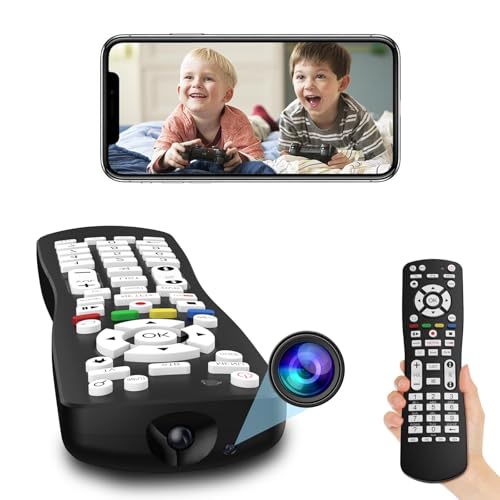
Best for: Home security-minded buyers who want discreet monitoring without drawing attention. The 1080P HD image helps you verify baby, pets, or staff from a distance via a phone app. The 3-in-1 remote control camera doubles as a TV/STB remote, enabling flexible placement in living spaces. A built-in 650mAh battery supports about three hours of use per charge, making it suitable for short sessions or continuous monitoring with a power source.
Why it’s selected: Its disguised design and dual-use functionality provide practical, low-profile surveillance without requiring separate devices. The 1080P resolution offers clear viewing for streaming or remote checks.
Caution: The camera is designed for short sessions; battery life is limited, and continuous recording will require frequent recharging or a constant power source.
EMEET C60E Dual-Camera 4K Webcam

Best for: Streamers and professionals who need flexible framing plus high-detail video. The C60E combines a wide-angle camera with a telephoto lens, offering up to 11x hybrid zoom and PDAF autofocus. Remote control lets you adjust zoom and color on the fly, while EMEET STUDIO provides deeper tweaking of brightness and lighting. Notable limitation: 4K at 60FPS is not available with maximum optical zoom, and some advanced features require the studio software.
Why it’s selected: The dual-camera design enables rapid switching between panorama and close-up views without repositioning the camera, making it ideal for product demonstrations, teaching, and live events.
Caution: Zoom in 4K is not supported at certain frame rates, which may require reducing resolution for full zoom fidelity.
OBSBOT Tail Air & Smart Remote Combo

Best for: Content creators needing compact, mobile 4K PTZ with AI tracking. Tail Air combines a small form factor with advanced AI-tracking to follow action across the frame. It supports NDI streaming, enabling versatile networked workflows without heavy cabling. A practical choice for worship teams, esports, and on-the-go shoots.
Why it’s selected: AI tracking and a portable footprint deliver professional tracking capabilities in a travel-friendly package. The NDI feature simplifies multi-device streaming in a local network.
Caution: Some advanced features may require additional licensing or external software for full NDI integration.
EMEET PIXY Dual-Camera AI-Powered PTZ

Best for: Streamers seeking automated framing with AI-assisted tracking and multiple presets. PIXY uses a dual-camera setup to maintain subject centering and skin tone accuracy with intelligent tracking, plus gesture control for hands-free operation. The bundled EMEET STUDIO software enables easy control of presets and whiteboard mode for educational streams.
Why it’s selected: The dual-camera AI approach delivers smoother tracking and richer framing than single-camera systems, helping maintain engaging streams for tutorials, fitness sessions, and live events.
Caution: Configuration complexity can be higher than basic webcams, and 4K/60FPS options may require compatible software and hardware.
ceabulila 4K Webcam With Remote

Best for: Professional online meetings, Zoom/YouTube creators, and streamers who want high-resolution output plus convenient remote control. The webcam offers 4K resolution and a remote for zooming, focus, and lighting adjustments, plus built-in RGB lighting for improved visuals in varying lighting conditions.
Why it’s selected: The combination of 4K image quality and a remote control simplifies on-camera adjustments during live sessions and presentations, reducing the need to interact with the computer during streams.
Caution: Zoom reach and image quality may depend on lighting; optimal results require good lighting setup and compatible USB connections.
Buying Guide: Key Considerations For Remote Control Cameras In Live Streaming
- Resolution and image quality: Choose 1080p for lower bandwidth needs or 4K for high-detail streaming. Consider if dual-camera or AI-assisted tracking is essential for your format.
- Remote control capabilities: Look for models with physical remotes, software control, or mobile apps that adjust zoom, focus, lighting, presets, and tracking without interrupting the stream.
- Tracking and framing: AI tracking or PTZ features help keep subjects centered. Dual-camera setups offer flexible framing but may require more setup.
- Connectivity: NDI support or wireless options can simplify multi-device workflows. Ensure compatibility with your streaming platform and capture gear.
- Audio considerations: Separate microphone quality matters if the camera’s mic is used; some models include noise reduction mics or require external mics.
- Portability and setup: Compact cameras suit on-the-go shoots; larger PTZ systems suit fixed studios. Consider mounting options and power requirements.
- Software and compatibility: Some devices come with companion software for presets, color correction, and privacy modes. Check system requirements and updates.
FAQ
- What is the main advantage of a remote-control camera for live streaming? It allows precise framing, zoom, and focus adjustments without interrupting the broadcast, improving production quality.
- Is 4K necessary for all live streams? Not always. 1080p is adequate for most online viewers and uses less bandwidth; 4K benefits large displays or future-proofing.
- Do dual-camera systems improve streaming quality? Yes, they enable rapid switching between wide and close-up views, which can enhance demonstrations, teaching, and performances.
- What should I consider before buying an AI-tracking camera? Look for tracking accuracy, latency, compatibility with your streaming software, and whether tracking works in real-time without lag.
- Can I use these cameras with platforms like OBS or Zoom? Most listed models support standard USB cameras or NDI-enabled workflows, but verify compatibility with your preferred platform.
- Are there safety concerns with hidden or covert cameras? Use only devices that comply with local laws and obtain consent where required. Ensure cameras are used responsibly and securely.