Best PTZ Camera Video Conference Solutions for Modern Meetings
Choosing the right PTZ camera system can elevate any video conference by delivering clear video, smooth movement, and reliable integration with common platforms. This guide highlights five standout options that fit small to medium meeting rooms, worship spaces, classrooms, and professional studios. Each product offers a mix of optical zoom, AI tracking, multi-channel outputs, and easy setup to support smooth, productive virtual gatherings.
The following quick-reference table provides key specs for quick comparison. (All specs are as listed by the manufacturers.)
| Product | Resolution / Frame Rate | Optical Zoom | Outputs | Special Tech |
|---|---|---|---|---|
| TONGVEO All-in-One Conference Room Video Camera System | 1080p, 60fps | 3x | HDMI, USB 3.0 | AI auto-tracking, Bluetooth speakerphone |
| TONGVEO Conference Room PTZ with 20X Zoom | 1080p, 60fps | 20x | HDMI, USB | Presets, silent PTZ, wide coverage |
| Logitech PTZ Pro 2 | 1080p | 4x | USB | Advanced pan/tilt/zoom; broad room view |
| Tenveo UHD 4K PTZ Camera | 4K (via HDMI), 60fps | 12x | USB 3.0, HDMI | 4K, silent movement, multiple outputs |
| Tenveo PTZ Conference Camera 3X Optical Zoom | 1080p, 60fps | 3x | USB 3.0, HDMI | Smooth PTZ, broad compatibility |
Best All-in-One Conference Room System With Auto-Tracking

The TONGVEO All-in-One Conference Room Video Camera System combines an HD 1080p auto-tracking camera with a Bluetooth speakerphone in a single package. It supports AI humanoid and face tracking to maintain focus on the speaker, while the full-duplex microphone array delivers clear audio within roughly 16.4 feet. With 3x optical zoom and HDMI plus USB 3.0 outputs, this configuration is suited for small-to-medium conference rooms and spaces where a simple plug-and-play setup is preferred. The integrated design reduces cable clutter and minimizes compatibility concerns with common conferencing platforms.
Key considerations include AI tracking reliability in varied room layouts, the balance between zoom reach and field of view, and the Bluetooth speaker’s ability to blend with existing room audio systems. Users should verify room acoustics and seating arrangements to ensure tracking performance matches meeting dynamics. This option is especially attractive for teams seeking an all-in-one, easy-to-deploy solution with strong audio-visual pairing.
Best 20X Optical Zoom PTZ For Large Rooms

The TONGVEO 20X Optical Zoom PTZ System is designed for larger spaces where presenters are distant from the camera or where audience shots require broader context. This camera outputs via HDMI and USB, supports 1080p at 60fps, and features a 59.8° field of view. Advanced white balance and exposure modes help maintain color fidelity across lighting conditions, making it a strong candidate for worship services, large seminars, or conference rooms. Presets enable quick transitions between close-ups and wide shots, while silent pan and tilt movement keeps interruptions minimal during live sessions.
Buying considerations for this model include the trade-off between zoom reach and low-light performance, the availability of preset management, and how easily it integrates with streaming or recording workflows (e.g., OBS, Zoom). It’s well-suited for venues that need reliable framing from distant seating areas and want a robust, pan/tilt/zoom workflow without complicated setup.
Best Budget-Friendly PTZ Pro For Meetings
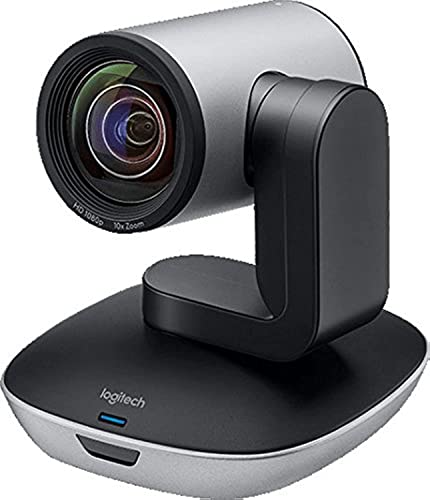
The Logitech PTZ Pro 2 offers a balance of performance and cost for professional conference room setups. With full 1080p resolution, enhanced pan/tilt/zoom motor performance, and a wide field of view, this camera supports clear visibility for all attendees and easy switching between presets. Its USB connectivity simplifies deployment in many corporate environments, particularly where a dedicated hardware video capture path is present. The system emphasizes color accuracy and smooth movements, which helps maintain a natural conversation flow during times of high interaction.
When considering this option, evaluate the camera’s compatibility with your preferred conferencing platforms, USB bandwidth in your setup, and whether the room’s audience reaches the camera’s effective field of view. For teams needing reliable performance without complex configuration, the PTZ Pro 2 remains a strong, middle-ground choice.
Best 4K PTZ For High-Detail Streaming

The Tenveo UHD 4K PTZ Camera delivers 4K resolution at 30fps via HDMI and USB outputs, providing ultra-sharp detail and a broad 90-degree field of view. Its 12x optical zoom supports precise close-ups without sacrificing image quality, making it ideal for streaming church services, worship events, or education sessions where presenters may be at different distances from the camera. The camera’s multiple outputs simplify integration with streaming software like OBS or vMix, and its silent PTZ movement helps maintain professional production standards during live broadcasts.
Key decision factors for this model include 4K vs. 1080p bandwidth requirements, the importance of a crisp image for distant participants, and how the device will be controlled (remote, RS-485, etc.). This camera is a solid option for users prioritizing high-resolution capture and flexible output options for live streaming and conferencing workflows.
Best 1080P 12X Zoom PTZ For Medium Rooms

The 12x Zoom PTZ from TONGVEO pairs a 12x optical zoom with AI auto-tracking to maintain subject framing across medium-to-large rooms. This system outputs through HDMI and USB 3.0 and includes Bluetooth conference speaker functionality for integrated audio. The combination of higher zoom, digital smoothing, and humanoid and facial recognition helps maintain focus on speakers, even as room dynamics shift. It’s a versatile choice for scenarios where presenters may move across the room or when a close-up of the speaker is needed for engagement.
Considerations for this option include the balance of microphone coverage with an external audio setup, the potential need for additional peripherals to maximize room coverage, and how well the AI tracking works with multiple participants. It’s a robust choice for environments that need reliable auto-framing and clear audio in a single system.
Buying Guide: Key Purchase Considerations
When evaluating PTZ camera systems for video conferencing, several criteria influence long-term satisfaction and ROI. The following perspectives cover the most important factors to weigh before buying.
- Resolution and frame rate: 1080p at 60fps is common for smooth video, while 4K offers sharper detail but requires more bandwidth. Consider your display setup and whether your streaming platform supports higher resolutions without buffering.
- Optical zoom and field of view: A wider field of view helps capture more participants, while a higher zoom is beneficial for close-ups of a speaker. Balance zoom with potential distortion and light conditions.
- Autotracking vs. manual control: AI auto-tracking can keep the speaker in frame, but some rooms benefit from presets or joystick control for precise framing during complex demonstrations.
- Outputs and compatibility: Check HDMI and USB outputs, and ensure compatibility with your video conferencing software (Zoom, Teams, OBS, etc.). Consider streaming and recording workflows and any integration with NDI or IP streaming if needed.
- Audio integration: Some systems include a Bluetooth speakerphone or built-in mics; others require a separate microphone array. Decide whether you want an all-in-one unit or modular components to fit your room acoustics.
- Room size and acoustics: Small rooms may perform best with modest zoom and strong auto-framing, while larger rooms might rely on higher zoom reach and audio coverage. Test tracking accuracy and auto-framing in your space if possible.
- Setup and management: Plug-and-play setups are ideal for fast deployments, but consider whether you need remote control, presets, and RS-485/RS-232 control for complex conference environments.
- Future-proofing: Unified control through popular platforms and ongoing firmware updates extend the life of a camera system as conferencing needs evolve.
These factors guide a balanced decision between performance, ease of use, and total cost of ownership. For environments prioritizing ease of use and an integrated audio-visual experience, all-in-one solutions may be preferable. For venues that demand maximum zoom reach and flexible streaming capabilities, higher-end PTZ models with multiple outputs and advanced control options can offer greater long-term value.