Best Ways to Print Photos From Old Slides
Old slides hold precious memories, and modern scanners and standalone viewers make digitizing and printing simple. This article highlights five reliable devices that convert slides and negatives into high-quality digital files ready for printing, sharing, or archiving. Each option offers a balance of ease of use, speed, and image quality to suit different budgets and needs.
| Product | Type | Key Benefit | Notes |
|---|---|---|---|
| KODAK Slide N SCAN | Film & Slide Scanner | 5” LCD preview, direct SD transfer | Supports 135/110/126 film; built-in gallery |
| ClearClick QuickConvert 2.0 | Standalone Scanner | No computer required; fast 22 MP interpolation | 4×6 and smaller; rechargeable battery |
| ClearClick Virtuoso 2.0 | Film & Slide Scanner | Large 5″ LCD; real-time preview | 35mm, 110, 126; no PC needed |
| DIGITNOW 22MP All-in-1 | Film & Slide Scanner | 2-second scans; standalone | Supports multiple formats; up to 22 MP via interpolation |
| ION Pics 2 SD | Photo/Slide/Film Scanner | Direct to SD card; no computer | Works with standard film and photos |
KODAK Slide N SCAN Film & Slide Scanner

The KODAK Slide N SCAN is a digital film scanner designed to convert slides and negatives into digital JPEG files stored on a memory card (not included). It supports 135, 110, and 126 formats and features a 5” LCD display for immediate preview and editing. Quick-load film inserts and included adapters streamline handling multiple slide formats, making it a practical choice for archival projects and family photo digitization. The device pairs a gallery-style viewing option with straightforward connectivity via USB and HDMI, enabling easy sharing and display.
ClearClick QuickConvert 2.0

ClearClick QuickConvert 2.0 is a standalone scanner that does not require a computer. It offers fast 2–3 second scans for photos, slides, or negatives up to 4×6 and smaller, with 14 MP native resolution and 22 MP interpolated output saved to an SD card. The built-in rechargeable battery enables cord-free scanning, and a compact 5″ LCD provides instant preview. It is designed for quick digitization of single items rather than batch scanning, emphasizing portability and ease of use for home projects.
DIGITNOW 22MP All-in-1 Scanner

DIGITNOW offers a versatile all-in-one solution for converting 35mm, 135, 110, 126, and Super 8 film, slides, and negatives into digital JPEGs in about two seconds. This stand-alone device includes internal storage (128 MB) and an adjustable brightness/color feature to optimize image output. It supports SD cards up to 32 GB and delivers up to 22 MP image quality through software interpolation. Its simplicity makes it a good pick for light archival tasks and quick personal projects, especially when computer access is limited.
ClearClick Virtuoso 2.0
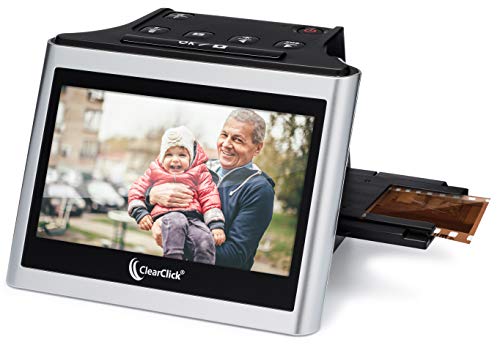
The ClearClick Virtuoso 2.0 expands on its predecessor with a larger 5″ LCD and enhanced scanning fidelity at 22 MP (interpolated). It works with 35mm, 110, and 126 negatives and 50mm slides, and, like the QuickConvert, requires no computer or drivers. Real-time preview helps verify results during scanning, while the stand-alone design supports quick digitization of an array of film formats for archiving or printing projects.
ION Pics 2 SD
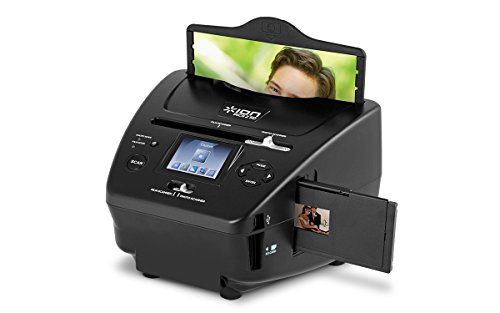
ION Pics 2 SD provides a straightforward path to digitizing photos, slides, and negatives with no PC required. It transfers scans directly to an included SD card, preserving high-resolution quality suitable for printing. It supports 35mm film and standard photo sizes (3×5, 4×6, 5×7). This device emphasizes simplicity and portability, making it an attractive option for travelers and hobbyists who want quick, computer-free digitization.
Buying Guide
- Output quality and interpolation: If you plan to print large photos, prefer scanners that offer higher native resolution and reliable interpolation to 22 MP or more.
- Format compatibility: Ensure the device supports your slide and film types (35mm, 110, 126, 120, Super 8) and the corresponding adapters.
- Standalone versus computer dependency: Standalone models are convenient for quick digitization, while computer-assisted scanners may provide more post-processing flexibility.
- Preview and workflow: A large LCD or gallery mode helps you review images before saving. Look for models with easy SD card transfer to streamline printing workflows.
- Ease of loading: Quick-feeder trays and slide holders reduce handling time and potential damage during bulk scans.
- Power and portability: Battery-powered or rechargeable units offer flexibility for on-site digitization, but consider run-time and charging needs for longer sessions.
- Storage and format options: Check SD card capacity limits and whether the device saves in JPEG or other formats, which affects immediate printing compatibility.
- Durability and aging media: For archival projects, assess whether the device preserves color fidelity and grayscale detail across faded slides and color negatives.