Best Printer for Instant Photos: Portable Instant Photo Printers
The top choice for instant-photo printing answers the question: which compact printer reliably creates 4×6 or 2×3 photos from a smartphone or computer? This guide highlights five models favored for their portability, ease of use, and photo-quality outputs. It targets buyers who want quick prints for scrapbooks, events, or travel, and who value straightforward setup over advanced features. The table below summarizes key options to compare at a glance.
| Product | Photo Size | Best For | Connectivity | Notes |
|---|---|---|---|---|
| Liene M100 | 4×6 | Android/iPhone users who want high-quality dye-sub prints | Wi‑Fi hotspot | Includes 100 sheets and 3 color cartridges |
| KODAK Step | 2×3 | On-the-go quick prints; social sharing | Bluetooth/NFC | Zero-ink technology |
| KODAK Dock Plus | 4×6 | Direct-phone docking and easy home use | Bluetooth/Wi‑Fi | Integrated docking station |
| Nelko PP01 White | 2×3 | Pocket-friendly sticker-back photos | Bluetooth | Water- and tear-resistant prints |
| HP Sprocket (2nd Edition) | 2×3 | Social printing with group sharing | Bluetooth | Compact and party-friendly |
Liene M100 4×6” Photo Printer

The Liene M100 is a portable 4×6 photo printer designed for iPhone, Android, and PC users. It ships with a full cartridge setup and 100 sheets of photo paper, plus an extra box with 80 more sheets. The printer uses thermal-dye sublimation to print vibrant, durable photos with a laminated surface resistant to water, scratches, fingerprints, and fading. It features a built-in Wi‑Fi hotspot for direct device connections, avoiding external networks. Best for travelers and families who want ready-to-frame prints from a mobile device.
Best for: Android or iPhone users who want a compact, all-in-one package with ample paper supply and a simple wireless workflow. Choose this if you prioritize vibrant, water- and fade-resistant 4×6 prints and a self-contained paper/cartridge bundle. Limitation: not ideal if you need more than 4×6 prints or prefer 2×3 formats.
Key features at a glance:
- Full package includes 100 sheets and 3 color cartridges
- Minimalist, magnetic design for easy storage
- Wi‑Fi hotspot for private printing from mobile devices
KODAK Step Instant Smartphone Photo Printer

The KODAK Step is a compact 2×3” printer that pairs via Bluetooth or NFC with iOS and Android devices. It uses ZINK zero-ink technology, producing durable photos with sticky backs for easy placement in scrapbooks or planners. The included app supports editing, collages, borders, and stickers, enabling creative customization before printing. Best for: social media enthusiasts and party-goers who want quick, decor-friendly keepsakes. Limitation: 2×3” prints may be smaller than some users expect for events or framing.
Why it stands out: lightweight, battery-friendly operation and an intuitive editing app make this a strong pick for spontaneous photo sharing. The zero-ink approach reduces messy supplies and simplifies maintenance.
KODAK Dock Plus 4×6” Photo Printer

The KODAK Dock Plus combines an integrated docking station with a 4×6” dye-sub printing process. It supports direct printing from a smartphone while charging the device simultaneously. The printer delivers fast, high-quality color prints with a clear protective lamination, designed to resist fingerprints, water, and fading. Best for: households and small offices that want a straightforward, plug-and-print experience. Limitation: 4PASS dye-sub prints can still require a short warm-up period between prints.
Notes: It’s easy to set up—power on, connect via Bluetooth, and print. The docking feature keeps phones stabilized during the print job, improving connection stability for some users.
Nelko Photo Printer PP01 White

The Nelko PP01 is a 2×3” portable wireless photo printer that uses advanced inkjet technology to deliver vivid, full-color prints on sticky-backed paper. It’s compact and light, weighing about 0.6 pounds, making it ideal for school, travel, and field trips. Bluetooth connects to iOS and Android via the Nelko app, and each cartridge supports up to around 80 full-color prints. Best for: students and travelers who want a pocket-size printer with adhesive-backed prints for journaling or scrapbooking. Caution: sticky-back paper adds a finished surface that may require careful handling to avoid smudges during application.
Why chosen: strong portability, solid color output, and adhesive backing make it a flexible option for on-the-go memories. Limitation: 2×3” prints are small for framing and sharing in larger albums.
HP Sprocket Portable Photo Printer (2nd Edition)
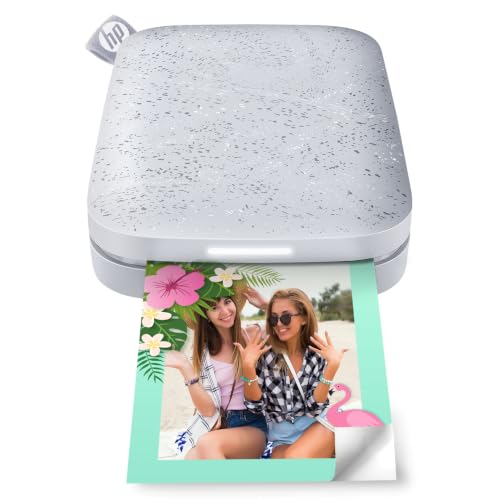
The HP Sprocket is a pocket-friendly 2×3” printer designed for quick mobile prints. It supports multiple devices simultaneously for a shared print experience and includes LED indicators for print status. The Sprocket app offers AR features and sorting options to create personalized mini-collections from social media and photos. Best for: group events and casual users who want simple, social-ready prints. Limitation: 2×3” format may be too small for some uses, and the print quality hinges on ZINK paper availability.
Why it’s a fit: ultra-portable with social features that encourage spontaneous sharing. The LED status and easy pairing make it a solid option for quick, on-the-go photos.
Buying Guide: Key Considerations
- Photo size and format: Choose 4×6” if you want larger prints for albums; 2×3” is better for stickers and quick sharing.
- Paper and ink system: Dye-sub (like KODAK and Liene) offers durability; ZINK (zero-ink) is maintenance-free but print quality varies by paper.
- Connectivity: Wi‑Fi hotspots are convenient for direct phone printing; Bluetooth/NFC works well for quick pairing on the go.
- Portability: If you travel often, look for lighter printers with adhesive-backed papers for immediate journaling.
- Ease of use: Apps with editing features add value by letting you personalize before printing. Look for built-in templates and borders if you enjoy customization.
- Paper supply and cost: Consider total cost of ownership—how many sheets come with the package, and how many sheets you’ll need per month.
- Durability and use-case: Dye-sub prints tend to resist water and fading better, which is ideal for travel keepsakes and scrapbooks.
Frequently Asked Questions
- What is the best printer for instant photos on the go? Answer: Printers with compact design, reliable wireless printing, and quick setup are best for mobility and spontaneous printing.
- Are 2×3 inch prints durable? Answer: Many 2×3 printers use sticky-backed paper that’s moisture- and tear-resistant, though durability also depends on paper quality and handling.
- Do dye-sub printers require special paper? Answer: Yes, dye-sub printers use compatible color papers with laminated coatings for lasting prints.
- Can I print from multiple devices at once? Answer: Some models, like the HP Sprocket, support multi-device printing via the app, which is convenient for group events.
- Is Bluetooth sufficient for reliable printing? Answer: Bluetooth works for nearby devices; Wi‑Fi direct connections are typically more stable for longer print sessions.
- Should I choose a docked printer? Answer: Docking printers simplify alignment and charging during prints, which can improve consistency for frequent home use.